What Is an Apple MacBook Logic Board?
An Apple MacBook logic board is the main printed circuit board inside a MacBook, MacBook Air, or MacBook Pro. Apple uses the term logic board for the central assembly that performs the functions commonly handled by the motherboard in another laptop.
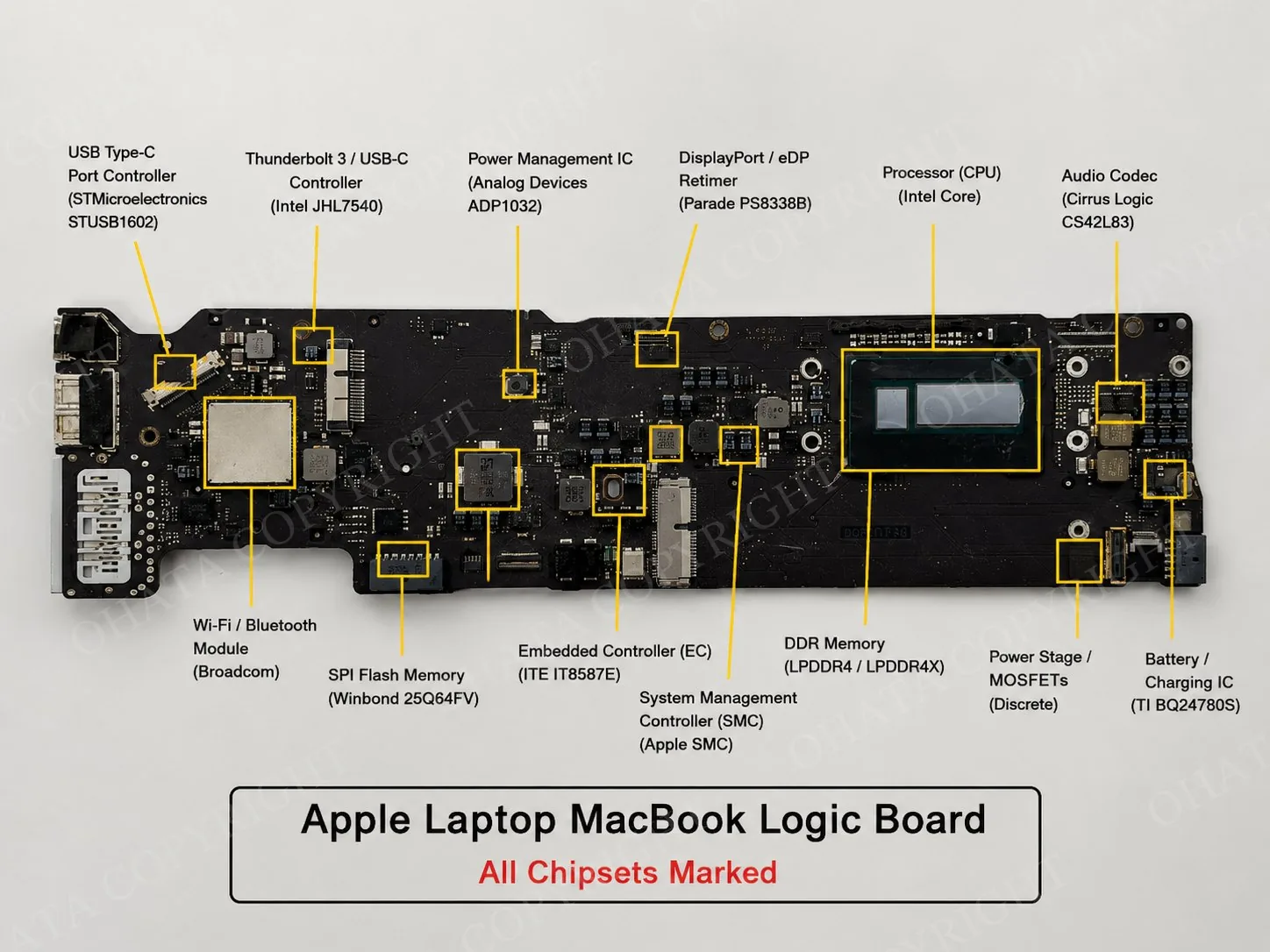
Depending on the model, the logic board houses or controls the processor, graphics, system memory, storage, battery charging, power distribution, wireless communication, audio, external ports, display, keyboard, trackpad, camera, speakers, and cooling system.
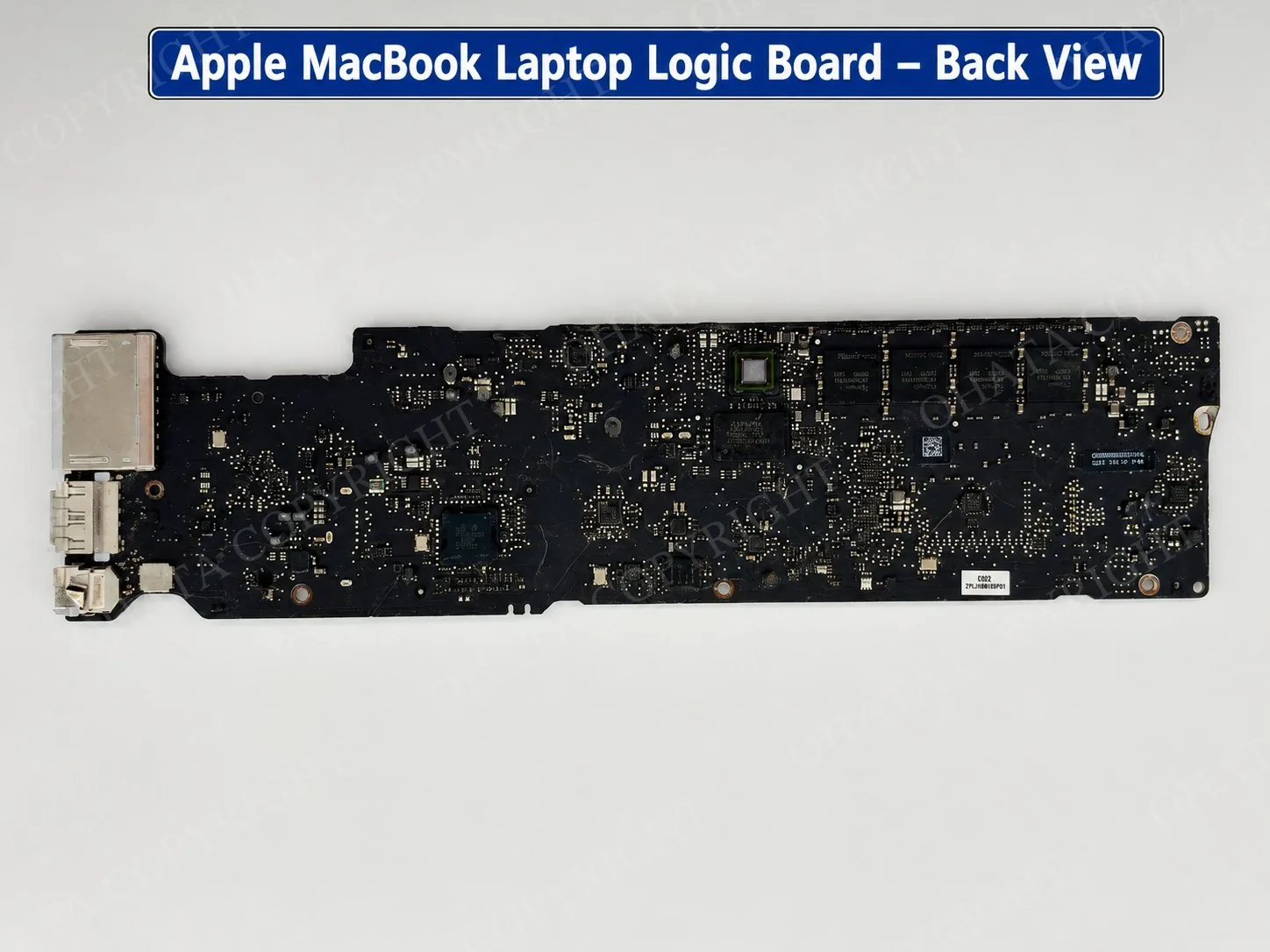
Most MacBook logic boards integrate several major subsystems directly onto one compact PCB. Hundreds of integrated circuits, capacitors, resistors, inductors, controllers, and connectors may be connected through dense surface-mount assembly.
A logic board should not be identified from one processor, connector, label, color, or board shape alone. Its Apple origin, complete layout, installed components, markings, and original application should be considered together.
Learn more: Apple MacBook Logic Board Scrap: A+ Grade Guide
MacBook Logic Board Generations
Early Macintosh computers used relatively large logic boards with through-hole components, socketed processors, and separate expansion assemblies. Later PowerBook and iBook boards became more compact and relied increasingly on surface-mounted components.
Intel-based MacBooks were introduced in 2006. Their logic boards commonly contain a soldered Intel mobile processor, platform controller hub, voltage-regulation circuitry, memory connections or soldered memory packages, storage interfaces, and supporting controllers. Some MacBook Pro models also contain a dedicated AMD or NVIDIA graphics processor.
Important Intel-era developments included:
Intel Core Duo and Core 2 Duo boards
later Intel Core i3, i5, i7, and i9 generations
Retina MacBook and MacBook Pro boards
Touch Bar MacBook Pro boards
compact Intel MacBook Air boards
Apple began moving Mac computers to Apple silicon in 2020. These boards use an Apple-designed M-series system-on-chip that combines the CPU, GPU, memory controller, Neural Engine, media engines, and several other computing functions.
Unified memory packages are located near the system-on-chip. Power-management, storage, communication, audio, and interface components remain distributed across the PCB.
Common MacBook Logic Board Types
The category includes logic boards from white and black polycarbonate MacBooks, aluminum MacBooks, Retina MacBooks, 11-inch and 13-inch MacBook Air models, and 13-inch, 15-inch, and 16-inch MacBook Pro models.
Both Intel-based and Apple-silicon boards may qualify. Board layouts differ according to the laptop model, screen size, enclosure, cooling design, and production period.
A narrow MacBook Air logic board may look substantially different from a larger MacBook Pro board. Some models use removable memory or storage, while others have these components soldered directly to the PCB.
Apple designs its logic boards, but manufacturing markings from companies such as Foxconn, Pegatron, Quanta, Wistron, or Compal may also appear. A contract-manufacturer name does not make the board a non-Apple product when the complete assembly can be identified as an Apple-designed MacBook logic board.
The MacBook model and manufacturing company can support identification, but neither determines the recycling grade by itself.
How to Identify an Apple MacBook Logic Board
Begin by confirming that the board came from a MacBook, MacBook Air, or MacBook Pro. Apple logos, printed part numbers, barcode labels, model information, and board identifiers can support identification.
Next, examine the complete board:
Board shape: MacBook logic boards commonly have long, narrow, compact, or irregular outlines designed for a particular laptop enclosure.
Component coverage: Processors, memory devices, controllers, power components, capacitors, and other parts often cover a substantial portion of the PCB.
Processor architecture: Intel-era boards commonly have a soldered Intel processor and platform controller hub. Apple-silicon boards use an M-series system-on-chip with nearby unified memory.
Connectors: Small connectors may link the board to the battery, display, keyboard, trackpad, camera, speakers, fans, storage, antennas, and external ports.
Power circuitry: Power-management ICs, MOSFETs, inductors, and capacitors are commonly concentrated around the processor, battery connection, and charging circuits.
Completeness: Inspect both sides for removed chips, missing connectors, cut PCB sections, corrosion, liquid damage, burning, or contamination.
Apple logic boards may appear green, dark green, black, or brown. Their appearance can vary with the model, protective coating, lighting, shielding, labels, and surface condition. Board color is an identification clue, not a classification rule.
Reference photographs can help identify common designs, but they are not an exclusive list of qualifying models. Apple has produced many hardware revisions, and boards within the same product family may have different layouts.
Main Components
Intel-based MacBook processors are commonly installed in Ball Grid Array packages and soldered directly to the board. They are not ordinary removable desktop CPUs.
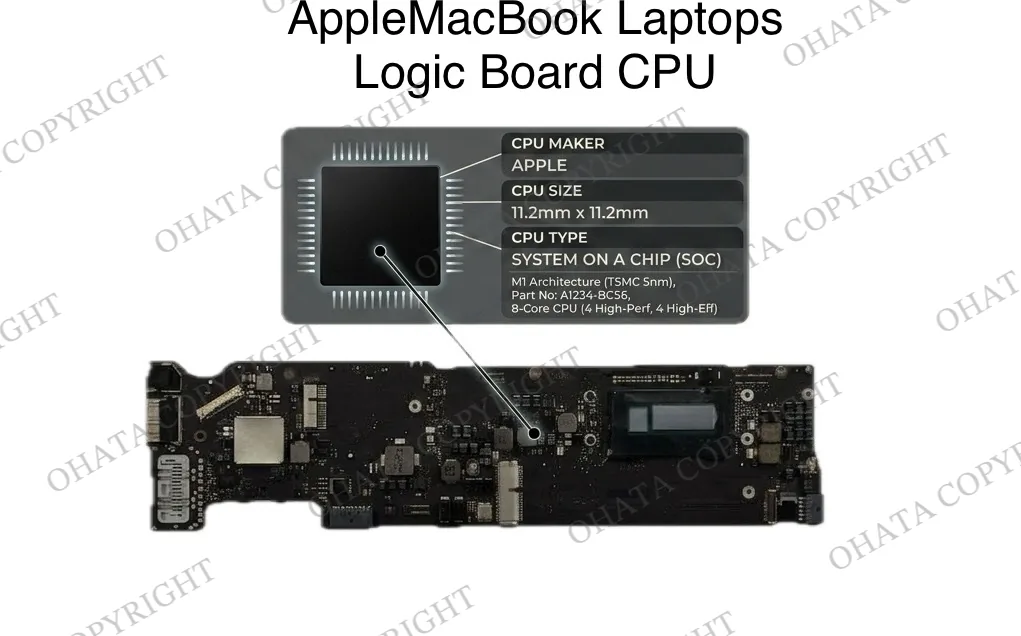
Many Intel-era boards also contain a platform controller hub, sometimes called the chipset. It coordinates USB, storage, PCI Express communication, audio, networking, and communication between major components.
Some MacBook Pro models contain a separate AMD or NVIDIA GPU in a large BGA package. Other Intel models use integrated graphics. Apple-silicon boards include graphics processing within the M-series system-on-chip.
Earlier Apple laptops may use removable SO-DIMM memory modules. Many later Intel MacBooks and Apple-silicon models have memory packages soldered directly onto the logic board.
Storage construction also varies. Some boards connect to a removable storage module, while others contain soldered storage components and controllers.
An empty removable memory or storage connection is different from a board that has had soldered packages harvested. Missing removable parts may be acceptable, but removed soldered components can materially affect classification and value.
Power Circuitry and Connectors
Power-management ICs work with MOSFETs, inductors, capacitors, charging controllers, and other components to regulate power for the processor, memory, battery, ports, and supporting systems.
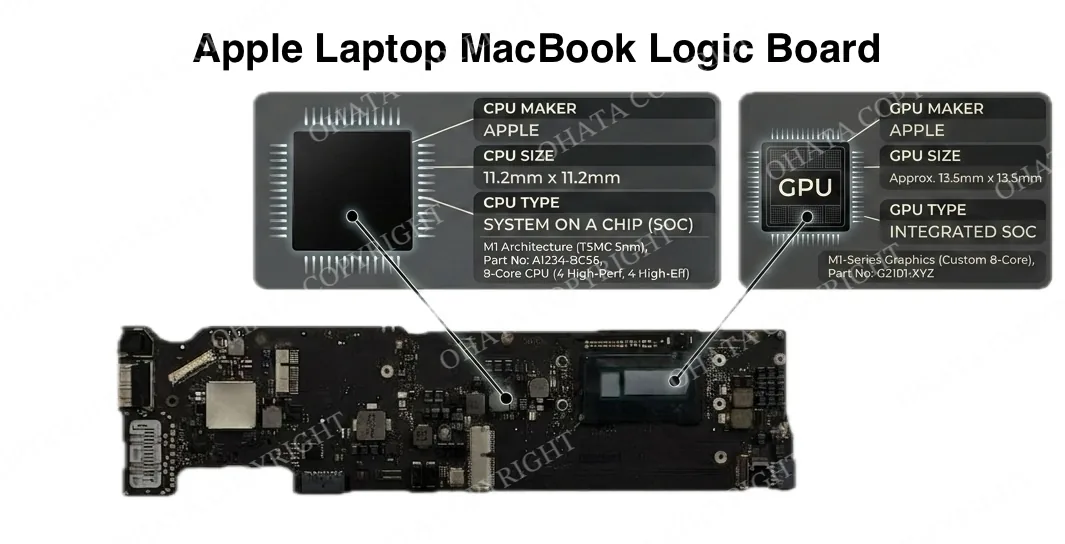
Other integrated circuits may control:
Thunderbolt and USB connections
Wi-Fi and Bluetooth
audio and firmware
sensors and system clocks
storage and charging
the keyboard and trackpad
external displays and cameras
Small connectors link the logic board to the battery, display, keyboard, trackpad, camera, speakers, fans, storage devices, antennas, and external ports.
Selected contact surfaces may use thin gold plating to resist corrosion and provide reliable electrical connections. Visible gold-colored contacts can support identification, but they do not determine the grade by themselves.
Construction and Recoverable Materials
MacBook logic boards use multilayer PCB construction with internal copper pathways for signal routing, grounding, and power distribution. Their compact layouts may include fine traces, densely spaced components, BGA packages, shielding, memory devices, connectors, and concentrated voltage-regulation circuitry.
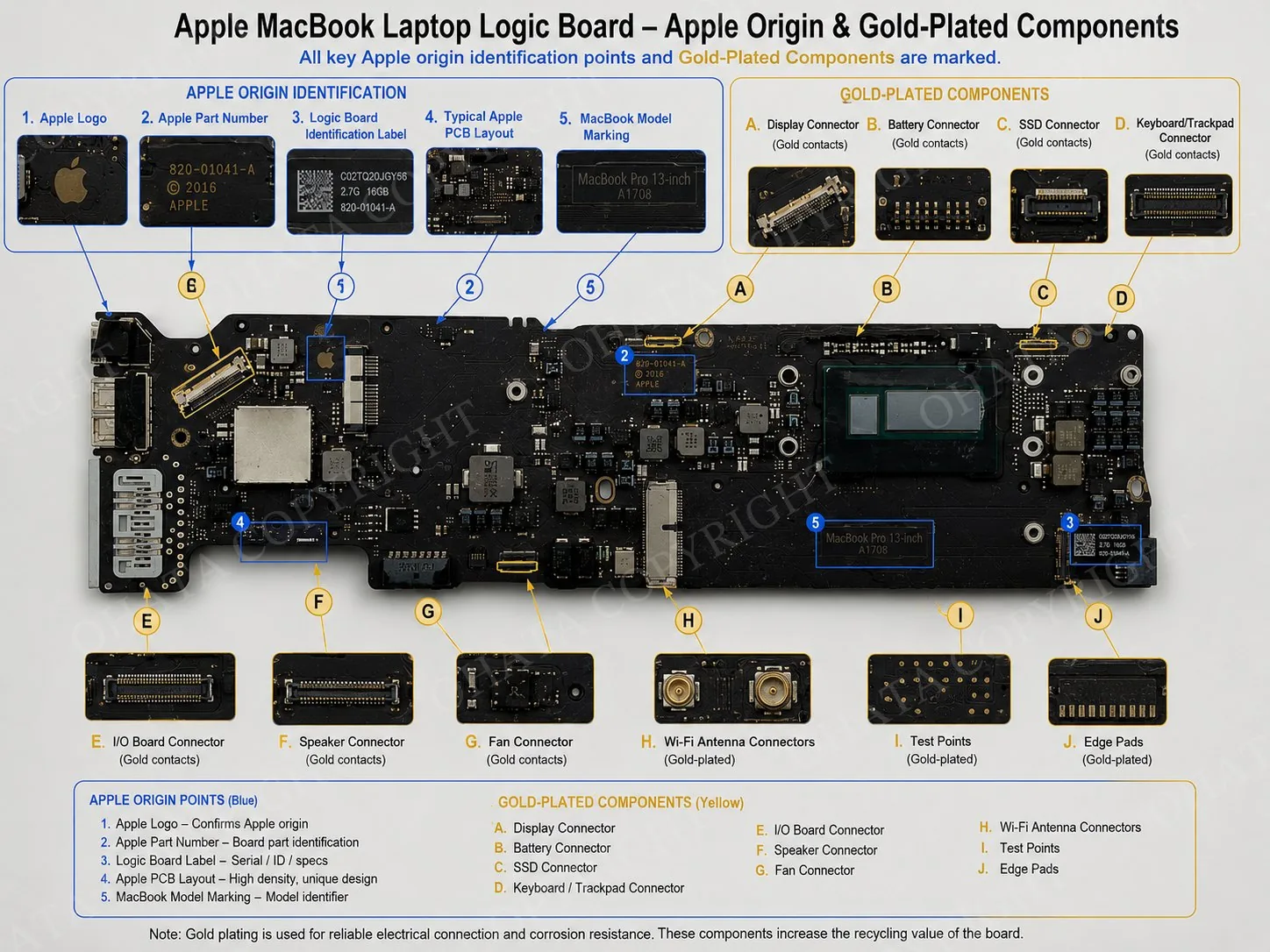
Copper is found in internal PCB layers, traces, power planes, coils, inductors, connectors, and other conductive structures. Gold, silver, tin, nickel, aluminum, tantalum, and other materials may also be present depending on the model, production period, and individual components.
Precious metals represent only a small portion of the board’s total weight. Their exact quantities cannot be determined from appearance because plating thickness, semiconductor packaging, solder composition, PCB construction, and component materials vary between models and suppliers.
Published estimates of the gold contained in a particular MacBook generation should not be treated as confirmed specifications without representative laboratory analysis.
Large BGA packages are important parts of the complete board. Some downstream processors separate particular components, while others process complete boards through controlled mechanical, thermal, smelting, hydrometallurgical, or combined recovery systems.
Do not remove BGA packages, scrape contacts, burn boards, or apply chemicals in an attempt to recover metals. These actions can reduce the board’s value and create electrical, chemical, fire, and handling hazards.
Recycling value comes from the combined construction and recoverable-material profile of the complete logic board, not from one processor, connector, BGA package, or assumed quantity of precious metal.
A+ Grade Classification
Qualifying Apple MacBook logic boards are purchased within the A+ Grade Circuit Board Scrap category.
Classification considers the board’s:
original application and function
overall PCB construction
processor or system-on-chip
integrated-circuit density
memory and control components
connectors and contact surfaces
completeness and physical condition
contamination and processing requirements
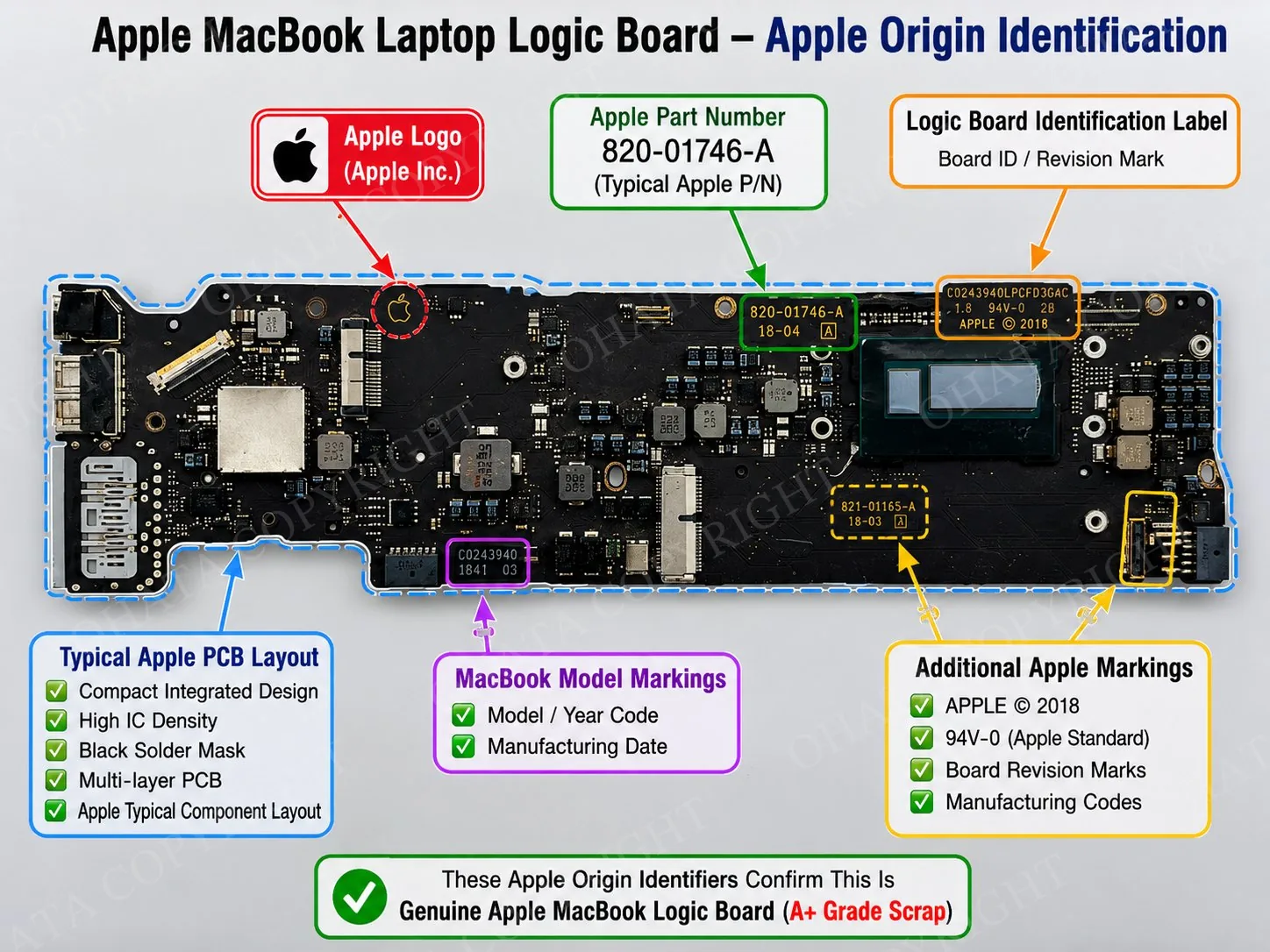
Apple branding alone does not qualify every circuit board for A+ Grade. The category applies to qualifying main MacBook logic boards. Smaller Apple accessory, I/O, power, display, audio, and secondary boards may require another classification.
Working condition is generally not required for recycling. A non-working logic board may still qualify when it retains its original construction and major components and meets the applicable condition requirements.
Comparison With Other Boards
Qualifying non-Apple laptop motherboards are generally evaluated within the separate A Grade category. They may have larger or more standardized layouts, removable RAM, different connector arrangements, and more unused PCB area.
This classification difference does not mean that every Apple board contains more recoverable material than every non-Apple board. It reflects the established purchasing categories and the characteristics of the complete board.
Desktop motherboards normally contain a larger CPU socket, removable RAM slots, expansion slots, storage connectors, and larger areas of exposed PCB. Their grade depends on the board type, socket construction, component configuration, completeness, and condition.
Server motherboards may contain one or more processor sockets, numerous memory slots, enterprise connectors, and high-current power sections. Their classification depends on their particular processor or socket configuration and should not be inferred from their size or original equipment cost.
Telecommunications boards can also contain dense BGA and connector populations. However, a MacBook logic board remains a laptop board and should not be classified as telecommunications material because of component density alone.
iPhone and iPad logic boards can share compact layouts and densely installed components with MacBook boards. MacBook boards are generally larger and contain laptop-specific power, cooling, storage, display, and interface circuitry. Smartphone and tablet boards belong to their own applicable purchasing categories.
The original function of the board should be identified before its components, density, completeness, and condition are used to determine the appropriate classification.
Buying Guidelines
Purchases of qualifying Apple MacBook logic board scrap start at 1 lb. Boards should remain substantially complete, identifiable, clean, and dry.
For the best purchasing value, retain the original:
CPU or Apple system-on-chip
platform controller hub or chipset
GPU where originally installed
soldered memory packages
storage controllers and components
power-management circuitry
connectors and complete PCB sections
Complete-laptop attachments such as batteries, displays, keyboards, plastic cases, fans, heatsinks, chargers, loose cables, and large metal brackets should be separated when this can be done safely without damaging the board.
Do not remove soldered chips, cut connector areas, scrape plated contacts, or break the PCB to separate materials.
Minor labels, normal dust, light scratches, ordinary surface wear, or limited missing passive components do not necessarily prevent classification when the board remains identifiable and substantially complete.
Reduced Value and Rejection Conditions
A board may receive a reduced classification or purchasing value when major processors, system-on-chips, GPUs, chipsets, memory packages, storage controllers, or other important ICs have been removed.
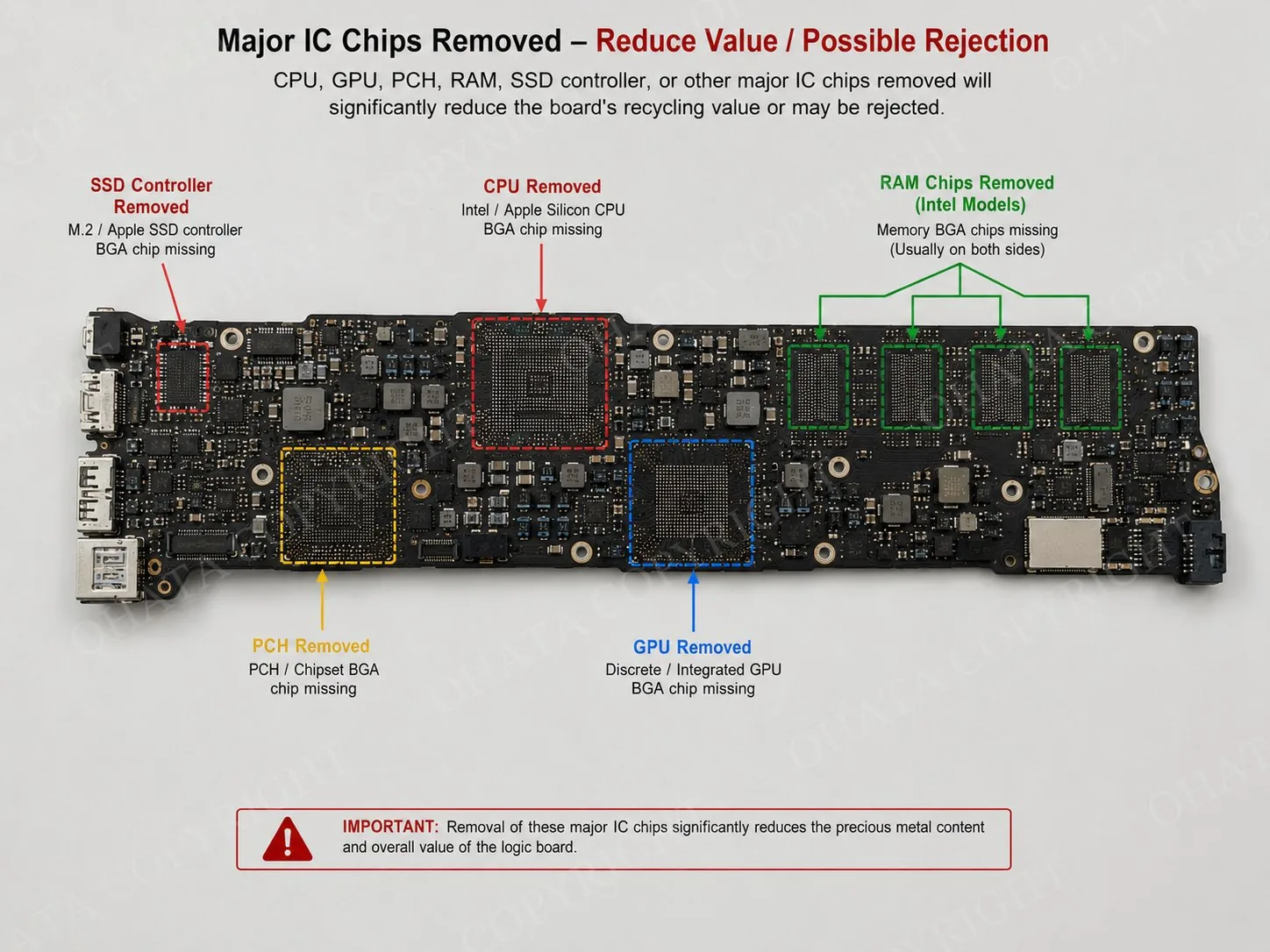
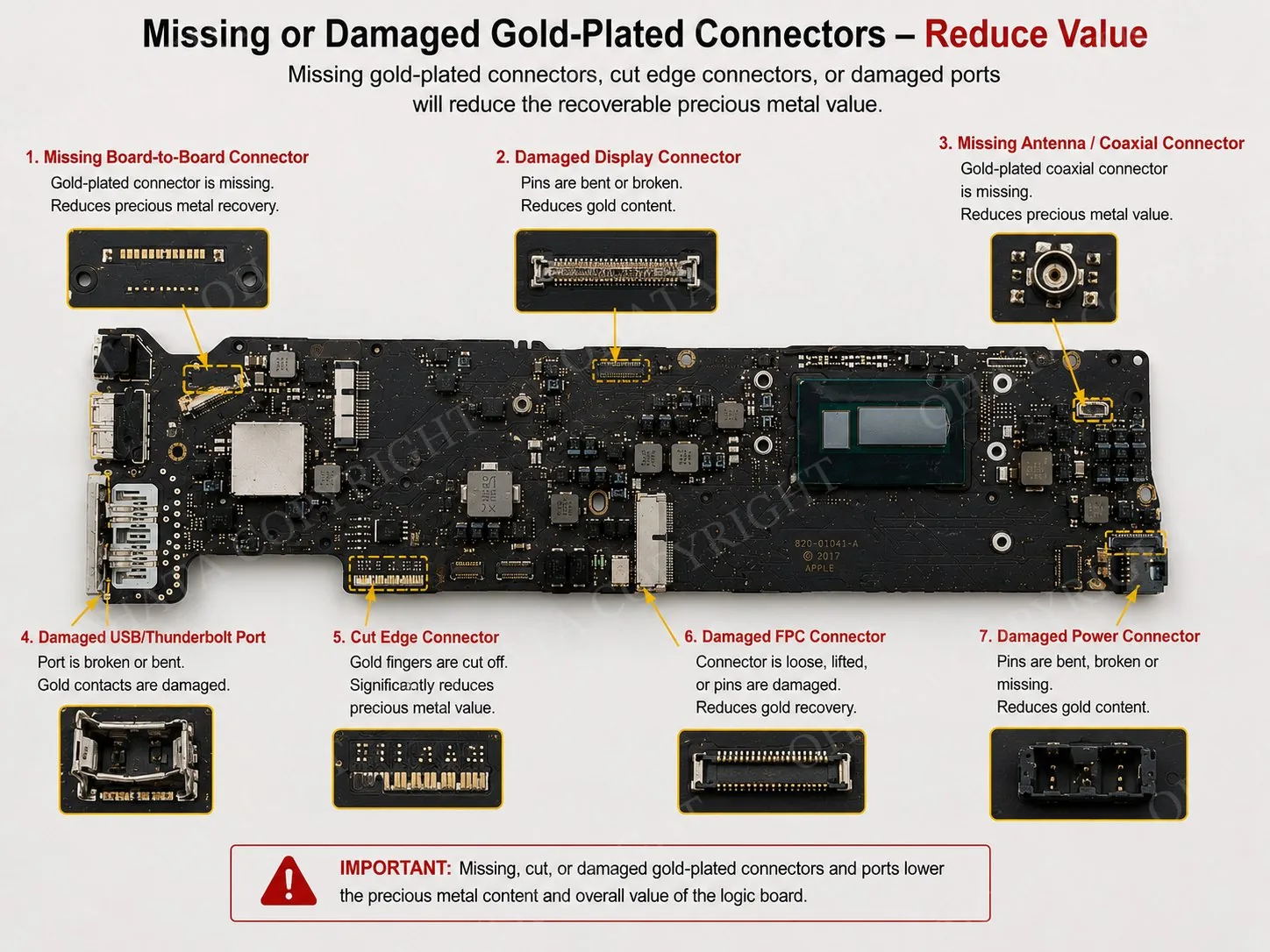
Other conditions that may affect classification include:
cut, cracked, broken, or bent PCBs
missing connectors or PCB sections
harvested components or extensive rework
burning, charring, or carbonization
corrosion, oxidation, mold, or liquid damage
oil, grease, paint, adhesive, or chemicals
excessive thermal compound or heavy dirt
battery residue or other hazardous contamination
attached screens, batteries, cases, cooling assemblies, cables, or unrelated material
mixed loads containing non-Apple boards or other circuit-board grades
Boards with severe fire damage, chemical treatment, extensive material loss, hazardous contamination, or damage that prevents reliable identification may be rejected.
Counterfeit, replica, heavily modified, or unidentified boards may require separate review when their construction or origin cannot be confirmed.
Sorting Apple Logic Boards
Keep MacBook logic boards separate from non-Apple laptop motherboards, desktop boards, telecommunications boards, smartphone boards, appliance boards, and other circuit-board grades.
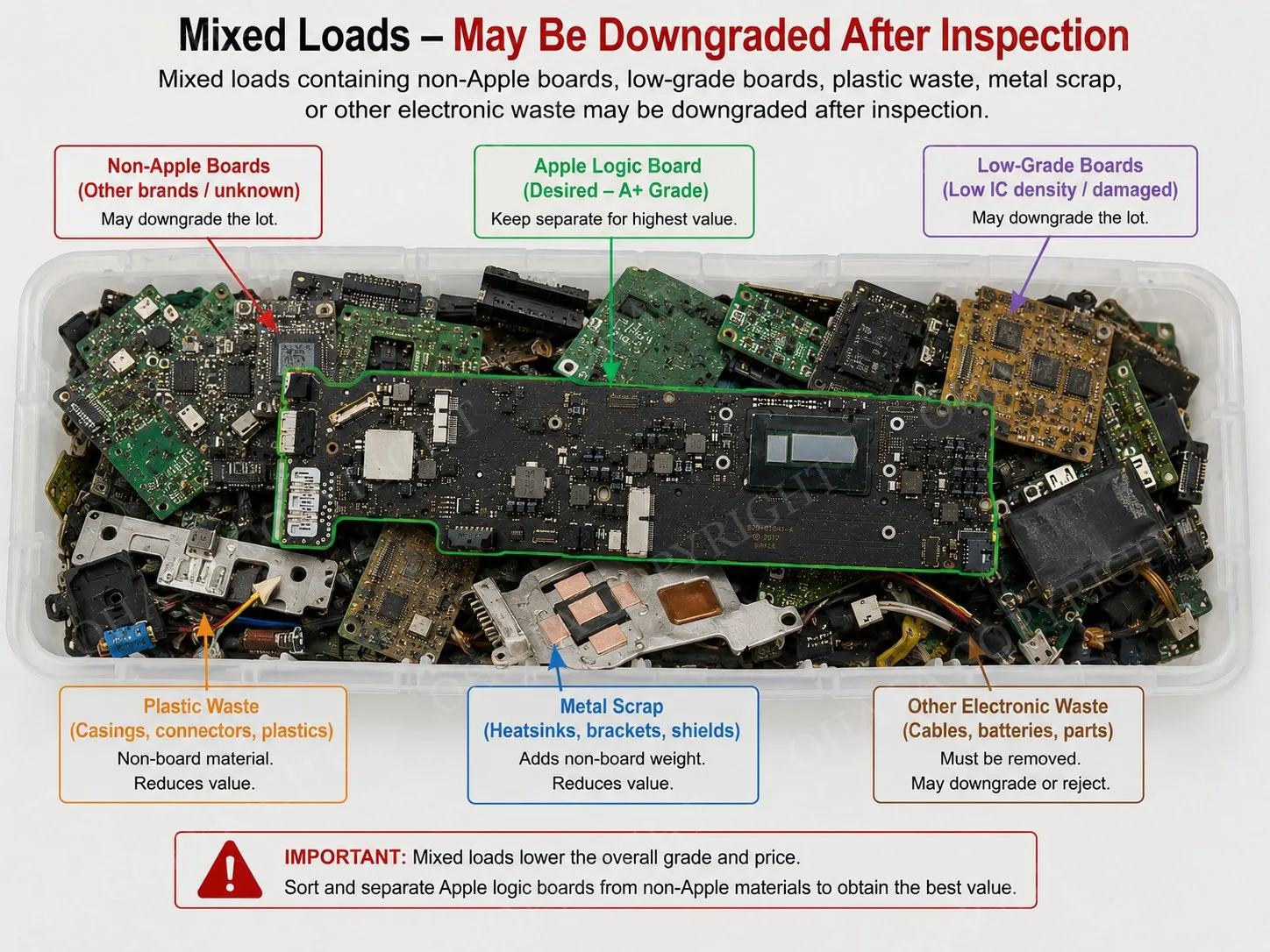
Also separate the boards from batteries, displays, keyboards, fans, heatsinks, cases, chargers, plastic, loose metal, wires, and unrelated electronic material.
Different MacBook models may generally be kept together when they qualify for the same purchasing category and condition standard. Damaged, harvested, burned, corroded, or heavily contaminated boards should be separated from complete and clean examples.
Proper sorting supports accurate identification, weighing, inspection, and evaluation. Mixing different grades or material types increases the processing required and may affect the purchasing evaluation.
Current Buying Price
As of September 3, 2026, the published Seattle buying price for qualifying Apple Laptop Logic Board Scrap is $10.80 USD per lb.
Prices and buying conditions may change with recycling markets and current purchasing requirements. Check the latest price and update date on the official Apple Laptop Logic Board buying page before sorting or selling material.
All qualifying boards that meet the current standard are purchased under the applicable Apple Laptop Logic Board category regardless of MacBook model, processor generation, memory capacity, original retail price, resale value, or working condition.
Final classification, acceptance, and purchasing value are confirmed after inspection under current buying requirements.
Internal sources
External sources
Related Scrap Price of buying items
See other USA motherboard buying price : Acer desk top motherboard | MCP61PM-AM Rev 1.0A scrap
See Ohata Resource Canada Inc. Buying ECS Desktop motherboard