Metal cable connectors and plastic gold connectors often arrive in the same box. Both may have shiny contact pins, both may come from computers or industrial equipment, and both may still have wire attached. That makes the first sort less obvious than it sounds.
Fortunately, you do not need to identify every connector standard. Start with the outer body. A connector enclosed by a substantial metal shell usually belongs with metal cable connectors. A lightweight connector built mainly around a plastic housing may belong with plastic gold connectors when qualifying gold-plated terminals remain inside.
This guide will help you decide which group you have, what to remove, what to leave intact, and how to prepare a mixed lot for inspection.
If you are also sorting circuit boards, RAM, CPUs, or other computer parts, the Ohata Scrap Wiki provides additional identification and preparation guides for those materials.
What Are Metal Cable Connectors?
Metal cable connectors are detached connector ends with a metal outer shell or housing. They commonly come from cables used with computers, displays, network equipment, telecommunications systems, laboratory instruments, audio and video equipment, and industrial machinery.
The shell may provide strength, shielding, grounding, or protection for the contact pins. Depending on the design, the connector can contain brass, copper alloys, stainless steel, aluminum, plating, and insulating material.
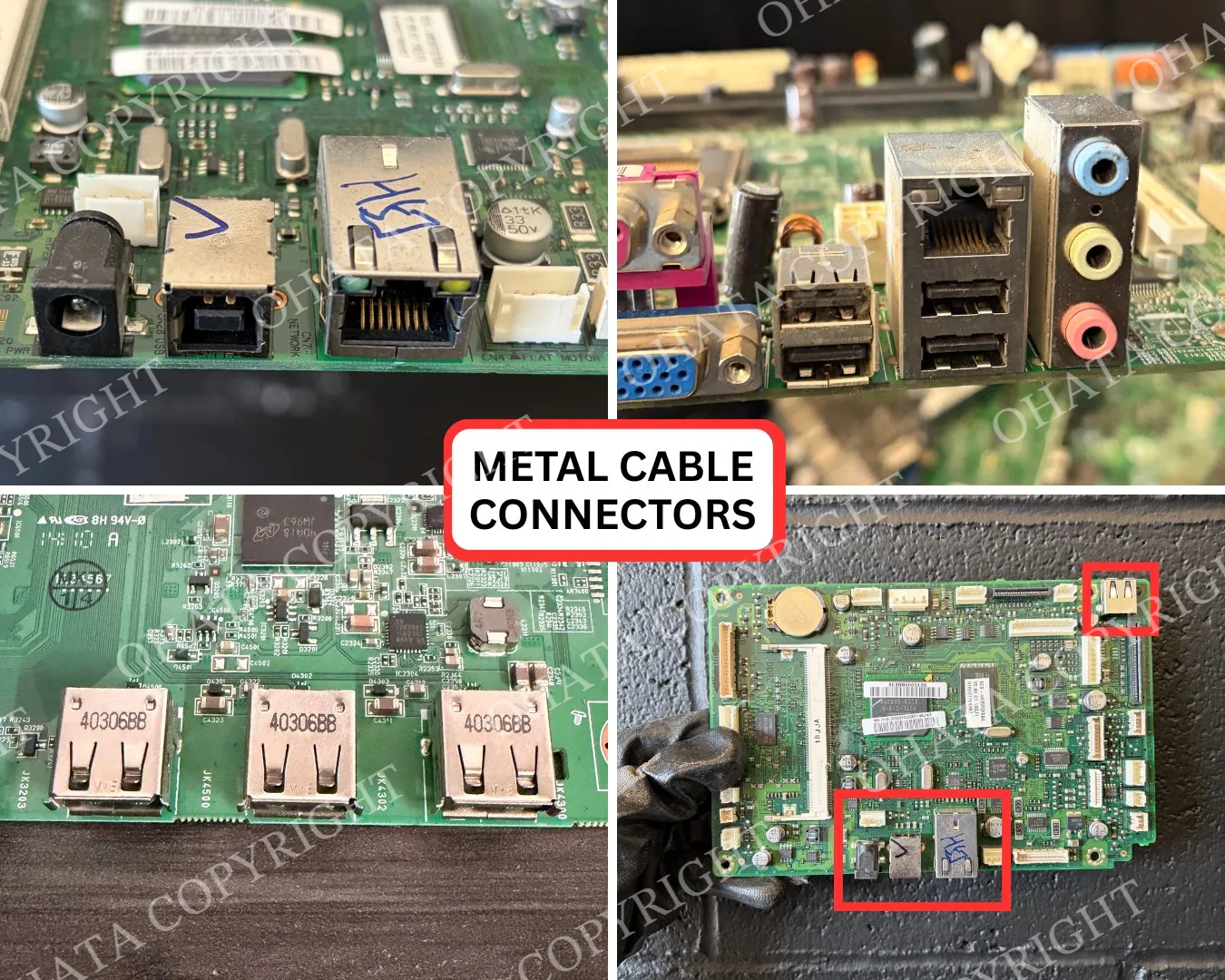
Common examples include:
USB Type-A and Type-B connector ends;
VGA and DVI connectors;
HDMI and DisplayPort connectors with metal shells;
DB9 serial and DB25 parallel connectors;
BNC, SMA, and N-Type RF connectors;
shielded RJ45 connectors;
IEC power connectors; and
circular or multi-pin industrial connectors.
You do not need to know the exact product name before sorting. If the connector has a substantial metal shell, placing it with similar metal-bodied ends is a sensible first step.
What Are Plastic Gold Connectors?
Plastic gold connectors are connector ends built mainly around a plastic housing with qualifying gold-plated contact terminals inside. They are often removed from internal computer wiring, servers, power supplies, storage systems, network equipment, and industrial electronics.
Common examples include:
ATX motherboard power connectors;
PCI Express power connectors;
CPU power connectors;
Molex connectors;
SATA power connectors;
IDC ribbon-cable connectors;
fan connectors; and
plastic multi-pin equipment connectors.
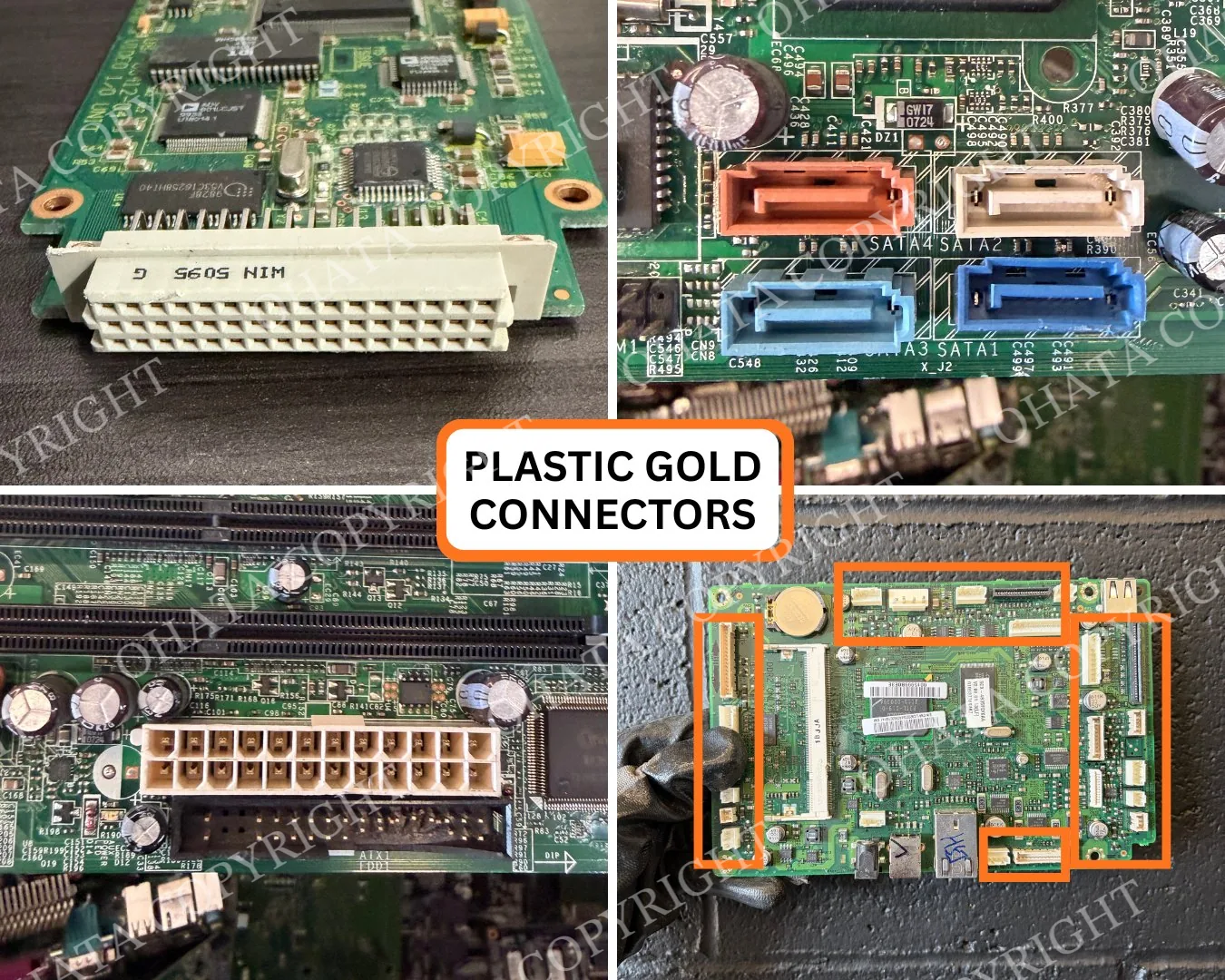
The housing should still contain its original terminals. An empty plastic shell is not equivalent to a complete connector, and a plastic connector with only tin- or nickel-coloured contacts may need a different evaluation.
Why Gold Colour Can Be Misleading
It is natural to focus on yellow or gold-coloured pins. They are easy to see, but colour alone cannot tell you the plating thickness, the amount of recoverable gold, or the final buying value.
Several things can create a gold-like appearance, including lighting, surface treatments, brass, and copper alloys. Genuine gold-plated contacts can also vary in colour and brightness.
Do not scratch, file, burn, or chemically test a connector simply to check the metal beneath the surface. These methods can damage the item and create unnecessary safety risks. A complete connector provides more useful information during inspection.
How to Tell Them Apart?
If you are standing in front of a mixed box, pick up one connector and look at the part you would normally hold—not only the pins.
Choose the metal connector group when:
the outside is a rigid metal shell;
the connector feels relatively heavy for its size;
the metal body surrounds an insulating insert and contact pins; or
it resembles a USB, VGA, DVI, DB-series, BNC, or industrial cable end.
Choose the plastic gold connector group when:
the body is mainly molded plastic;
the connector is light;
multiple contact terminals remain inside the plastic housing; and
those terminals have qualifying gold-plated contact surfaces.
Still unsure? Keep the item separate. It is better to create a small “inspection needed” group than to mix uncertain pieces into a clean lot.
Feature
Metal Cable Connectors
Plastic Gold Connectors
Main outer body
Metal shell
Plastic housing
Typical weight
Heavier
Lighter
Main recyclable features
Metal housing and internal contacts
Plated copper-alloy terminals inside the housing
Often found on
External computer, display, network, RF, and industrial cables
Internal computer, server, power, and equipment wiring
Common examples
USB, VGA, DVI, HDMI, DB9, BNC
ATX, PCIe power, CPU power, Molex, SATA power, IDC
Preferred preparation
Wire removed; connector complete
Wire removed; connector complete
Ohata category
Computer parts
Computer parts
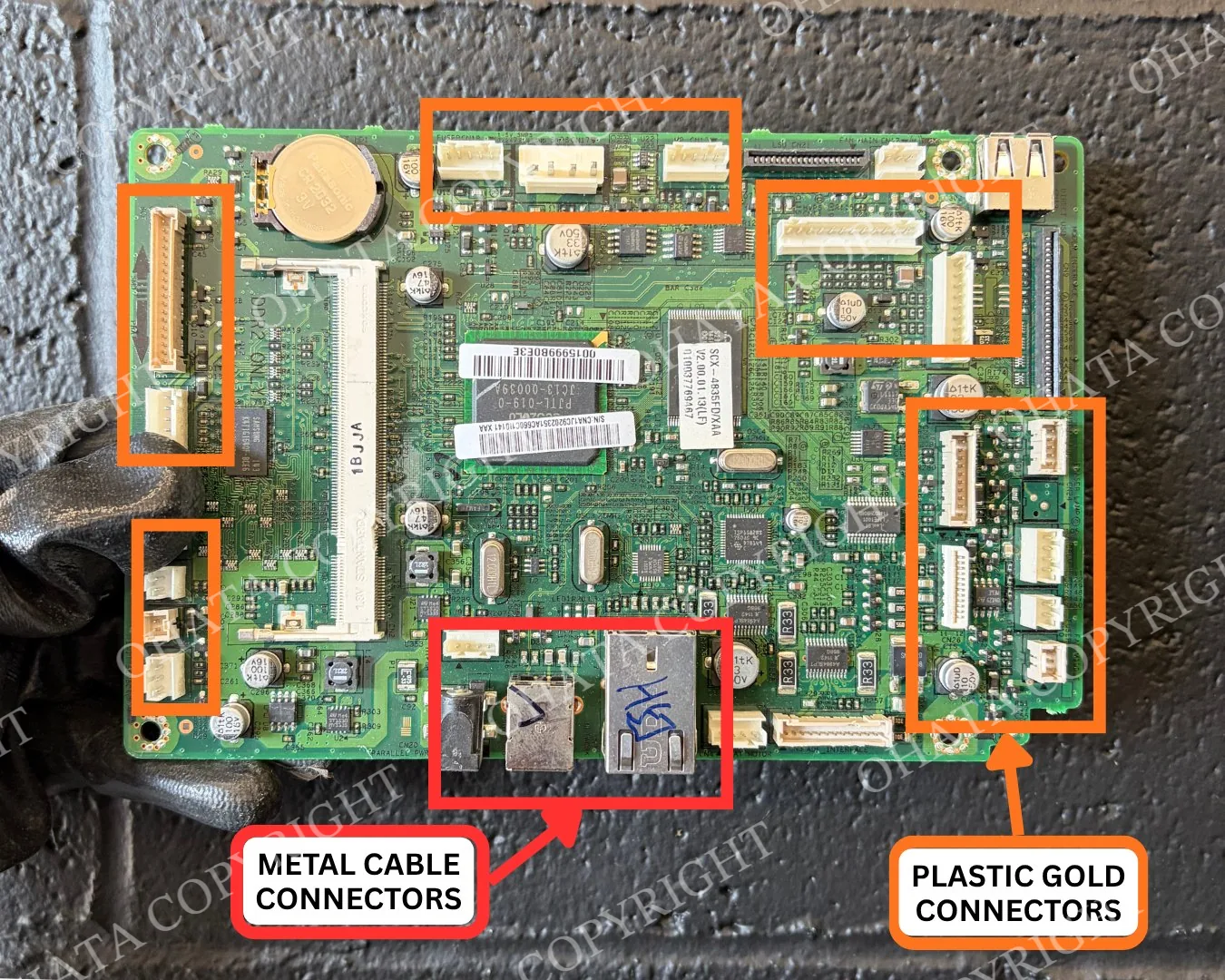
Some connectors combine plastic and metal. In that case, look at the dominant outer construction and the complete assembly rather than one small shield or clip.
Should You Remove the Wire?
In most cases, yes. Remove attached wire when it can be done cleanly and safely. This reduces insulation and unrelated cable material in the connector lot.
Cut the wire close to the back of the connector without crushing the housing. You can also remove loose cable jackets, rubber boots, strain reliefs, or heat-shrink tubing when they come away without damaging the connector.
If the cable is molded deeply into the connector or removal would break the body, leave it attached. The material can still be shown for inspection, although additional sorting may affect its evaluation.
What Should Stay Attached?
Leave the actual connector assembly complete. Do not remove:
internal contact pins or terminals;
the metal outer shell;
the plastic housing;
insulating inserts;
locking clips that are part of the connector; or
small original retention hardware.
Removing these parts does not create a cleaner connector. It creates separate fragments whose original construction is harder to confirm.
Oversized mounting plates, equipment frames, unrelated screws, and large steel brackets are different. Keep those out of the connector lot when practical.
How to Sort a Mixed Box
You can sort most small loads with three containers:
Metal-shelled connector ends — USB, display, DB-series, RF, and similar metal-bodied connectors.
Plastic connectors with qualifying plated contacts — ATX, Molex, SATA power, IDC, and similar plastic-bodied connectors.
Uncertain or incomplete pieces — badly damaged connectors, empty housings, unusual hybrid designs, and items with heavy attachments.
Keep complete cable assemblies, insulated copper wire, printed circuit boards, power supplies, and loose electronic components outside these containers. They are separate material categories.
For a larger load, you may sort metal connectors further into computer/display, RF, and industrial groups. Plastic connectors can be grouped by similar size and contact density. This is optional, but it can make inspection faster.
What Can Lower the Buying Value?
A model name or connector type is only part of the evaluation. The material presented for sale is what matters.
Factors that may reduce value or require additional sorting include:
attached cable and excessive insulation;
missing pins or terminals;
empty connector housings;
crushed or broken bodies;
severe corrosion or water contamination;
burned or melted material;
heavy dirt, grease, glue, or tape;
large steel brackets and unrelated hardware; and
metal and plastic connector categories mixed together.
Complete, dry, reasonably clean, and consistently sorted connectors are easier to identify and weigh. That does not guarantee a particular price, but it gives the inspector a clearer lot to evaluate.
Taking Useful Identification Photos
If you want help before visiting, spread the connectors on a plain surface instead of photographing them inside a deep box.
Take:
one overhead photograph of the complete group;
one closer image showing the outer housings;
one image of the contact side; and
a separate close-up of any unusual or damaged connector.
Avoid overlapping pieces, strong glare, and photographs taken from too far away. If wire remains attached, include enough of it in the image to show how much is present.
A photograph may support preliminary identification, but it cannot confirm hidden contacts, internal material composition, exact plating, total weight, or final price.
Final Classification and Pricing
This guide is designed to help you make a practical first sort. It does not establish a guaranteed category or price from a photograph, contact colour, or model name.
Final acceptance, classification, weight, and purchasing price are determined after physical inspection. Connector construction, contact material, completeness, condition, contamination, quantity, sorting, and current buying requirements may all affect the result.
Before preparing a delivery, check the current Ohata e-scrap buying prices. Published prices and conditions may change, and the listed amounts remain subject to inspection of the actual material.