

MSI Z87 MPOWER Motherboard Recycling Guide
Good morning from Richmond!
I’m Tomona from Ohata Resource Canada Richmond Yard. Thank you for stopping by my blog today. I’m really glad you’re here.
It’s a comfortable summer day in Richmond. Temperatures are around 22°C this afternoon, with partly sunny conditions expected for much of the day.
There may be showers later this evening, so here’s one quick reminder if you’re transporting electronic scrap:
Please try to keep your circuit boards dry.
A covered box or plastic container can help protect your boards from rain and moisture. It’s a small step, but it can make identification and sorting much easier when you arrive.
There’s also something cheerful happening in the community today.
The City of Richmond is holding South Arm Pride in the Park from 4:00 to 5:30 p.m. This free, all-ages event includes crafts, music, dancing, and light refreshments.
I always enjoy seeing Richmond offer events where neighbours can relax and connect. It’s one of the things that makes this such a welcoming community.
Now, let me ask you something.
Do you have an older custom-built computer sitting in your garage, office, or storage room?
If you do, you may find a large black-and-yellow motherboard inside. It could be an MSI Z87 MPOWER.
Today, I’d like to show you how I would identify this motherboard, what condition details I would check, and how you can prepare it for an in-person recycling evaluation.
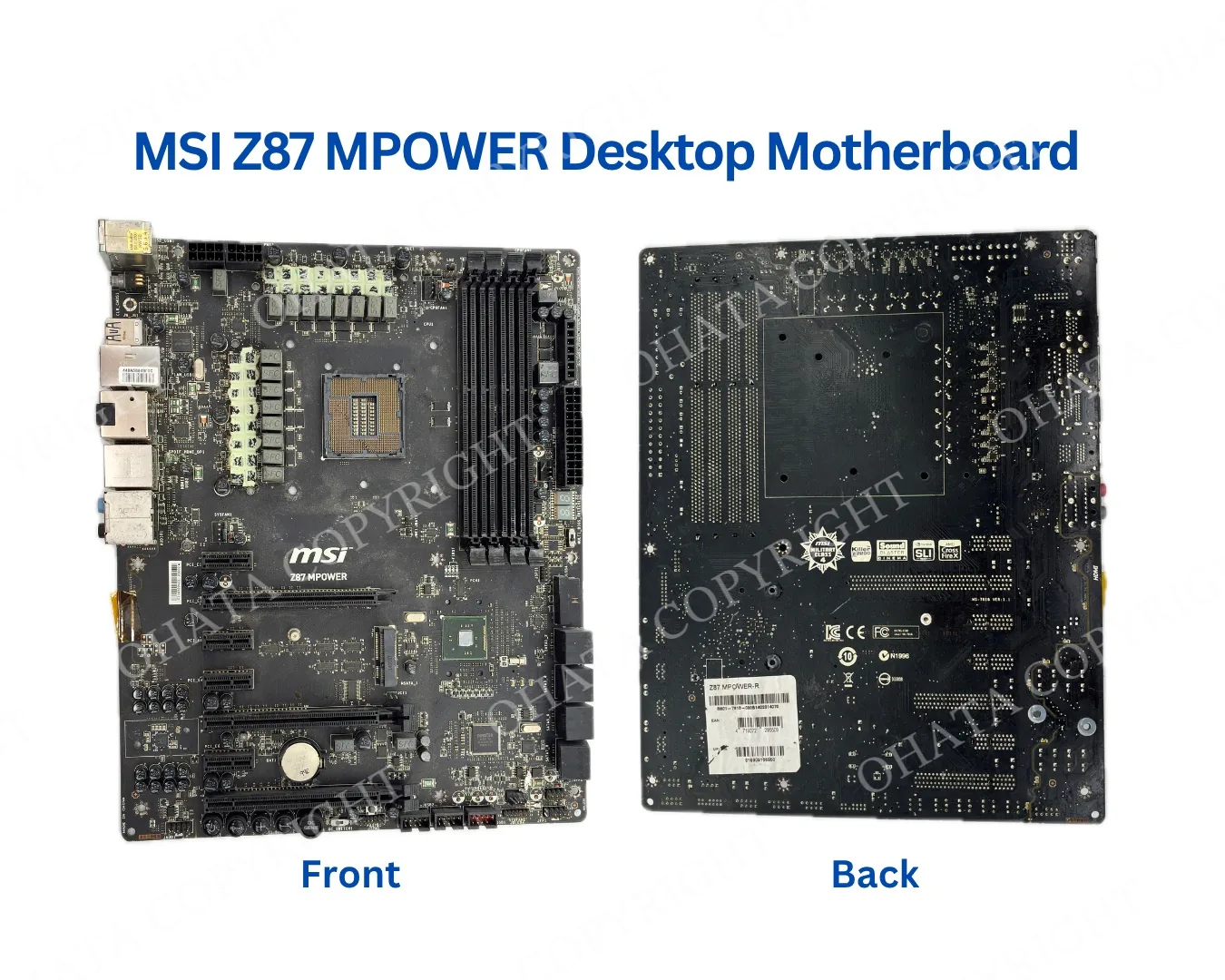
Let’s Get to Know the MSI Z87 MPOWER
The MSI Z87 MPOWER is a desktop computer motherboard.
A motherboard is the main circuit board inside a computer. It connects the processor, memory, storage drives, graphics card, power supply, and external devices so they can work together.
MSI made the Z87 MPOWER for custom desktop computers using fourth-generation Intel processors. It was the kind of motherboard you might find in an older gaming PC, enthusiast computer, or personally assembled desktop.
Even if the computer no longer works, don’t be too quick to dismiss the board.
It still contains a printed circuit board, integrated circuits, connectors, solder, and internal copper pathways. These are some of the features considered when electronic scrap is identified and evaluated.
That doesn’t mean every MSI Z87 MPOWER automatically receives the same buying category or price. The actual board, its condition, and its completeness still need to be checked.
What I Look for First
One question I hear quite often is:
"Does the motherboard still need to work?"
The answer might surprise you.
When I'm identifying a motherboard for recycling, the first thing I check isn't whether it still powers on. Instead, I focus on whether I can clearly identify it and whether it's still reasonably complete.
For a motherboard like the MSI Z87 MPOWER, I usually start by checking:
Is the model name still visible?
Is the CPU socket still attached?
Are the memory slots still in place?
Are the PCIe expansion slots complete?
Does the board appear clean and dry?
Are the major components still attached?
These quick checks help me understand what I'm looking at before moving on to a more detailed inspection.
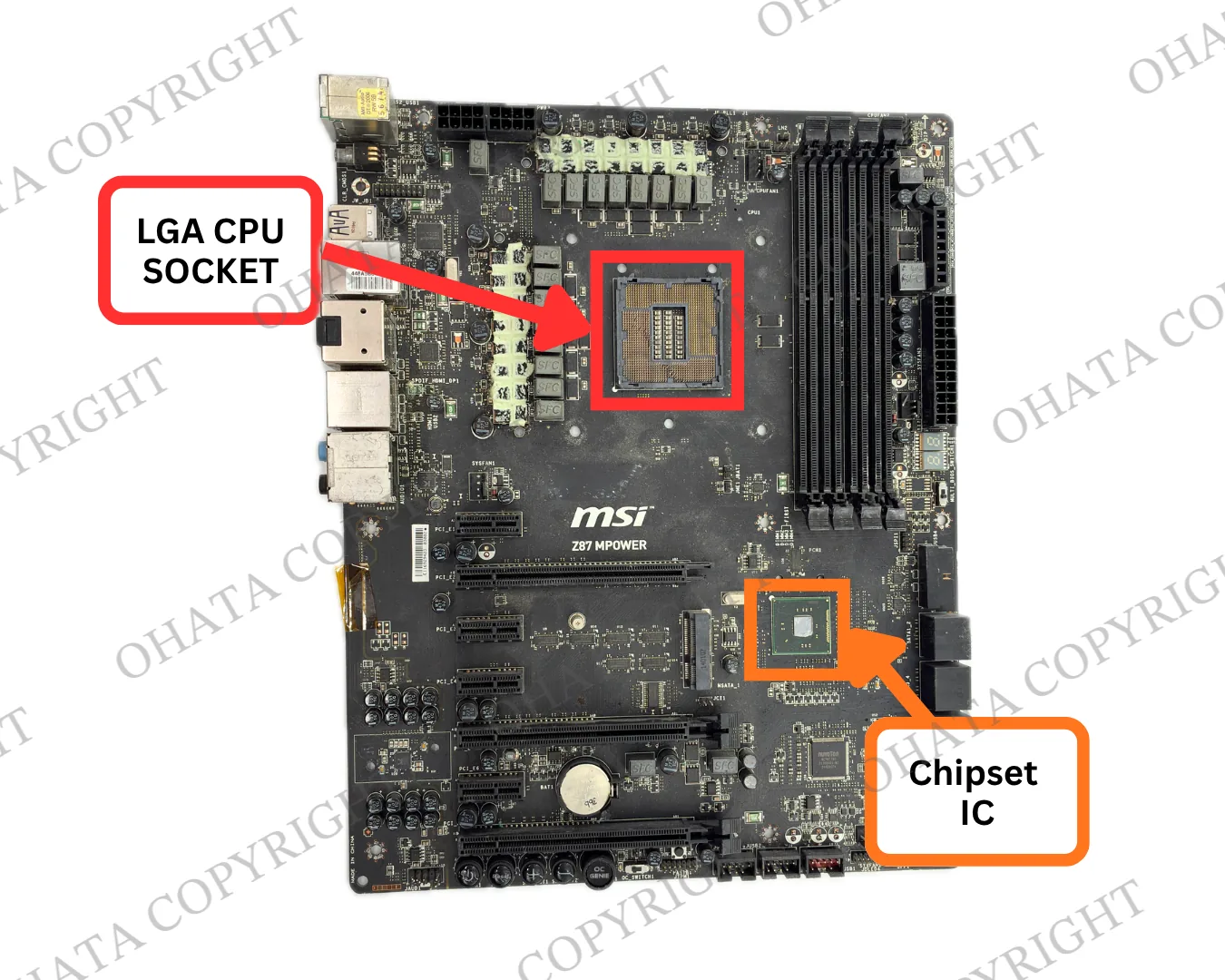
I also take a moment to look for anything unusual, such as heavy corrosion, burn marks, cracked sections of the PCB, or major missing components. Every motherboard tells a slightly different story, so it's important to look at the whole picture rather than just one detail.
Is Every MSI Z87 MPOWER a D Grade Board?
This is another question I get asked quite a bit.
Because the MSI Z87 MPOWER was originally marketed as a gaming motherboard, many people assume it must automatically be a high-grade board.
In reality, that's not how our grading system works.
At Ohata Resource Canada, we don't grade a motherboard based on its original selling price or how powerful the computer used to be. Instead, we evaluate the board itself, its construction, component layout, recoverable materials, and overall condition.
If an MSI Z87 MPOWER meets our current inspection requirements, it may be classified as a D Grade desktop motherboard.
That's why you'll sometimes see two boards with similar names receive different evaluations. A complete, well-preserved board may be assessed differently from one that's been heavily damaged, stripped of parts, or affected by corrosion.
If you'd like to learn more about D Grade boards or check the latest buying information, you can always visit our Board D Grade Price Page after reading this article.
Why Older Motherboards Are Still Worth Looking At
You might be wondering why we still pay attention to a motherboard that was released years ago.
The simple answer is that older doesn't always mean worthless.
Motherboards like the MSI Z87 MPOWER can still contain recyclable materials such as copper, aluminum, solder, integrated circuits, and connector contacts. These materials can often be recovered through responsible recycling processes.
Of course, every motherboard is different. The amount of recoverable material depends on factors like its design, condition, and how complete it is when it arrives.
That's why I never judge a board just by its age or appearance. I always prefer to inspect the actual motherboard before making any conclusions.
A Simple Tip Before You Bring It In
Before you bring a motherboard to our Richmond yard, I'd like to share one simple tip that can make the inspection process much easier.
If possible, leave the motherboard as complete as you found it.
I know it can be tempting to remove parts like heatsinks or chips, especially if you've heard they contain valuable materials. However, removing major components can sometimes make the board more difficult to identify and evaluate.
Unless you already know how each part is sorted separately, it's usually best to leave everything in place.
And don't worry if the motherboard isn't in perfect condition. I see boards with scratches, dust, or signs of normal use all the time. Every motherboard is a little different, so I'm always happy to take a closer look before making any conclusions.
Not Sure What You Have? Try Ohata.AI Vision
If you're not sure what motherboard you have, you don't have to guess.
Before visiting our Richmond yard, you can upload a clear photo to Ohata.AI Vision. It's a simple way to get a reference identification and learn a little more about your board before you make the trip.
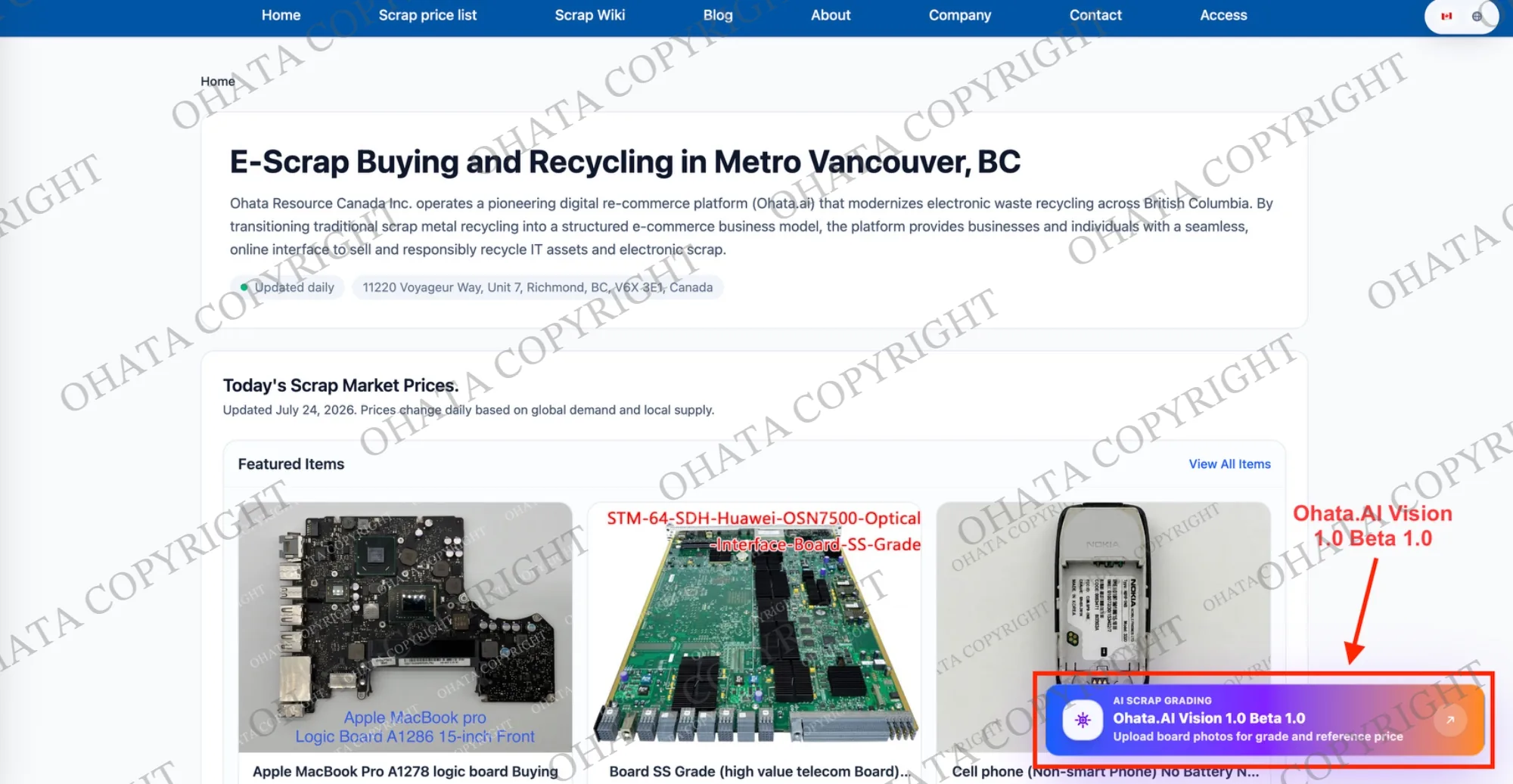
For the best results, I recommend:
Place the motherboard on a flat surface.
Use good lighting.
Take a photo of the entire board.
If you can, include a close-up of the printed model name.
The system can provide a helpful starting point, but please remember that the final classification is always based on the actual board we inspect in person.
If you are uncertain about the result, please bring the material to us. Our team will be happy to check it with you.
Visiting Our Richmond Yard
Ohata Resource Canada Inc. is a C2B e-scrap buying business serving individuals and businesses in Metro Vancouver.
C2B means “consumer to business.” In simple terms, eligible electronic scrap is brought to a business for evaluation and possible purchase.
You can find us at:
Ohata Resource Canada Inc.
11220 Voyageur Way, Unit 7
Richmond, BC V6X 3E1
Telephone and WhatsApp: +1 (236) 888-1086
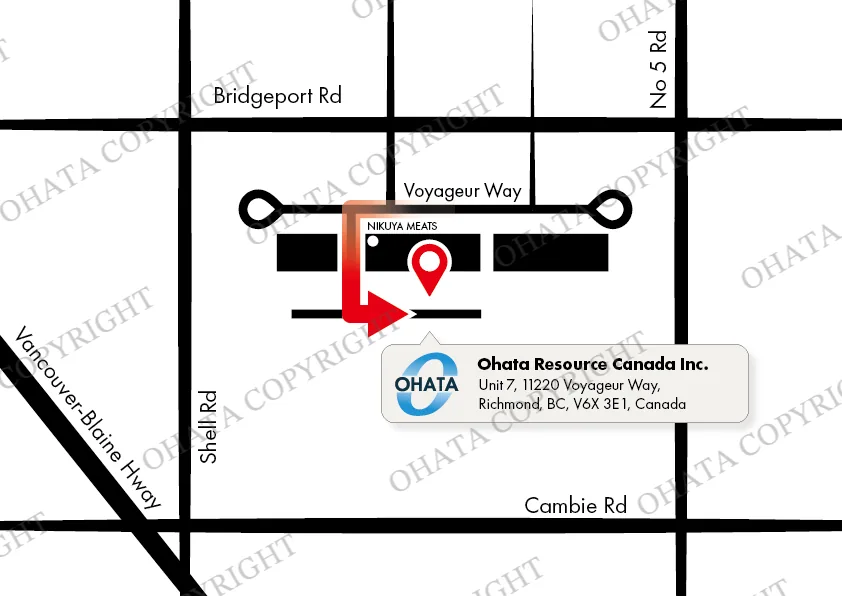
Our currently published business hours are:
Monday to Saturday: 8:00 a.m.–5:00 p.m.
Sundays and holidays: Closed
You can visit our Scrap Wiki to learn more about motherboard classifications or check our Scrap Price pages for today's buying prices.
If you have a large load, a business purchase, or a special request, please contact us before visiting. You can also check the latest Richmond yard information before leaving home.
Frequently Asked Questions
1. Do you buy from individuals as well as businesses?
Eligible e-scrap may be evaluated from both individuals and businesses.
Acceptance depends on the item, quantity, condition, and current buying requirements.
2. Does the MSI Z87 MPOWER need to work?
Not necessarily.
For scrap evaluation, the board’s identity, grade, completeness, physical condition, and major components may be more important than whether the computer still operates.
3. Is every MSI Z87 MPOWER automatically D Grade?
No. The model name is an identification reference, but the final grade depends on the actual board, its condition, completeness, attached material, and current Ohata classification requirements.
4. What is the current price for D Grade boards?
The current reference price and buying conditions are published on the official D Grade price page:
Board D Grade buying price and conditions
Published prices may change and should not be treated as a guaranteed price for every load. The actual material must still be inspected.
5. Is there a minimum quantity?
The official D Grade price page currently states that D Grade boards are purchased from a minimum of 1 lb.
Current requirements should still be checked before visiting because buying conditions may change.
6. Should I remove the CPU before bringing in the motherboard?
You do not need to remove it for initial identification.
A detachable CPU may be evaluated separately during inspection. Avoid damaging the CPU socket or motherboard while attempting removal.
Thank You for Reading!
Thank you for spending a few minutes with me today.
I hope this guide has made the MSI Z87 MPOWER feel a little less confusing. If you find one inside an older desktop, you don’t need to know its final category before contacting us.
Take clear photographs of both sides and prepare an approximate weight. You can then contact our Richmond team or visit during confirmed business hours.
Final acceptance, classification, and price are determined after physical inspection.
Have a safe drive, enjoy your day in Richmond, and I hope to see you in the next guide!
See you soon,
Tomona
Ohata Resource Canada Inc.
Related Ohata.ai Resources
Sources

Comments
0 comments