

Canada How to Sell Used Network Switches in Metro Vancouver
Good morning! I’m Han Han. Today is August 20, 2026.
If you want to sell used network switches in Metro Vancouver, you may have an older Cisco or other enterprise switch sitting in an office, server room, or storage area and be wondering whether it still has value.
The first step is simple. You do not need to identify every chip or take the switch apart. Clear photos, a readable model label, and basic condition information are often enough to start.
A Quick Vancouver Check-In
Vancouver is having a sunny summer day. Environment Canada forecasts a high of 23°C, reaching about 28°C inland, with a clear evening and a low around 16°C.
It is a comfortable day to finally organize that IT storage room or take a closer look at network equipment that has been sitting on a rack for years.
External Reference: Environment Canada – Vancouver Weather Forecast
Science World is also hosting Soccer & Technology from the FIFA Museum through September 7, 2026, exploring how technology is used in modern soccer. It is a good reminder that equipment can look simple outside while hiding sophisticated electronics inside.
External Reference: Science World – Soccer & Technology
Today’s Item: A Used Enterprise Network Switch
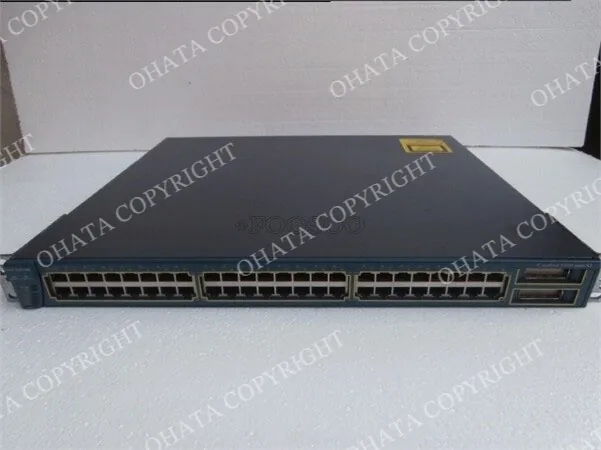
The original photo shows an older Cisco-branded rack-mount network switch with many Ethernet ports across the front. I can reasonably identify it as enterprise-style networking equipment, but the exact model and internal circuit-board grade cannot be confirmed from this view alone.
I would first check the manufacturer label, model number, port layout, uplinks, power supplies, and overall condition. You do not need to understand every specification yourself.

A rear view can reveal power supplies, uplinks, and model information. If the board is already safely accessible, a full PCB photo is even more useful.
What Did Ohata AI See?
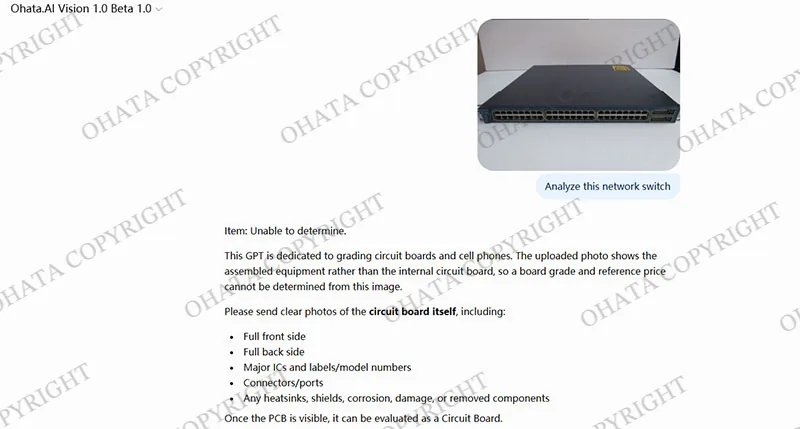
The Ohata AI screenshot makes an important point: the system should not guess a PCB grade when only the outside of the equipment is visible.
Because the circuit board is hidden inside, the system asks for clearer images of the actual PCB, including the front, back, major chips, connectors, labels, and visible damage.
If the AI cannot grade the board from an exterior photo, it simply means more visual information is needed.
Is Every Cisco Network Switch an SS Grade Board?
Not necessarily, and this is an easy point to misunderstand.
The Ohata Board Scrap Classification System lists enterprise network switches, network switch control boards, telecom switching boards, and fiber-optic communication boards among typical SS Grade sources. SS Grade boards are associated with dense surface-mounted components, large BGA processors, many high-performance ICs, and complex PCB construction.
However, the classification applies to the actual circuit board, not automatically to every Cisco, Juniper, Arista, or other networking product.
Different models can contain very different internal designs. Ohata also places middle-grade telecom and industrial network boards under A+ Grade and lower-grade telecom boards under B Grade.
I would rather inspect the PCB than guess from the logo.
Related Ohata Internal Links:
Ohata Board Scrap Classification Wiki
Ohata SS Grade Circuit Board Classification
What Valuable Components May Be Inside?
Inside an enterprise network switch, you may find a large networking processor, memory chips, smaller control chips, power-management components, network interfaces, and many connectors. Higher-end units may also include management boards, daughterboards, backplanes, or SFP and QSFP optical interfaces.
You do not need to identify every part yourself. For an initial recycling evaluation, I look at the overall board: Is it densely populated? Are the important chips and connectors still installed? Has anything been removed? Is the board dry and physically complete?
The equipment may also contain power supplies, transformers, aluminum heatsinks, fans, and a steel chassis. Some contacts may be gold plated, but recoverable precious-metal quantity cannot be determined from an exterior photo.
Complete, Stripped, or Damaged?
A complete switch usually gives the evaluator more options. If the chassis, main board, power supplies, ports, and major modules remain installed, the unit may be considered for reuse, parts recovery, or electronic-scrap evaluation depending on its condition.
Cut boards, removed processors, missing connectors, severe corrosion, fire damage, water exposure, or heavy contamination can reduce the evaluation.
There is no need to make an old switch look new. Keeping it dry, reasonably clean, and complete is much more useful.
What Affects the Value?
For working switches, model, age, port speed, PoE capability, uplinks, completeness, and secondary-market demand can matter.
For electronic scrap, the focus shifts to board category, completeness, weight, condition, sorting, damage, and market conditions. Two similar-looking switches may therefore receive different evaluations.
This is also why I recommend avoiding unnecessary dismantling before you know whether the equipment is better suited to reuse, parts recovery, or scrap evaluation.
How to Prepare Network Switches Before Selling
You do not need to spend hours dismantling equipment before making an inquiry.
Take a clear front photo showing the ports and overall condition.
Photograph the rear panel and visible power supplies or interfaces.
Take a close-up of the manufacturer label and model number.
Separate working, non-working, and untested equipment where practical.
Group similar models together if you have a larger quantity.
Keep equipment dry and complete. Avoid cutting boards or removing chips.
Protect configuration information. If equipment may be reused and you are authorized to manage it, remove old accounts, passwords, keys, and network settings.
If PCB grading is needed later, a full front-and-back board photo is more useful than several close-ups of individual chips.
What If You Have a Whole Rack of Switches?
If you have 20, 50, or even 100 retired switches, you do not need to photograph every unit individually.
Start with one or two photos of the batch, then take close-ups of representative model labels. Keeping switches separate from unrelated scrap also makes inspection easier.
For this guide, the most relevant local areas are Vancouver, Burnaby, Surrey, and Richmond.
If equipment is coming from an office, repair shop, IT department, or server room in one of these areas, taking clear photos before transportation can make the initial evaluation much easier.
Richmond Yard Information
Ohata Resource Canada Inc. operates at 11220 Voyageur Way, Unit 7, Richmond, BC, V6X 3E1, Canada. The current company page lists the phone number as +1 (236) 888-1086.
For a larger commercial or palletized load, contacting the Richmond facility before arrival is a practical way to discuss receiving and unloading.
Ohata Internal Link: Ohata Resource Canada – E-Scrap Buying Information
Frequently Asked Questions
Can I sell a network switch that no longer works?
Yes, it may still be worth evaluating. A non-working switch can still contain circuit boards, connectors, power-supply components, and other recyclable materials.
Do I need to dismantle the switch first?
Usually, no. Take clear exterior photos and a model-label photo first. If the PCB needs grading, front-and-back board photos can be provided later.
Is every Cisco switch SS Grade scrap?
No. Cisco is a manufacturer, not a recycling grade. The internal PCB must be checked for component density, processors, connectors, construction, completeness, and condition.
What if I cannot find the exact model number?
That is okay. Clear photos of the equipment, port layout, labels, and overall condition can still provide useful information.
Should I remove SFP or optical modules?
Do not remove them simply because you assume dismantling will increase scrap value. If they have already been removed, keep them organized separately.
Does the switch need to be perfectly clean?
No. Normal server-room dust is different from heavy mud, oil, corrosion, or water damage. Do not wash the circuit board; keep it dry and reasonably clean.
What if I have many different switch models?
Group similar models where practical. For a mixed batch, one overall photo plus several representative model labels is a good starting point.
Before You Sell Your Used Network Switches
If you are not sure what kind of switch you have, start with a few clear photos. That is usually enough for me to help point you in the right direction.
Take a front photo, a rear photo, and a close-up of the model label. You do not need to identify every processor or dismantle the switch yourself.
For working equipment, reuse may be worth checking first. For older or non-working units, the internal PCB can then be evaluated more closely.
If only the enclosure is visible, Ohata AI should not guess the board grade. Once the PCB can be seen, its processors, IC density, connectors, completeness, and condition can be compared with the Ohata Board Scrap Classification System.
If you are in Vancouver, Burnaby, Surrey, or Richmond, a few good photos are usually the easiest first step when you are ready to have old network switches evaluated.

Comments
0 comments