

We Buy Hard Drive Controller Boards in Richmond, BC
Hello! This is Tomona from the Ohata Resource Canada Richmond Yard.
Today is July 29, 2026, and it’s a sunny afternoon here in Richmond. The temperature is around 22°C, with partly cloudy conditions expected later.
If you’re sorting electronic scrap today, please take your time, stay hydrated, and don’t try to lift a heavy container by yourself. There’s no need to rush. Sorting a small amount at a time is perfectly fine.
I also recommend keeping your circuit boards in a dry, covered box. You don’t need any special packaging. A sturdy container that protects the boards from moisture, loose dirt, and accidental damage is usually enough.
You can check the latest conditions through Environment and Climate Change Canada’s Richmond forecast.
I recently noticed an update from the City of Richmond asking residents to sort their recycling more carefully. Contamination levels have exceeded the limits accepted by Recycle BC, so the City is encouraging people to check where each item belongs.
I understand that sorting can sometimes feel confusing—especially when different items look very similar. The same is true with electronic scrap. If you come across an unfamiliar circuit board, please don’t feel that you need to identify or dismantle it by yourself. It’s usually better to ask before cutting it, removing components, or throwing it away.
You can read the City of Richmond’s recycling update here.
That brings me to the item I’d like to introduce today. If you’ve removed a small circuit board from the bottom of an old hard drive, you may be looking at it and wondering, “What exactly is this, and could it still have recycling value?”
That small part is called a hard drive controller board. Let me show you how I recognize one, how SATA and non-SATA boards differ, and what you can do before bringing your boards to our Richmond yard.
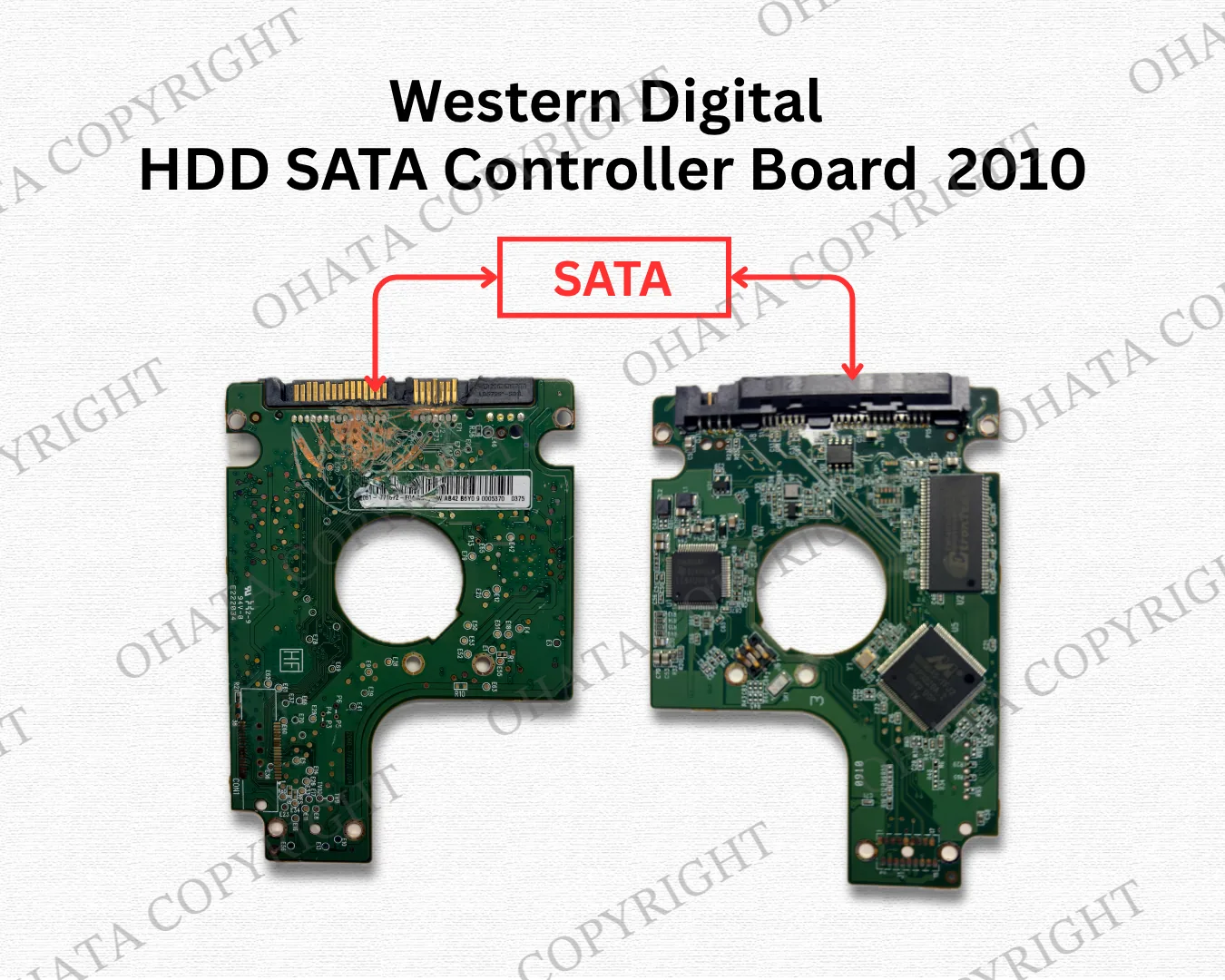
What Is a Hard Drive Controller Board?
First, let’s make sure we’re looking at the same item.
If you turn over a traditional hard disk drive, you’ll usually see a small circuit board attached to the bottom. This is called a hard drive controller board or HDD PCB. PCB simply means printed circuit board.
The board helps the hard drive communicate with a computer. It also helps manage power, control the motor, and coordinate the drive’s reading and writing functions.
You may have one after replacing a hard drive in a desktop computer, server, external storage device, or surveillance system. Perhaps you work at a repair shop, school, office, or IT company and have slowly collected a box of them.
Whatever the reason, you don’t need to know every technical detail before contacting us. A clear photograph and an approximate weight are often a helpful place to begin.
HDD controller boards can contain integrated circuits, copper pathways, connector contacts, solder, and other recoverable materials. Their buying category and value can differ, however, so I can’t classify every board in the same way simply because it came from a hard drive.
What I Look for When Identifying the Board
So, how can you recognize this type of board? I usually begin by looking at its shape and asking where it came from.
A controller board is normally shaped to fit the underside of a particular hard drive. You’ll often see several mounting holes, exposed contact pads, major chips, and one or more connectors positioned along the edge.
It also looks quite different from a desktop motherboard. It won’t have long memory slots, a large CPU socket, or several rows of expansion slots. HDD boards are much smaller and usually have a more compact layout.
Next, I check the integrated circuits. An integrated circuit, commonly called an IC or chip, is a small electronic component that performs a particular control or processing function.
A controller board may have a main controller chip, a motor-driver chip, memory, firmware-related components, and voltage regulators. These parts can vary between manufacturers and drive generations, so I look at the entire layout instead of relying on one chip.
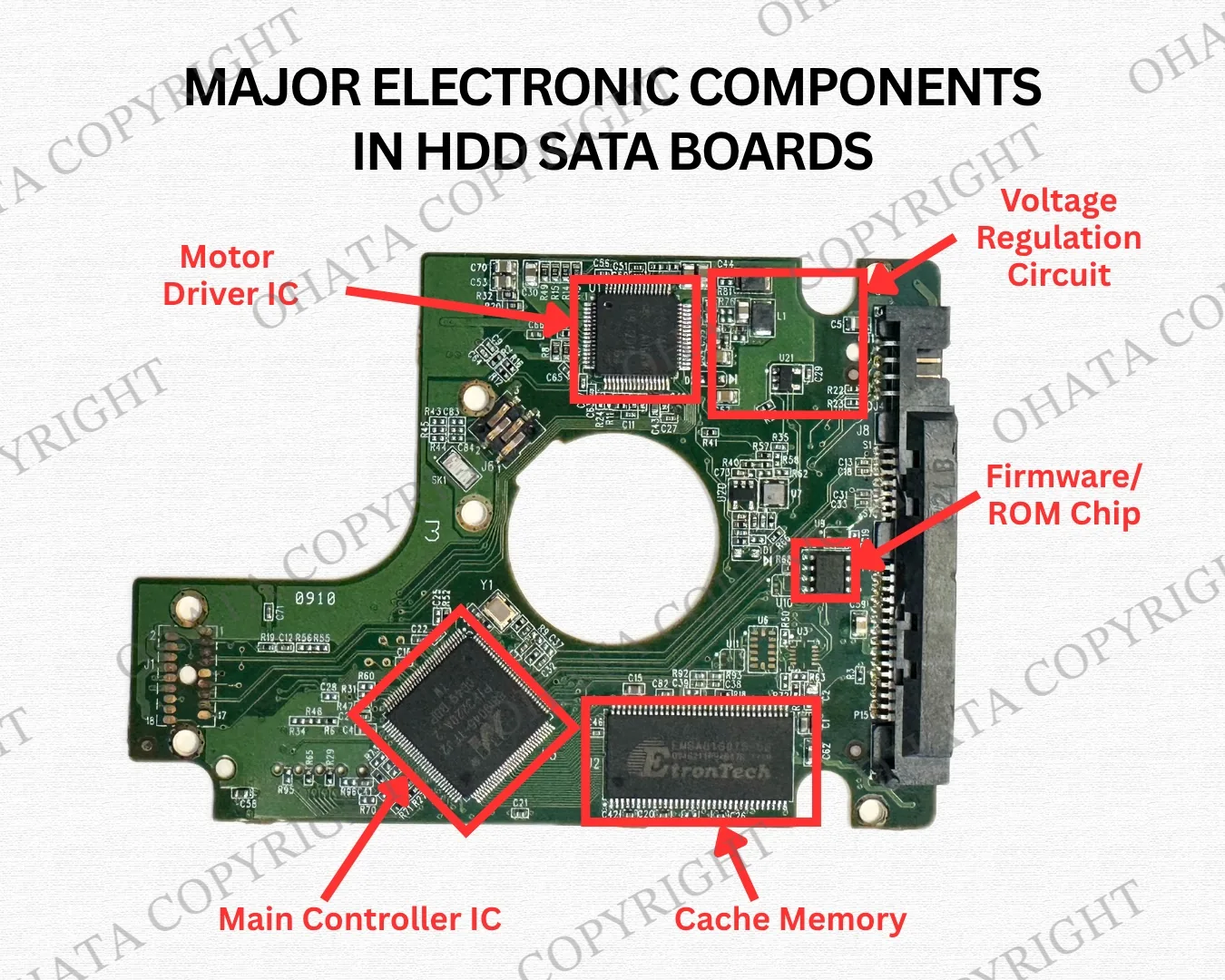
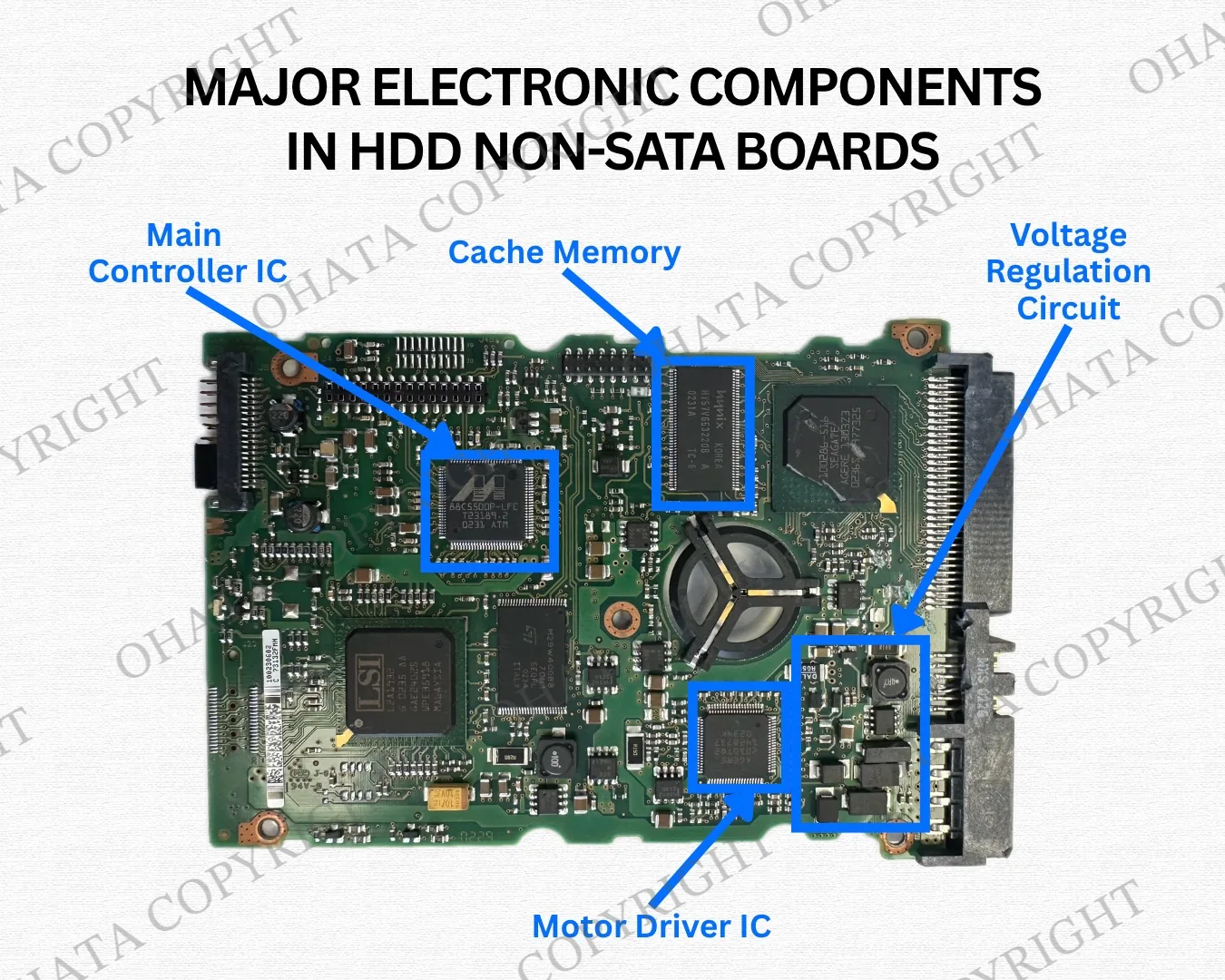
Printed names and numbers can also be helpful. A manufacturer’s name, PCB number, barcode, or revision code may give me useful clues.
Please don’t worry if a label is faded or you can’t find a model number. I won’t classify a board using one marking alone. I also consider its connectors, construction, remaining components, and overall condition.
A Simple SATA and Non-SATA Comparison
One useful sorting step is to look at the connection along the edge of the board.
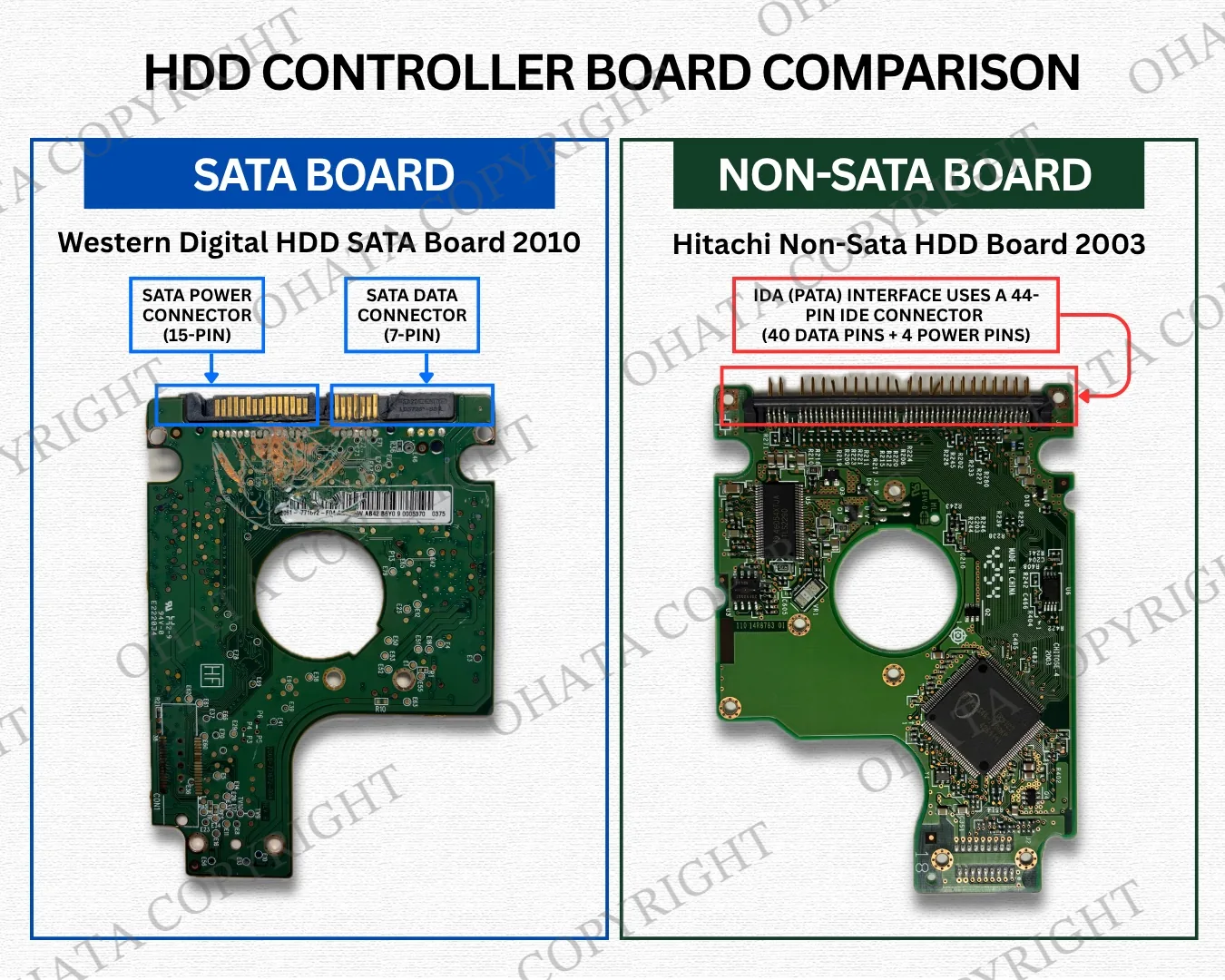
A SATA controller board normally has two adjacent L-shaped connectors. The narrow connector carries data, while the wider connector supplies power. SATA boards are common in relatively modern desktop computers, external hard drives, and other storage equipment.
A non-SATA board doesn’t use that familiar pair of L-shaped connectors. For example, an older Parallel ATA board—also known as PATA or IDE—may have a wide row of exposed metal pins for a ribbon cable.
You may also find controller boards from server or specialized hard drives. These can use SCSI, SAS, or other interface designs, so they may not look like either a typical SATA board or an older IDE board.
Why does the difference matter? SATA and non-SATA boards may belong to different buying categories and may have different buying conditions.
If you can identify them confidently, keeping them in separate containers can help. If you can’t tell the difference, please don’t feel that you need to guess. You can take clear pictures or bring the boards as they are, and we can inspect them.
You Usually Don’t Need to Remove Anything
You may be wondering whether you should remove the large chips, connectors, or other components before bringing the boards in.
In most cases, I recommend leaving the board complete.
The original controller chip, motor-driver IC, memory, voltage-regulation components, and connectors all help me identify the board correctly. Removing these parts may make the board harder to recognize and could reduce its evaluation.
You may also see gold-coloured contacts. Although these can be helpful identification features, their colour alone doesn’t confirm the metal content or determine the buying price.
If you’re unsure, the safest and easiest choice is usually to leave everything attached. I’d rather inspect a complete board than have you spend time dismantling it unnecessarily or risk hurting yourself with a tool.
Ohata AI Can Give You a Starting Point
If you have several unfamiliar boards, you can use Ohata AI to receive a suggested item type or possible buying category from a photograph.
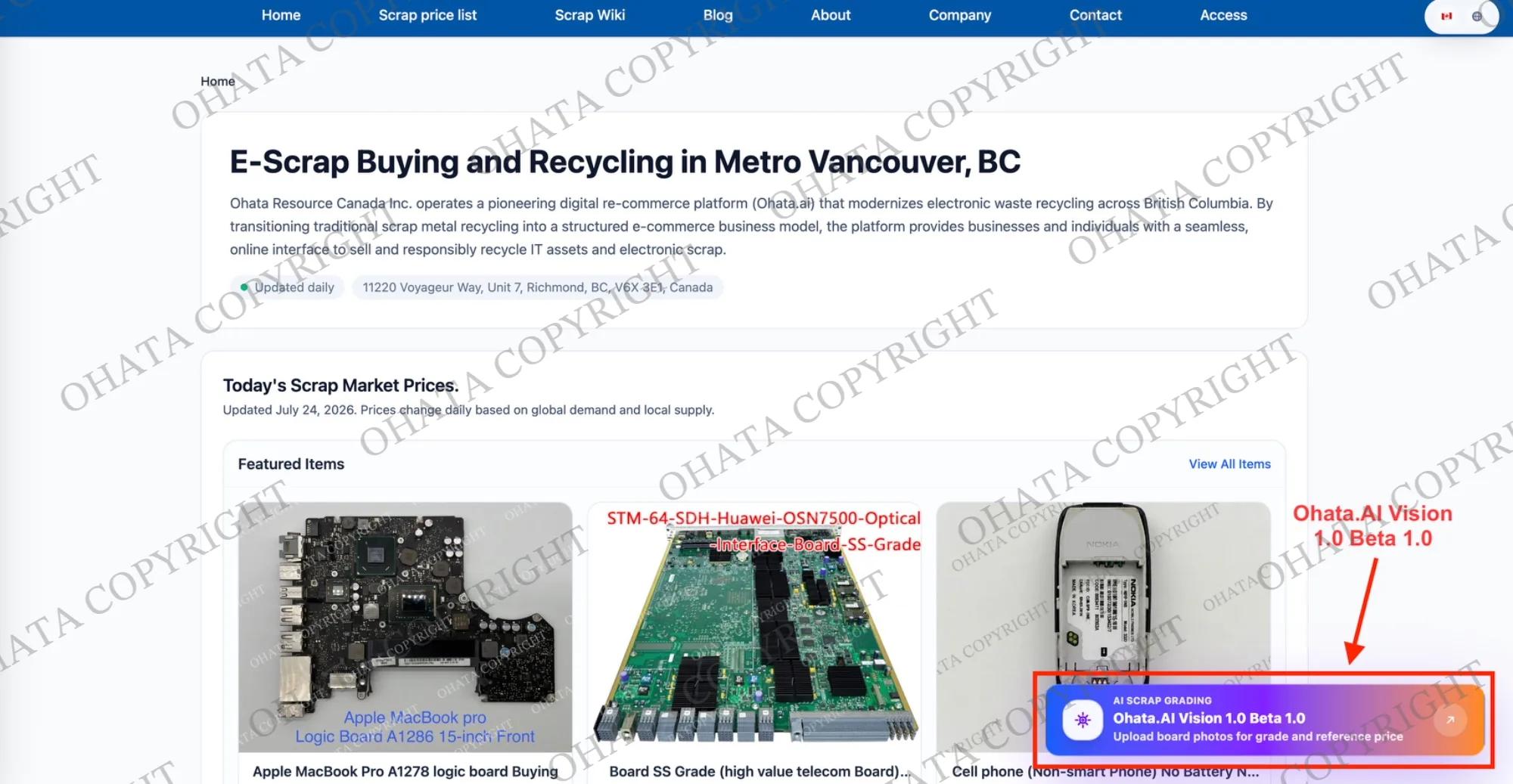
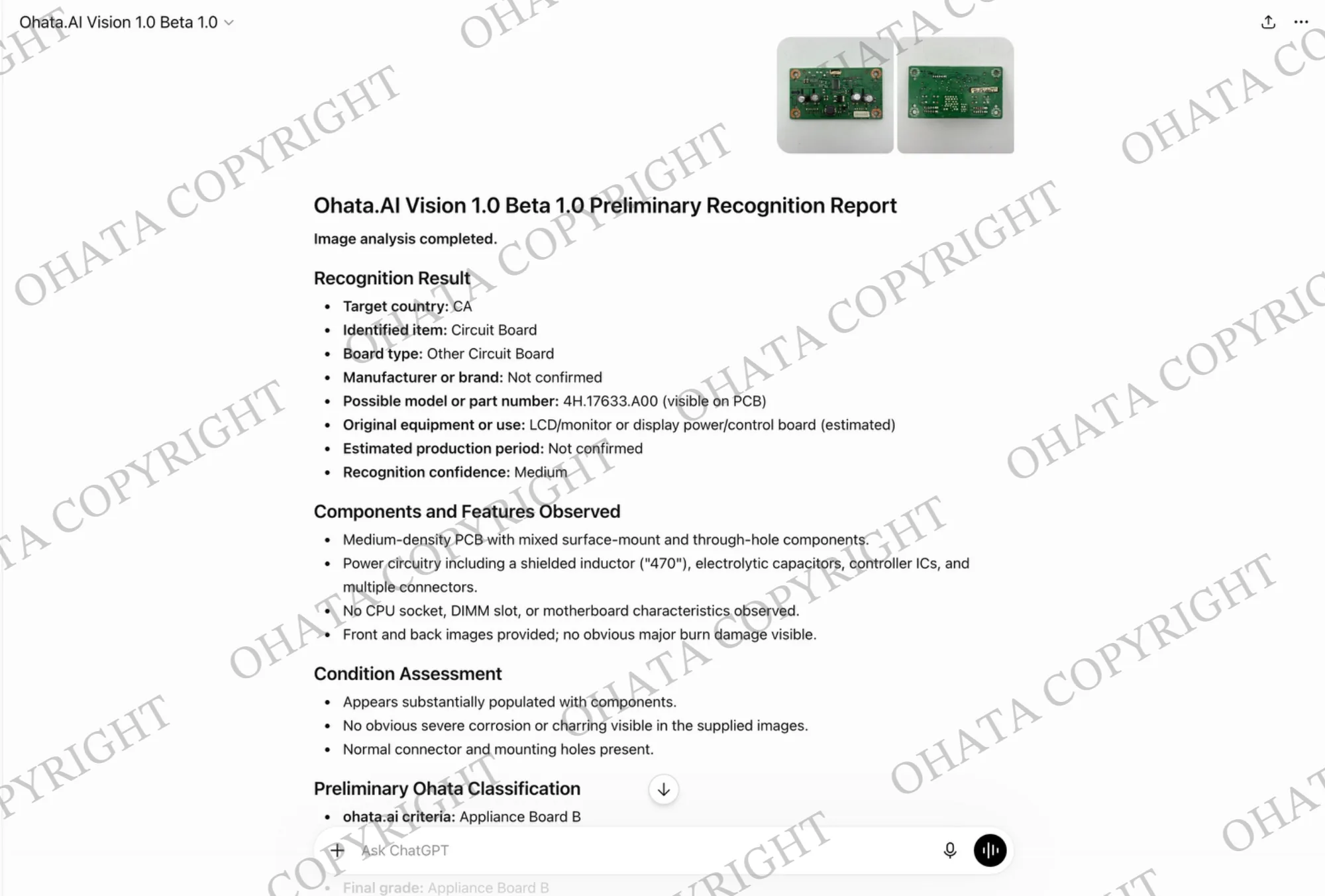
Try placing one board on a flat surface in good lighting. Make sure the full outline is visible, and take separate photographs of the front and back. If the image isn’t perfect, that’s all right—just avoid heavy shadows, glare, and blur when possible.
Please remember that Ohata AI is an identification aid. It doesn’t guarantee acceptance, classification, or a final buying price.
We still need to consider the board’s physical condition, actual weight, completeness, sorting quality, and our current buying requirements.
What If the Board Is Damaged?
Does a damaged or non-working controller board still have value? It may, so you don’t necessarily need to throw it away.
I look at what kind of damage is present. A complete but non-working board is different from a board that has been cut or had its major chips removed.
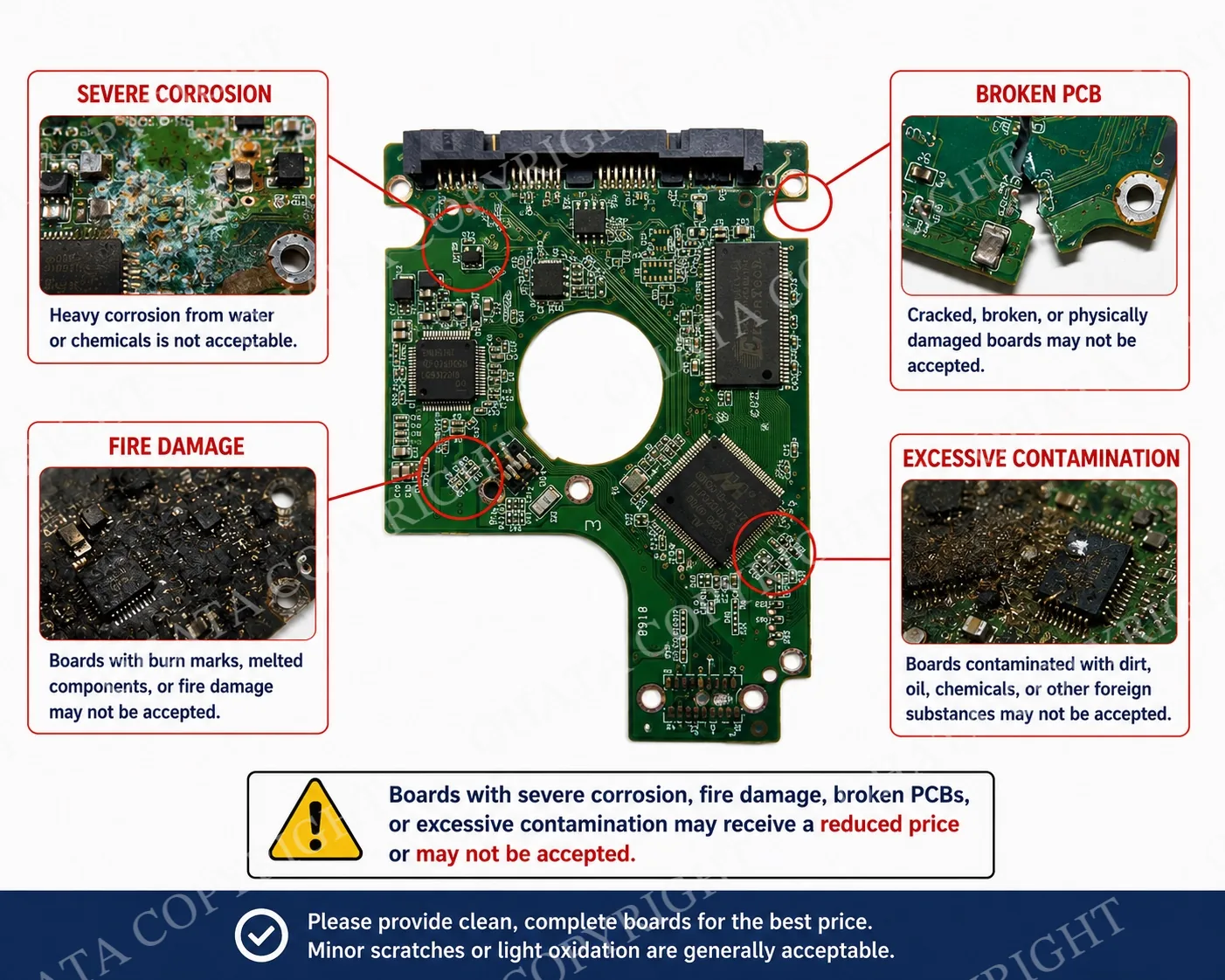
Broken connectors, missing components, cracked PCBs, heavy corrosion, water contamination, fire damage, chemical residue, oil, or excessive dirt can affect the evaluation. However, you don’t need to repair the board or clean it with strong chemicals before showing it to us.
If a board is wet, heavily corroded, burnt, or contaminated, keep it separate from cleaner material. Handle it carefully and let us know about its condition before bringing it in if you have any safety concerns.
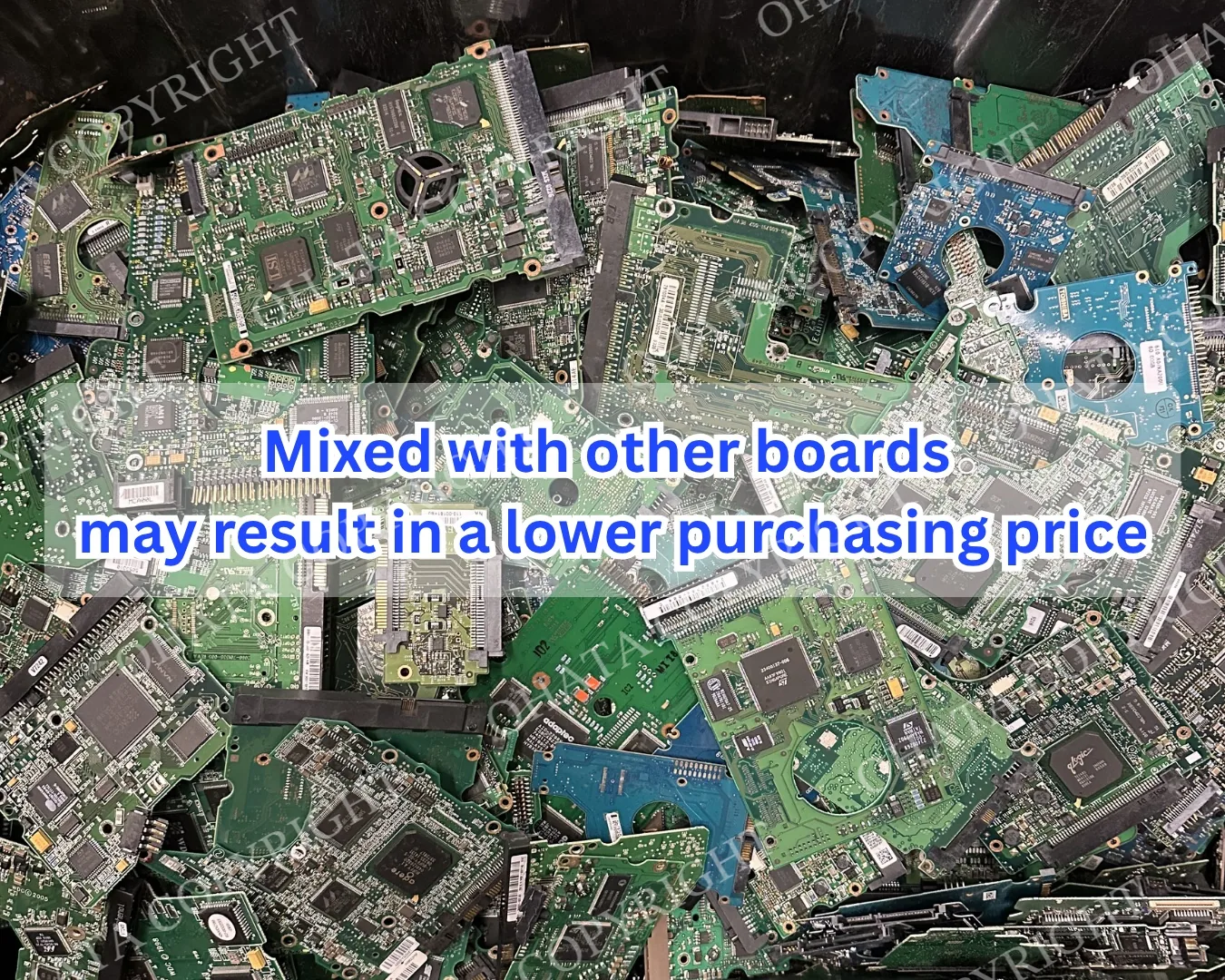
Sorting can affect the evaluation as well. A container of confirmed SATA boards is easier to assess than a mixture of controller boards, motherboards, cables, screws, and metal pieces.
Ohata.ai’s published reference prices may consider international raw-material markets and internal pricing algorithms. The final buying price is determined after I or another team member physically inspects the actual material.
A Few Easy Steps Before Your Visit
You don’t need to prepare the boards perfectly. These simple steps are enough:
Keep SATA and non-SATA boards separate if you can identify them confidently.
Place unrelated circuit boards, complete hard drives, cables, and metal parts in different containers.
Keep the boards dry and reasonably clean, but don’t use chemical cleaners.
Don’t cut the boards or remove their major chips and connectors unnecessarily.
Take clear photographs of the front and back.
Prepare an approximate weight if possible.
The currently published buying conditions for HDD SATA boards state a general minimum quantity of 1 lb, or approximately 450 g. Mixed HDD board loads may be accepted, but they may receive a lower buying price than properly sorted material.
If you still have complete hard drives, please back up any files you need and securely erase confidential data before selling or recycling them. Removing the controller board isn’t a verified method of erasing the information stored inside a hard drive.
Please also be careful with batteries found in mixed electronic loads. HDD controller boards don’t normally contain batteries, but other equipment in the same box might. Protect batteries from crushing, puncturing, and contact with loose metal.
Visiting Our Richmond E-Scrap Buying Yard
Ohata Resource Canada Inc. is a consumer-to-business, or C2B, e-scrap buying business serving individuals and businesses throughout Metro Vancouver.
Company: Ohata Resource Canada Inc.
Address: 11220 Voyageur Way, Unit 7, Richmond, BC V6X 3E1
Telephone: +1 (236) 888-1086
Business hours: Monday–Saturday, 8:00 a.m.–5:00 p.m.; Sundays and holidays closed
Service area: Metro Vancouver, including Richmond and surrounding communities
Appointment policy: Walk-ins are accepted during regular business hours; please contact us before bringing a large or commercial load
General minimum for HDD SATA boards: 1 lb, approximately 450 g
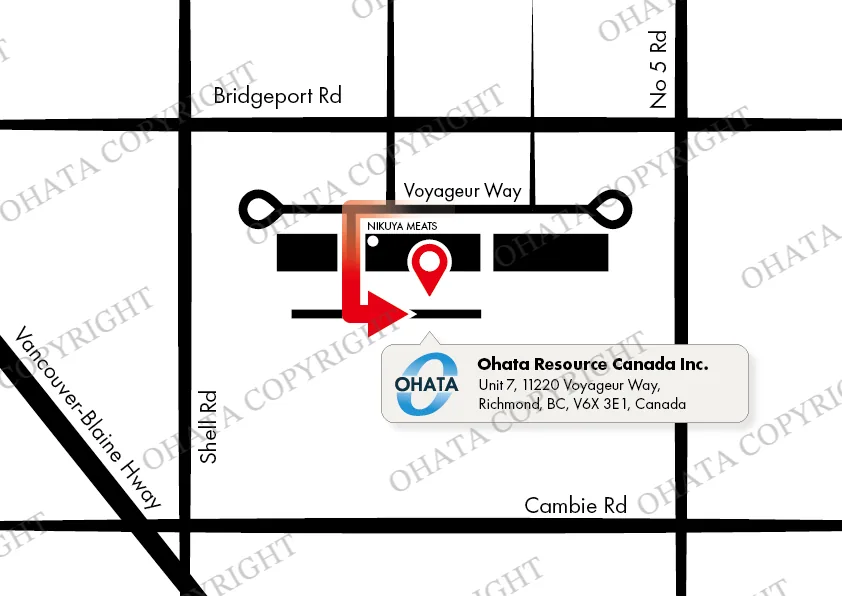
Our unit doesn’t have a customer entrance at the front of the building. Please come around to the back and look for the Ohata.ai sign.
Because schedules and buying conditions may change, please review the Richmond yard contact information before travelling.
Frequently Asked Questions About HDD Controller Boards
How can I distinguish an HDD controller board from another circuit board?
Look for a small PCB designed to fit the underside of a hard drive. It commonly has drive-specific mounting holes, contact pads, major controller chips, and a SATA, pin-style, or another storage-device interface.
How can I tell a SATA board from a non-SATA board?
A SATA board normally has two adjacent L-shaped connectors for data and power. A non-SATA board may have a wide row of pins or a different connector used by older, server, or specialized drives.
Do non-working HDD controller boards qualify?
They may. The board doesn’t necessarily need to operate, but it must meet the current item category, condition, quantity, and acceptance requirements.
Should I remove the chips or connectors?
Generally, no. Removing major ICs or connectors can make the board harder to identify and may reduce its buying evaluation.
Can I mix boards from different manufacturers?
Mixed boards may be accepted, but they can receive a lower buying price than properly sorted material. Separate them by confirmed category or manufacturer when practical, but don’t guess if you’re uncertain.
Does a broken SATA connector affect the evaluation?
Yes, it can. A missing or broken connector may reduce the board’s value, and some severely damaged boards may not meet the current acceptance requirements.
Do controller boards contain my personal files?
Your ordinary files are generally stored on the hard drive’s internal magnetic platters, not on the controller board. However, removing the board doesn’t securely erase or destroy the information inside the drive.
Can Ohata AI determine the final buying price?
No. It can suggest a possible identification or category from a photograph, but the final classification and price require physical inspection.
Do I need an appointment?
An appointment generally isn’t required for a regular walk-in during current business hours. Please contact us first if you have a large commercial load or require special unloading arrangements.
How is the final price determined?
The evaluation considers the correct item category, actual weight, completeness, condition, contamination, sorting quality, current metal markets, and current buying requirements.
Prepare Your Photos and Approximate Weight
If you have HDD controller boards in Metro Vancouver, start by taking clear photographs of both sides. Separate the confirmed SATA and non-SATA boards, keep them dry, and prepare an approximate weight.
You’re welcome to bring properly prepared material to our Richmond yard during confirmed business hours. Final acceptance, classification, and buying price will be determined after physical inspection.
Related Ohata.ai Resources
Check the current HDD SATA board buying price and conditions
Check the current HDD Non-SATA board buying price and conditions

Comments
0 comments