

I’m Nicole, AI Data Analyst | Ohata Shoji America Seattle Yard.
Today is Thursday, September 24, 2026. Seattle is expecting mostly cloudy skies, with temperatures reaching the low 60s and a chance of rain later in the day.
Autumn is now in full swing, and it’s officially Gilmore Girls season. Channel your Gilmore of choice (sorry to say, I’m Emily) and go do something cozy!
This weekend, Remlinger Farms in Carnation is opening its Fall Harvest Pumpkin Festival on Saturday, September 26. The festival runs from 10 a.m. to 6 p.m. and includes a large pumpkin field, a corn maze, wagon rides, seasonal food, and more than 30 rides and attractions. Their 2026 lineup also includes a new 425 Magazine corn maze and seasonal treats like pumpkin pie-spiced mini-donuts and caramel apple desserts.
Anyway, back to old computer hardware. Today I want to explain why CPU-D slot CPUs look so different from modern processors, what is actually inside the module, how to identify one, and what can affect its classification when it is sold as e-scrap.
We Buy Qualifying E-Waste in Seattle: Why Do CPU-D Slot CPUs Look So Different?
A CPU-D Grade Slot CPU or CPU Module is a processor assembly built around a longer board-mounted structure rather than a compact standalone package.
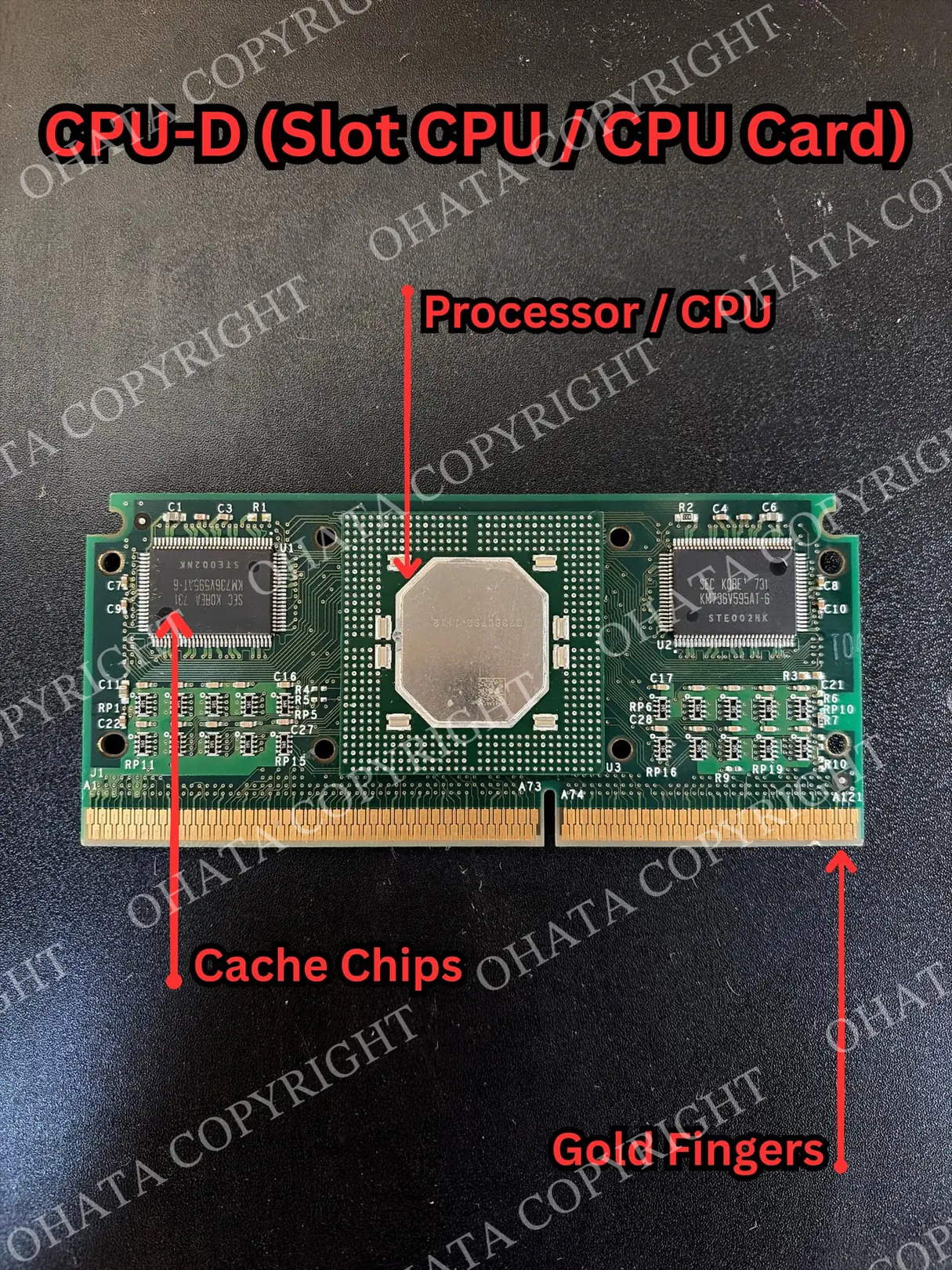
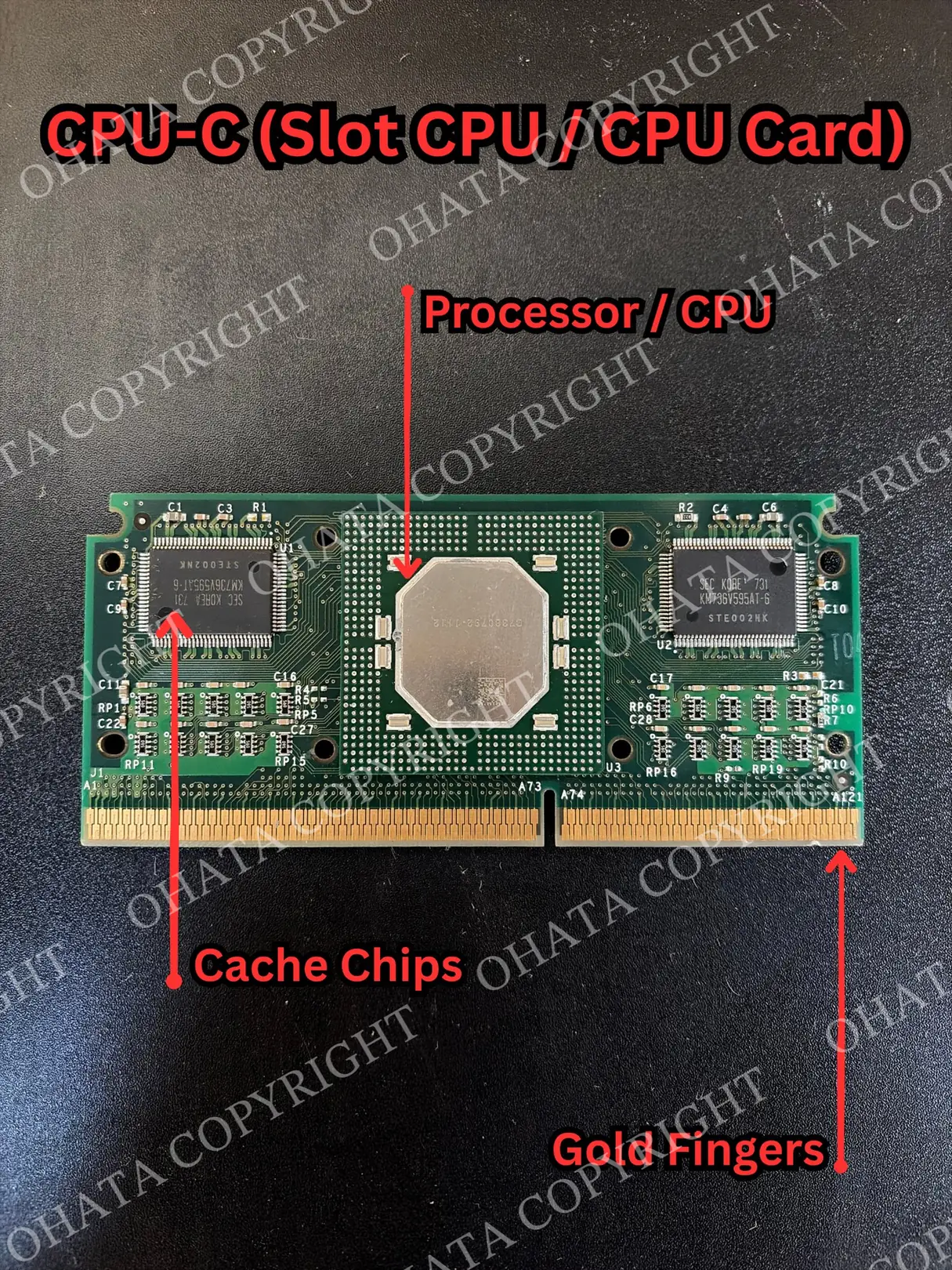
In a typical modern desktop, the processor sits directly in a socket on the motherboard. In a slot-style design, the processor is mounted on a narrow printed circuit board, or PCB, together with supporting components, and the complete assembly plugs into a long slot on the motherboard.
The board is part of the processor module itself, not a separate accessory.
Depending on the design, the module may include:
The processor package
Cache-memory chips
Supporting integrated circuits
Resistors and capacitors
A PCB
Gold-plated edge contacts
A heatsink
A plastic or metal cartridge
Structural brackets or backing plates
This construction explains why a slot CPU can resemble an expansion card or a large memory module when it is removed from the computer.
CPU-D describes the physical construction of the processor module rather than the speed or former retail value of the processor. A faster model does not automatically belong to a different recycling category if its package construction still matches CPU-D.
Learn more: Ohata CPU Scrap Classification Wiki | CPU Identification & Recycling Guide
Why Slot CPUs Were Built This Way
The slot format emerged from the packaging requirements of late-1990s processor design. One of the main reasons was cache memory. Cache is a small amount of very fast memory used by the CPU to hold frequently accessed instructions and data. It reduces the amount of time the processor has to wait for slower system memory. In some processor generations, important cache memory was not fully integrated into the CPU package. Separate cache chips were placed near the processor instead.
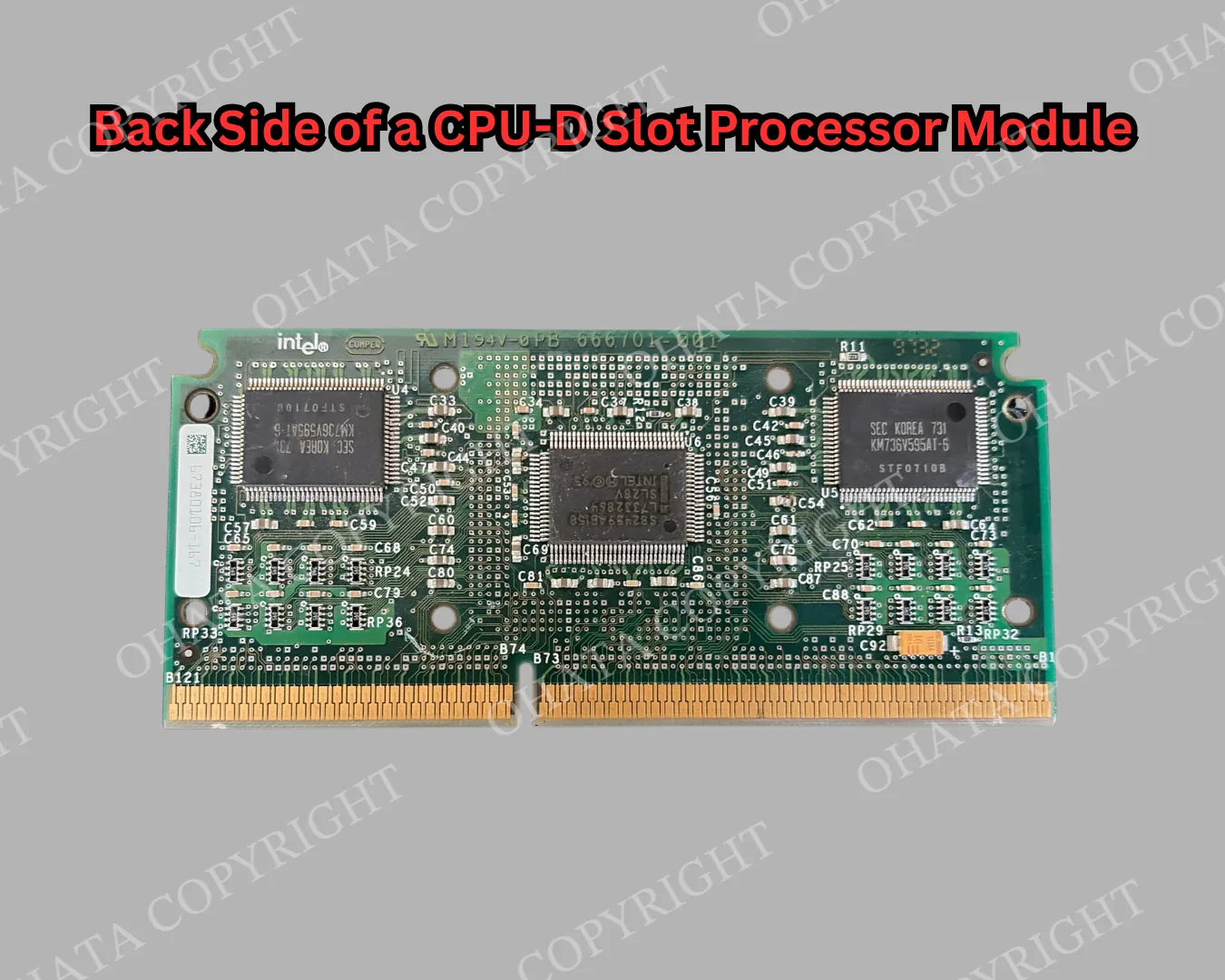
A slot module provided enough board area to mount the processor, cache memory, and supporting electronics together while keeping the assembly removable. This arrangement was particularly important for processors such as Intel’s Pentium II.
The complete module behaved as one replaceable processor unit even though it contained several distinct electronic components.
As semiconductor manufacturing improved, more cache and supporting functions could be integrated directly into the processor package. Smaller socketed designs became more practical, and the long cartridge-style module gradually disappeared.
SECC, SECC2, and S.E.P. Packages Can Look Different
Intel used several related slot-processor package styles during this period.
SECC stands for Single Edge Contact Cartridge. It enclosed the processor assembly in a larger cartridge.
SECC2 reduced the amount of surrounding enclosure and left more of the processor assembly exposed.
S.E.P., or Single Edge Processor Package, exposed even more of the board and was used on some Celeron processors.
These differences are useful during identification because genuine slot CPUs do not all have the same outer appearance. One may resemble a closed black cartridge, while another may expose much of the internal circuit board.
The absence of a full cartridge therefore does not automatically rule out a slot-style processor.
How CPU-D Differs Physically From a Modern CPU
A modern CPU concentrates most of its functional circuitry into a compact package designed to sit directly in a motherboard socket.
A slot CPU distributes part of that architecture across a longer board. The processor package itself is only one part of the assembly. Cache chips, support circuitry, electrical contacts, and cooling hardware may all occupy separate positions on the module.
The motherboard connection is also different. Instead of a grid of pins or flat contacts underneath the processor package, a slot CPU uses an edge connector running along the bottom of the board.
This packaging approach made sense for the processor technology of the period. It also explains why slot CPUs are physically larger and more complex than the socketed processors that replaced them.
How to Recognize a CPU-D Slot Processor
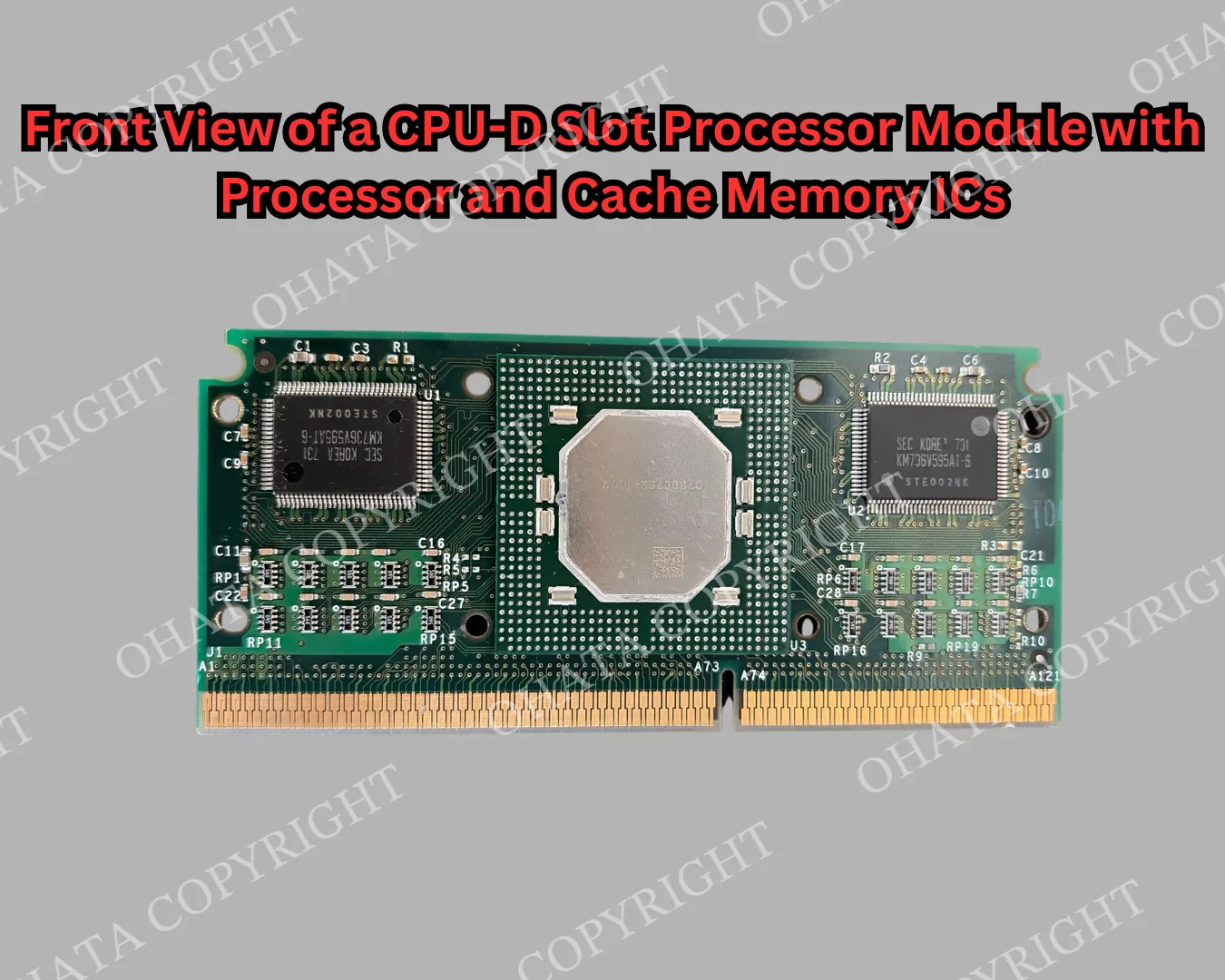
A CPU-D slot processor is usually identifiable by its overall construction rather than by one label or marking.
Long board or cartridge: CPU-D modules are typically longer than standard socketed CPUs and may use a plastic cartridge or exposed board.
Edge connector: A row of plated contacts runs along one edge and connects the module to the motherboard.
Gold fingers: These contacts may look similar to the ones found on RAM and other computer components, so they should not be used as the only identification feature.
Processor assembly: The module may include a large processor package, cache chips, a heatsink, cartridge housing, and other supporting components.
Manufacturer markings: Model numbers and branding can help identify the processor family, but physical construction is more important for classification.
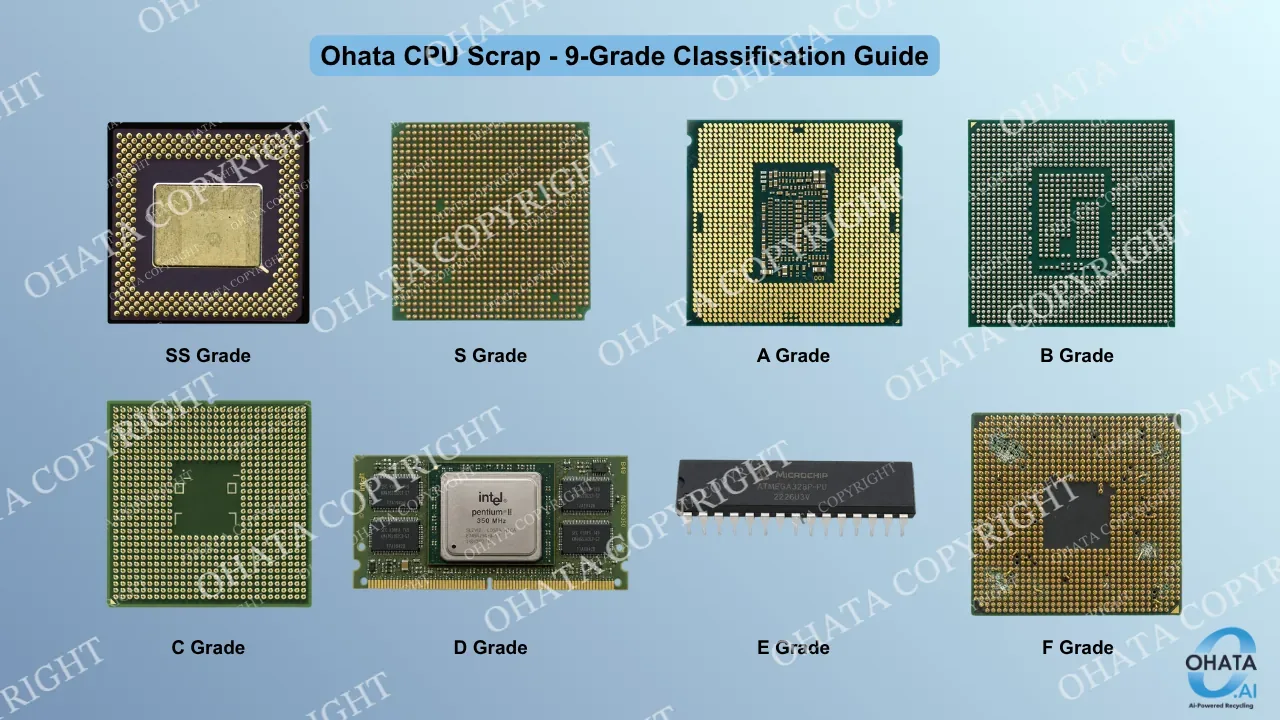
Ohata classification: The Ohata CPU Scrap Classification considers package type, material, contact structure, completeness, and condition.
What Is Slot 1?
Slot 1 was Intel’s motherboard interface for several cartridge-style processors, including the Pentium II and some Pentium III models.
Instead of lowering the processor into a square socket, the complete module was inserted vertically into a long motherboard connector.
The electrical contacts were positioned along the edge of the processor module rather than arranged underneath the CPU package.
Physically, the installation resembles inserting an expansion card into a motherboard, although the function is completely different. Slot 1 was a processor interface designed to connect the computer’s main CPU to the motherboard.
What Is the Difference Between Slot 1 and Slot A?
Intel used Slot 1 for several processor families, including Pentium II and some Pentium III models.
AMD used Slot A for early Athlon processors.
Both used long cartridge-style modules and edge connectors, which is why they can appear similar when viewed as loose e-scrap.
They were not electrically compatible. If labels or housings are missing, the two formats can be difficult to distinguish by appearance alone. For recycling purposes, the exact original platform may be less important than determining whether the physical construction matches the current buying category.
What Are the Other Chips Beside the CPU?
The additional chips on a slot processor are not extra CPUs.
Some are cache-memory ICs. Others may support voltage regulation, signaling, or other functions required by the processor module.
Older processor designs often placed functions on separate chips that later generations integrated more closely into the CPU package. An exposed slot processor therefore shows more of the supporting architecture than most modern CPUs. This is one reason these modules are useful for understanding the development of processor packaging. The physical separation between the CPU, cache, support circuitry, and motherboard connection is still visible.
Why CPU-D Can Be Mistaken for RAM
CPU-D slot processors and RAM are not the same type of component.
A CPU processes instructions and calculations, while RAM temporarily holds data that the CPU needs while programs are running.
They can still look similar at first glance because both may use a long rectangular board with gold-plated edge contacts and several chips. The comparison below shows the physical differences more clearly.
Feature
CPU-D Slot Processor
RAM Module
Main function
Executes instructions and performs calculations
Provides temporary working memory
Overall shape
Long board or cartridge-style processor module
Long, thin memory module
Edge contacts
Uses gold-plated contacts to connect to the motherboard processor slot
Uses gold-plated contacts to connect to a memory slot
Chip layout
Usually has one main processor package with different supporting chips
Usually has several similar memory ICs arranged in a repeated pattern
Cooling hardware
May include a large heatsink, metal backing, or cartridge
Usually has no large heatsink or cartridge
Construction
Thicker and more structurally complex
Generally thinner and more uniform
Ohata classification
CPU-D when it meets the applicable slot-CPU requirements
Classified under the applicable RAM grade
The similar board shape and gold contacts are what cause most of the confusion. The large processor package, cooling hardware, and less uniform chip layout are usually the clearest signs that the item is a slot CPU rather than RAM.
How CPU-D Differs From a Modern LGA CPU
A modern LGA processor uses a very different connection method.
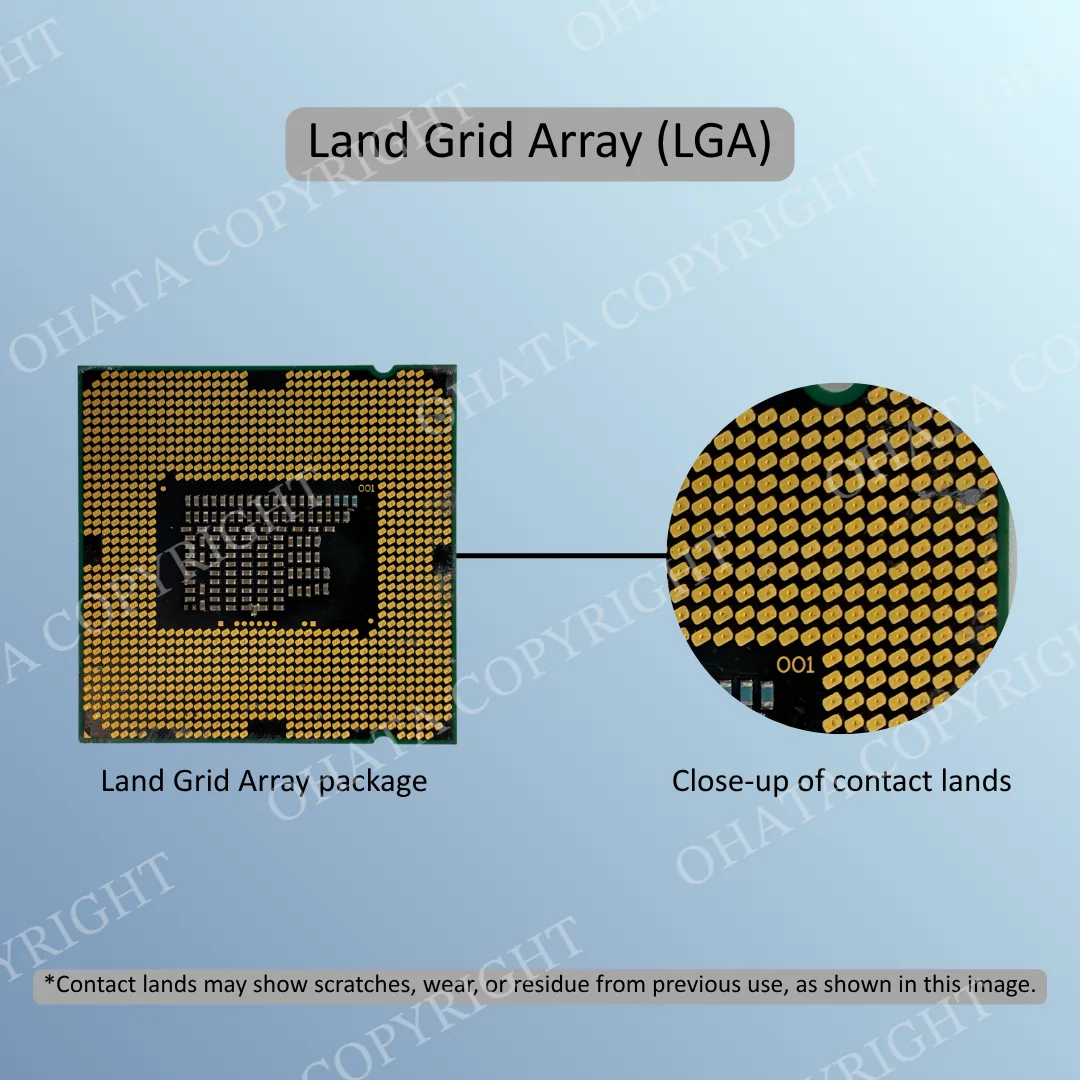
LGA stands for Land Grid Array.
Instead of using a long board and edge connector, an LGA processor has a dense field of flat electrical contacts underneath the package. The matching spring contacts are located inside the motherboard socket. This allows the processor package to remain compact while maintaining a large number of electrical connections. The contrast between CPU-D and LGA packaging shows how much processor design changed after the slot era. Functions once distributed across a module became increasingly concentrated within the CPU package itself.
Learn more on YouTube: Comparing CPU Packages: BGA, LGA, and PGA
Why the Gold Edge Contacts Are Important
The gold fingers along the bottom edge are the contact points that connect the CPU module to the motherboard.
They carry the electrical signals and power needed for the processor to communicate with the rest of the computer. The gold-colored surface is a thin plating, not solid gold, and is used because gold resists corrosion and maintains a reliable electrical connection.
On the CPU-D module shown above, the gold fingers run across the full lower edge of the board. They are part of the original processor assembly, along with the CPU and cache chips.
For e-scrap classification, the connector should generally remain intact. Cutting or trimming the gold fingers removes part of the module and can affect how the item is evaluated.
Does a CPU-D Slot Processor Store Personal Data?
A CPU is not a long-term storage device in the same way as an HDD or SSD.
Processors use registers and cache while the computer is running, but these are part of the system’s temporary working process rather than the persistent storage used for documents, photographs, and other personal files.
A loose CPU-D module removed from an old computer generally does not require the same data-erasure process used for storage devices. If the same load includes hard drives, SSDs, phones, or complete computers, those devices should still be handled separately for data protection.
Does a CPU-D Processor Need to Work?
No. Function does not affect the CPU-D scrap classification.
A CPU-D slot processor may still qualify whether it is working or non-working. The evaluation is based on the physical item, including its construction, completeness, attached components, condition, sorting, and measured weight.
What Can Affect CPU-D Buying Value?
A complete CPU-D module may include the processor package, PCB, supporting ICs, edge connector, housing, and other original components. Missing or damaged parts can affect how the module is classified and evaluated.
Conditions that may reduce the buying value or result in a downgrade include:
Processor removed
Cache chips or other major ICs removed
Gold fingers cut or heavily damaged
PCB cut, broken, or missing sections
Housing heavily damaged
Severe corrosion or water damage
Fire or chemical damage
Heavy dirt, residue, or unrelated foreign material
Significant dismantling that leaves only part of the original processor assembly
Old labels, light dust, minor scratches, and ordinary surface wear are common on vintage computer hardware and do not by themselves indicate serious damage.
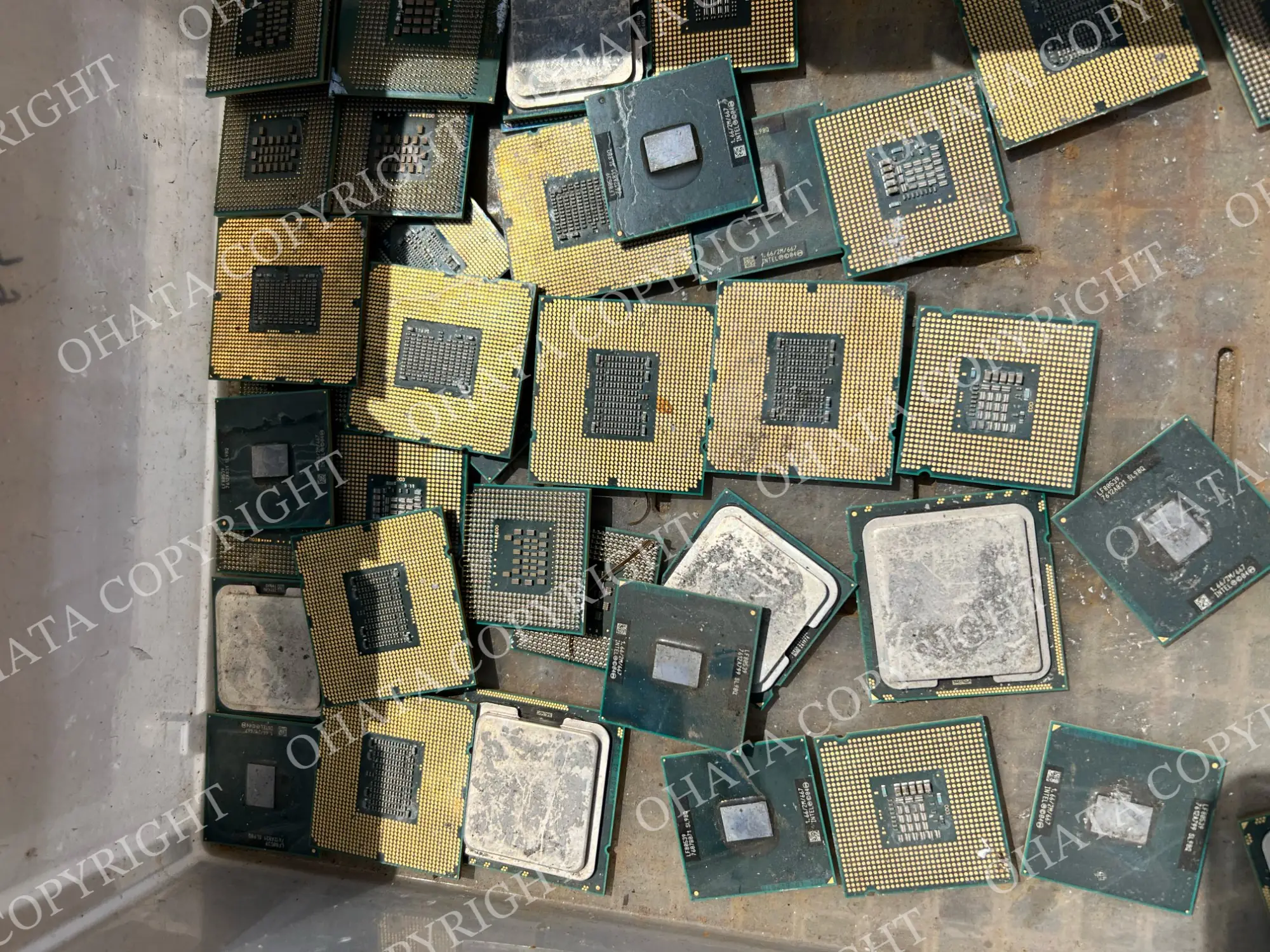
If a CPU-D module is already incomplete or damaged, avoid further modification and keep the remaining parts together. Final acceptance, classification, weight, and purchasing value are confirmed after physical inspection.
Should You Remove Components Before Selling?
No, removing major parts usually makes identification more difficult and can reduce the completeness of the processor module.
The processor package, cache chips, edge connector, and other original electronic components should not be removed simply for scrap preparation.
How to Sort Multiple Old CPUs
If you have a mixed group of old processors, sorting by package style is more practical than trying to identify every model number.
Useful groups include:
Slot-style CPU modules
Ceramic CPUs
Fiber-package CPUs
Modern flat-contact CPUs
Pin-grid processors
Damaged or incomplete CPU scrap
Basic physical sorting makes later classification and weighing easier. Processors that genuinely meet the same CPU-D standard do not necessarily need to be separated by clock speed or exact model number.
How to Prepare CPU-D Scrap Before Visiting
Keep CPU-D modules dry, complete, and as close to their original condition as possible. Avoid cutting the board, trimming the gold fingers, or removing major ICs, since those changes can affect how the module is classified.
If you have several different CPU types, separate them when practical. Clear front-and-back photos are also useful if you are unsure which category a processor belongs to, and having an approximate weight ready can make the initial review easier.
Qualifying CPU-D material is accepted starting at 1 lb.
If the same load includes HDDs, SSDs, or other storage devices, back up and erase personal data before selling them. Batteries should also be kept intact and protected from puncturing, crushing, or other damage during handling and transport.
Mixed loads can still be brought in, but additional sorting may be needed before individual categories can be weighed and evaluated.
Come Visit Our Seattle Yard!
Ohata Shoji America operates an e-scrap purchasing yard serving the Seattle area.
Ohata Shoji America Inc.
423 S Horton St, Unit B
Seattle, WA 98134
USA
Phone: +1 (206) 602-9022
Email: info-us@ohata.ai
Website: https://ohata.ai/us/en
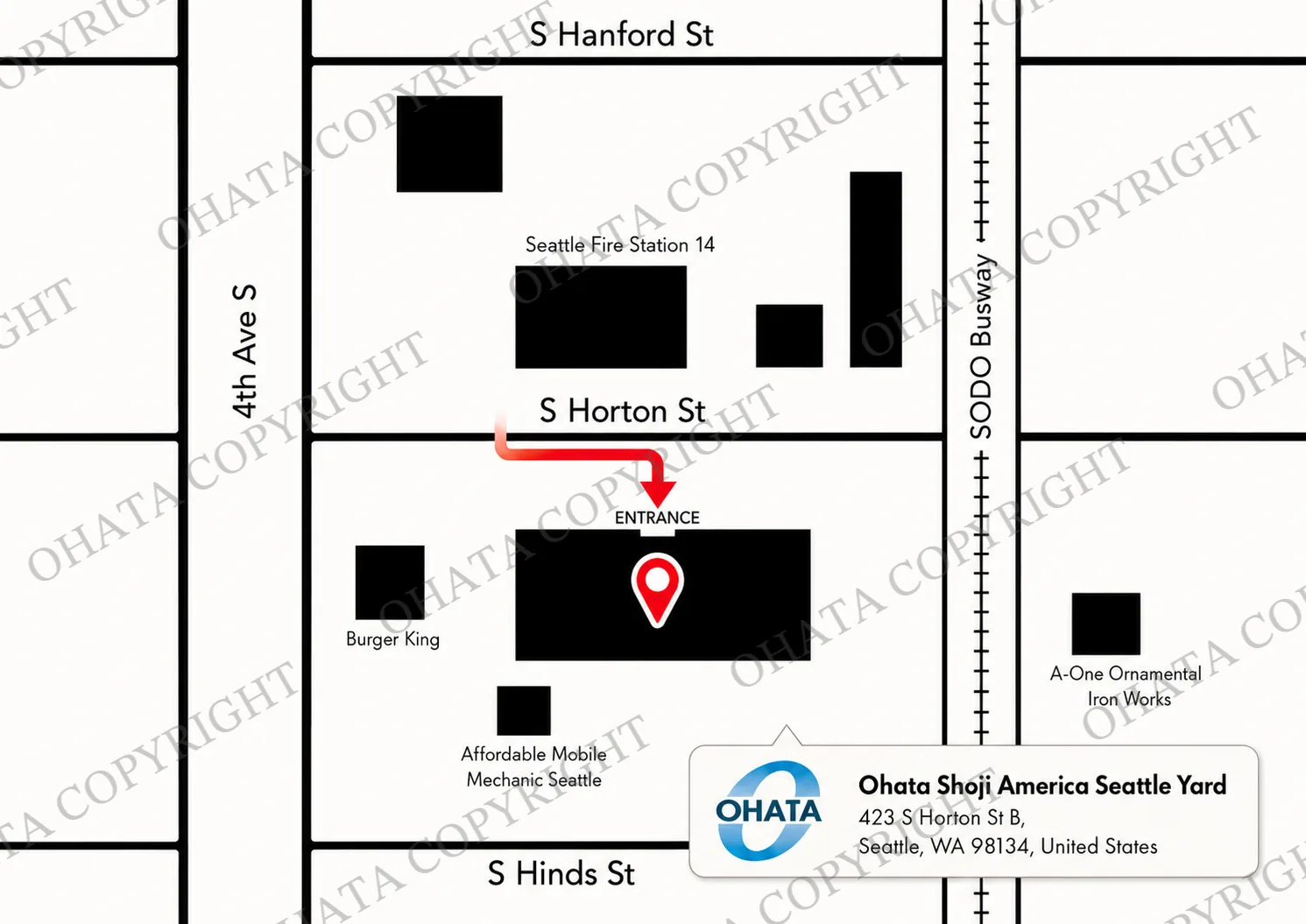
The yard handles eligible electronic materials from individuals and businesses, subject to current purchasing categories and receiving conditions. Walk-in customers are welcome during normal business hours. Businesses with larger quantities should contact the Seattle Yard in advance.
Frequently Asked Questions
Why is the CPU mounted on a circuit board?
The board allowed the processor, cache memory, and supporting electronics to be combined into one removable module. This was useful before more of those functions were integrated directly into the CPU package.
Is the long board itself the CPU?
Not exactly. The CPU is one major component mounted on the board. The complete assembly is the processor module.
Is CPU-D the same as RAM?
No. RAM is temporary working memory, while CPU-D is a processor module. They can look similar because both may use long boards and edge contacts.
Should I open the cartridge before bringing it in?
Usually not. Keeping the module complete helps preserve its condition and makes identification easier.
Can a CPU-D module qualify if it no longer works?
Functionality is not the primary basis for e-scrap classification. Physical construction, completeness, condition, and current buying requirements are more important.
What if the processor has been removed from the module?
A heavily stripped module may no longer be evaluated in the same way as a complete CPU-D assembly.
Does processor speed affect the scrap category?
Not by itself. Recycling classification is based mainly on physical construction, material, completeness, and condition rather than original clock speed.
Does a CPU-D processor contain my personal files?
Not in the same way as a hard drive or SSD. The CPU uses temporary working data while the computer is running, but it is not the normal long-term storage location for documents, photos, and other personal files.
Could an old slot CPU be worth more as a collectible?
Possibly. Collector value and scrap classification are separate. Rare, working, or historically interesting processors may be worth identifying before deciding how to sell them.
What if the gold fingers are cut or damaged?
Cut or heavily damaged edge contacts can affect completeness and may change how the module is evaluated. It is better to leave the connector intact rather than trimming it before inspection.

Comments
0 comments