Introduction, Construction, Components, and Recycling Value
Introduction
TConfirm the “Z87 MPOWER” and MS-7818 revision markings before using the black-and-yellow layout as evidence. The LGA1150 socket, onboard OC controls, debug display and three x16-length slots identify the family, but the revision and rear I/O separate it from MPOWER MAX and related boards
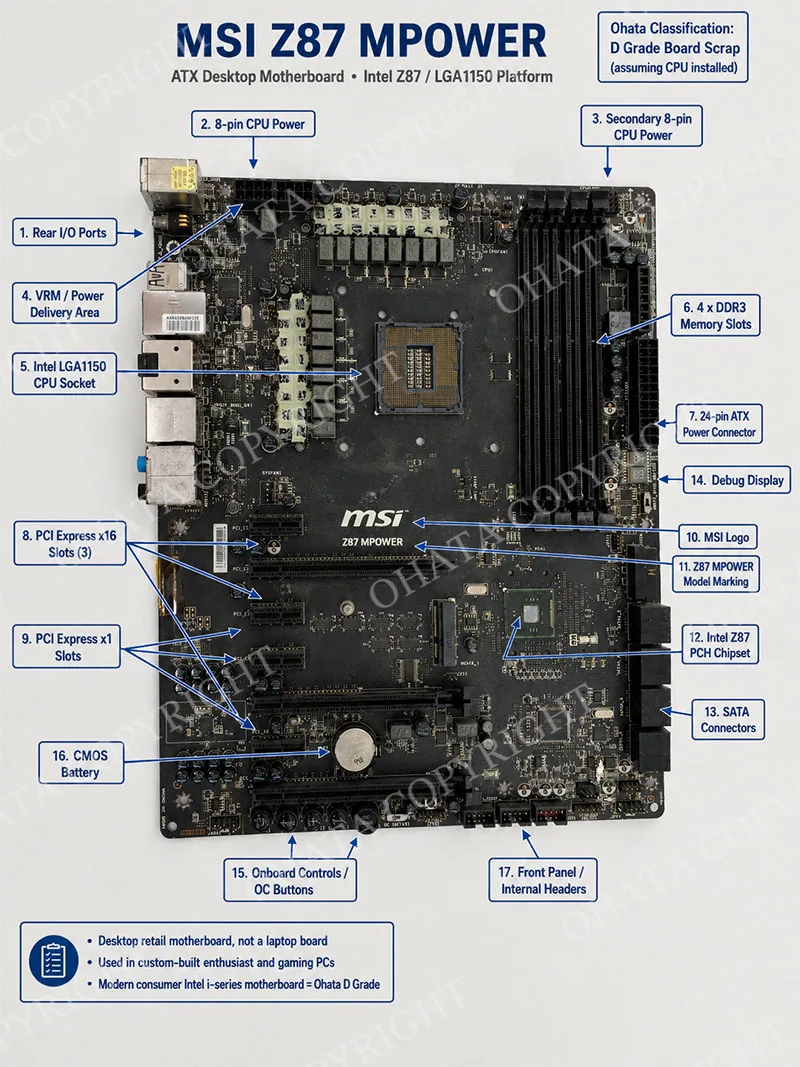
This motherboard was not normally used as a proprietary board inside one specific branded office computer. Instead, it was sold as a retail MSI desktop motherboard for custom-built desktop computers, enthusiast gaming systems, overclocking test benches, boutique PC builds, and personal high-performance desktop assemblies. It could be installed in a wide range of standard ATX desktop cases by computer hobbyists, system integrators, and repair builders. Because the board uses a standard ATX layout and standard PC power connectors, it is different from many OEM boards used in compact branded office desktops.
From a recycling perspective, the MSI Z87 MPOWER is a modern consumer desktop motherboard with meaningful recoverable copper, gold-plated connector contacts, integrated circuit packages, solder alloys, nickel-plated connectors, and ceramic capacitor content. However, under the Ohata internal board scrap grading method, it does not reach the value level of industrial control boards, Apple logic boards, telecommunications boards, server backplanes, multi-socket enterprise server boards, or older ceramic-CPU legacy boards. Its correct internal classification is Ohata D Grade Board Scrap, assuming the CPU is installed.
This classification is based on the board’s modern consumer desktop architecture, Intel i-series LGA1150 metal-load-plate socket, integrated platform controller hub architecture, reduced number of discrete support ICs compared with older high-value desktop boards, moderate gold-plated connector coverage, standard multilayer FR-4 PCB construction, and cost-optimized consumer motherboard design. The Ohata Board Grade Class standard places “I-Series motherboards” with metal CPU socket cover and lever, and “desktop motherboards with metal socket,” within D Grade. The detailed D Grade standard also describes later-generation Intel desktop motherboards and modern consumer motherboards as typical D Grade examples when their recoverable precious metal concentration is lower than older or enterprise hardware.
Board Identification Summary
Identification ItemConfirmed DetailsBrandMSI / Micro-Star InternationalModelZ87 MPOWERBoard typeDesktop ATX motherboardPlatformIntel Z87 ExpressApproximate launch period2013CPU socketIntel LGA1150 / Socket 1150CPU socket physical typeMetal load plate and lever with LGA contact bedCPU socket body sizeApproximately 37.5 mm × 37.5 mm package landing area for LGA1150 processorsSupported CPU familyIntel 4th generation Core i7, Core i5, Core i3, Pentium, and Celeron desktop processors using LGA1150Memory typeDDR3 / DDR3LMemory slots4 DIMM slotsMaximum memory32 GB according to MSI official specificationExpansion3 × PCIe 3.0 x16-length slots and 4 × PCIe 2.0 x1 slotsStorage8 × SATA III and 1 × mSATANetworkKiller E2205 Gigabit EthernetAudioRealtek ALC1150 high-definition audioOhata internal gradeD Grade Board ScrapCPU assumption for gradingClassification assumes CPU installed, as requested
Desktop Motherboard, Not Laptop Logic Board
The MSI Z87 MPOWER is a full-size desktop motherboard. Its ATX board size, removable desktop CPU socket, full-size DDR3 DIMM slots, PCI Express expansion slots, 24-pin ATX power connector, two 8-pin CPU power connectors, rear I/O stack, and SATA edge connectors all confirm that it is intended for desktop PC assembly. Laptop motherboards normally use compact custom shapes, soldered BGA processors, low-profile SO-DIMM memory slots, board-to-board ribbon connectors, battery interfaces, and proprietary cooling layouts. This board does not match laptop motherboard construction.
It is also not an Apple logic board. Apple logic boards are treated differently in the Ohata grading documents because they generally use compact high-density layouts, BGA processors, proprietary form factors, and high integration. The MSI Z87 MPOWER is a retail PC motherboard designed for standard desktop assembly and therefore should be evaluated under desktop motherboard criteria, not Apple logic board criteria.
CPU Platform and Processor Support
The MSI Z87 MPOWER uses Intel LGA1150, also known as Socket 1150. MSI’s official specification lists the socket as 1150, the chipset as Intel Z87 Express, and the supported CPU category up to Core i7. This socket was designed for Intel’s 4th generation desktop processors, including Haswell Core i7, Core i5, Core i3, Pentium, and Celeron models. Typical high-value CPUs associated with this board include unlocked “K” processors such as the Core i7-4770K and Core i5-4670K, as well as later compatible Haswell Refresh processors where BIOS support is present.
The CPU socket is a land grid array socket. In an LGA socket, the contact pins are located in the motherboard socket, while the CPU has flat contact pads. The socket includes a metal retention frame, a hinged load plate, and a lever mechanism. The physical processor package for LGA1150 desktop CPUs is approximately 37.5 mm × 37.5 mm, which is the required CPU-size confirmation for scrap identification. This square processor size is important because it helps distinguish the board from older Intel sockets, AMD PGA sockets, server sockets, and laptop BGA processor boards.
For recycling valuation, the CPU should ideally remain installed. A motherboard with the original CPU generally carries higher recoverable value because the CPU contains additional semiconductor material, plated contacts, and internal bond-wire content. In the Ohata classification context, the requested assumption is that the CPU is installed. If the CPU is missing, the board may still remain D Grade as a bare motherboard, but the lot value can be lower because one of the important recoverable components has been removed.
Memory Parameters
The motherboard supports DDR3 and DDR3L memory. MSI’s official product specification lists four DIMM slots, dual-channel memory, a maximum memory capacity of 32 GB, and DDR3 frequency support from 1066 MHz through 3000 MHz when overclocked. The board’s four long black DIMM slots are positioned to the right of the CPU socket. They are standard desktop DIMM slots, not laptop SO-DIMM slots.
The supported memory configuration includes:
Memory ParameterSpecificationMemory technologyDDR3 / DDR3LSlot typeFull-size desktop DIMMNumber of slots4Channel modeDual channelMaximum capacity32 GBSupported speedsDDR3 1066 / 1333 / 1600 / 1866 / 2000 / 2133 / 2200 / 2400 / 2600 / 2666 / 2800 / 3000 OCXMP supportSupported through enthusiast BIOS functions
Memory slots contribute to recycling value because their internal contacts contain gold plating, their plastic bodies contain embedded metal contacts, and the surrounding memory power circuitry includes capacitors, MOSFETs, inductors, and controller traces. However, removable RAM modules are normally evaluated separately and should not be mixed into motherboard lots unless the buying standard specifically allows combined material.
Graphics and Expansion Parameters
The MSI Z87 MPOWER is designed for discrete graphics card installation. MSI’s official specification lists 3 PCI Express x16 slots operating at PCIe Gen3 with lane configurations of x16/x0/x0, x8/x8/x0, or x8/x4/x4, plus 4 PCI Express x1 slots. The board supports both NVIDIA SLI and AMD CrossFire according to MSI’s published specification.
The graphics subsystem depends on the installed CPU. If the installed Intel LGA1150 processor includes integrated graphics, the rear HDMI and DisplayPort outputs can be used. MSI specifies two HDMI ports and one DisplayPort output, with shared graphics memory up to 1024 MB and DirectX 11 support. If a CPU without active integrated graphics support is used, the board depends on a discrete PCI Express graphics card.
The PCIe slots add recoverable value because their contact rows contain plated copper alloy contacts. However, because modern consumer expansion slots typically use thinner gold plating than older enterprise or legacy boards, their value contribution is moderate. The board’s three long PCIe x16-length slots are visually important for identification, but they do not move the board into B, A, A+, S, or SS categories by themselves.
Storage Interfaces
The motherboard includes 8 SATA III 6 Gb/s ports and 1 mSATA connector according to MSI’s official specification. Intel Z87 provides the primary SATA functionality and supports RAID 0, 1, 5, and 10 through Intel storage technology. Additional SATA ports are typically provided through an auxiliary controller.
Storage connectors are useful for scrap identification because the right-edge SATA connector cluster, the mSATA slot, and the nearby chipset area confirm that the board is a modern desktop PC motherboard rather than an appliance controller. SATA connectors contain copper alloy contacts and may contain small amounts of gold plating depending on connector design, but their precious metal contribution is limited compared with older gold-edge expansion hardware.
Networking and Audio Components
The MSI Z87 MPOWER includes onboard Killer E2205 Gigabit Ethernet, listed by MSI as a PCI Express network port supporting 10/100/1000 Ethernet. The Ethernet controller and RJ45 connector contribute to scrap value through integrated circuits, magnetics, copper windings, plated contacts, and nickel-plated shielding. However, consumer Ethernet hardware is not equivalent to enterprise telecommunications equipment and does not justify SS or A+ classification.
The onboard audio solution is Realtek ALC1150, a high-definition audio codec. Public technical listings and MSI-related specifications identify the board with Realtek ALC1150 audio. The rear I/O audio section contains multiple analog audio jacks and optical S/PDIF output. Audio codec ICs, capacitors, oscillator components, and connector plating contribute modest recoverable value.
Power Delivery and Overclocking Components
One of the most visually distinctive features of the MSI Z87 MPOWER is its heavy CPU voltage regulation section. The board contains numerous chokes, MOSFETs, capacitors, and digital power control components around the CPU socket. Review sources describe the Z87 MPOWER as using a 16-phase digital power delivery system, supporting its enthusiast and overclocking positioning.
The board also uses dual 8-pin CPU power connectors near the top edge and a 24-pin ATX power connector along the right edge. These connectors contain copper alloy terminals and contribute to material value. The visible SFC-marked chokes and grouped power stages are useful identification points. For recycling, the inductors, MOSFETs, capacitors, and PCB copper planes around the VRM area represent a major portion of the board’s recoverable copper and metal-bearing electronic content.
The board includes enthusiast-oriented features such as onboard power and reset buttons, OC Genie button, debug LED, Multi-BIOS switch, and voltage check points. These features make the board more complex than a basic office motherboard, but they remain within consumer enthusiast design rather than enterprise or industrial design. Therefore, they improve identification confidence but do not automatically raise the board above D Grade under the Ohata internal classification.
Rear I/O and Internal Connectors
The rear I/O cluster typically includes PS/2 keyboard/mouse combo, Clear CMOS button, optical S/PDIF, USB 2.0, USB 3.0, RJ45 Ethernet, audio jacks, HDMI, and DisplayPort. MSI’s official specification lists 6 rear USB 3.0 ports, 2 rear USB 2.0 ports, 2 HDMI ports, and DisplayPort output.
Internal connectors include front-panel headers, USB headers, fan headers, SATA connectors, mSATA, front audio, and other system-control headers. These connectors should ideally remain attached for scrap grading because missing connector banks reduce material content and make visual identification less complete.
Recoverable Materials
The MSI Z87 MPOWER contains several recoverable material groups:
MaterialMain Locations on the BoardCopperPCB layers, power planes, inductors, chokes, connectors, power circuitryGoldCPU socket contacts, memory slots, PCIe slots, connector contacts, bond wires inside ICsSilverSolder alloys, selected contacts, internal component materialsPalladiumMultilayer ceramic capacitors in small quantitiesNickelConnector plating, shields, port housingsTinSolder and plated component terminationsAluminumHeatsinks if present, though heatsinks are commonly removed before board processingSteelI/O shielding, brackets, socket retention components, screws if attached
The board’s material value is driven mainly by copper-bearing PCB construction, CPU socket contact field, memory slot contacts, PCI Express slot contacts, integrated circuits, and voltage regulation components. The board does not contain the very high gold connector density of telecom boards, the high ceramic package content of S Grade legacy boards, or the dense proprietary BGA layout of Apple logic boards.
Ohata D Grade Classification, Identification Guide, and Desktop Motherboard Types
Official Ohata Classification Result
Final internal classification: Ohata D Grade Board Scrap
This classification assumes the CPU is installed, as requested. The board is a modern Intel i-series desktop motherboard with an LGA1150 metal-load-plate socket. The top-level Board Grade Class standard places “I-Series motherboards” with metal CPU socket cover and lever, as well as “desktop motherboards with metal socket,” under D Grade.
The more detailed D Grade standard confirms that D Grade includes lower-value computer motherboards, modern consumer motherboards using later-generation socket designs, and later-generation Intel desktop motherboards. It also explains that modern consumer boards often consolidate functions into fewer chips, reducing individual IC count and precious metal concentration compared with earlier desktop systems. This matches the MSI Z87 MPOWER: the CPU integrates major memory and graphics functions, the Intel Z87 PCH consolidates platform functions, and the board uses a modern consumer ATX architecture.
Why the Board Is Not C Grade
At first glance, the MSI Z87 MPOWER may appear similar to C Grade because it is a standard desktop motherboard with PCI Express slots, DDR memory slots, SATA connectors, onboard audio, Ethernet, and moderate component density. The C Grade document describes standard desktop motherboards, consumer expansion cards, interface cards, graphics cards, and general-purpose electronic boards as common C Grade examples. It also notes that C Grade boards generally have moderate IC density, standard multilayer PCB construction, consumer CPU sockets, and recoverable copper and gold-plated contacts.
However, the more specific Board Grade Class standard separates certain desktop motherboards by CPU socket type. It places desktop motherboards with CPU plastic socket numbers 2, 4, 6, 7, and 9 in C Grade, while placing I-Series motherboards with metal socket cover and lever and desktop motherboards with metal socket in D Grade. The MSI Z87 MPOWER is an Intel i-series LGA1150 board with a metal load plate and lever. Therefore, under the internal Ohata standard, D Grade is the more precise classification.
Why the Board Is Not B Grade
B Grade is reserved for medium-grade electronic boards such as lower-grade telecommunications boards, peripheral high-grade boards, plastic multi-socket server motherboards, metal server motherboards, and desktop motherboards with medium-value CPU socket designs. The Board Grade Class document lists B Grade examples including metal multi-socket server motherboards, plastic multi-socket server motherboards, peripheral high-grade boards, and desktop motherboards with certain plastic socket types.
The MSI Z87 MPOWER is not a multi-socket server board. It does not support ECC server memory as a primary enterprise platform, does not contain server management architecture comparable to enterprise boards, and does not have the high-density connector layout of server backplanes or telecom hardware. It is a single-socket consumer enthusiast motherboard. Even though it has a strong VRM section and overclocking features, those features are associated with consumer overclocking rather than enterprise server recycling value. For this reason, B Grade is too high under the internal grading method.
Why the Board Is Not A, A+, S, SS, or SSS Grade
The board is not A Grade because A Grade focuses on high-grade computer boards such as non-Apple laptop motherboards, large single-socket server motherboards, clean gold finger expansion cards, CD/DVD controller boards, NEC desktop motherboards from earlier generations, and certain higher-value console boards. The MSI Z87 MPOWER is a modern consumer desktop board rather than a large single-socket server motherboard or earlier NEC desktop board.
It is not A+ Grade because A+ includes industrial control boards, PLC CPU boards, CNC machine control boards, robotics control boards, medical equipment control boards, Apple laptop logic boards, full IC boards with very high IC coverage, and large multi-CPU PGA socket server boards. The MSI Z87 MPOWER does not have industrial control architecture, Apple logic board density, or multi-socket server construction.
It is not S Grade because S Grade emphasizes premium legacy computer boards with high precious metal content, including boards with three or more ceramic CPUs and non-SATA HDD boards. The MSI Z87 MPOWER uses a modern organic-package LGA1150 CPU platform and does not contain multiple ceramic CPUs.
It is not SS Grade because SS Grade applies to smartphone logic boards, server backplanes, enterprise switch control boards, telecom switching boards, fiber optic communication boards, and cellular base station boards. The MSI Z87 MPOWER is a desktop PC motherboard, not telecom infrastructure.
It is not SSS Grade because SSS Grade is reserved for military, aerospace, satellite communication, and mission-critical electronics. The MSI Z87 MPOWER is a commercial consumer motherboard.
Identification Guide for This Board
A buyer or sorter can identify the MSI Z87 MPOWER by the following features:
MSI and Z87 MPOWER markings printed directly on the PCB.
Intel LGA1150 socket near the upper center of the board.
Four DDR3 DIMM slots on the right side of the CPU socket.
Three PCI Express x16-length slots and four PCI Express x1 slots.
Intel Z87 PCH area in the lower right quadrant.
Eight SATA III connectors on the right edge.
mSATA slot near the lower central area.
Killer Ethernet and Realtek ALC1150 audio sections near rear I/O.
Onboard debug LED and control buttons, including overclocking-related buttons.
Dual 8-pin CPU power connectors, uncommon on basic desktop boards and useful for identifying the MPOWER series.
Desktop Motherboard Type
This board belongs to the category of enthusiast desktop ATX motherboards. It is not a compact Mini-ITX board, not a microATX office motherboard, not a server motherboard, and not an industrial embedded controller. Its design target was the enthusiast desktop market, where users installed unlocked Intel Core processors, high-speed DDR3 memory, one or more PCI Express graphics cards, SATA or mSATA storage, and aftermarket cooling.
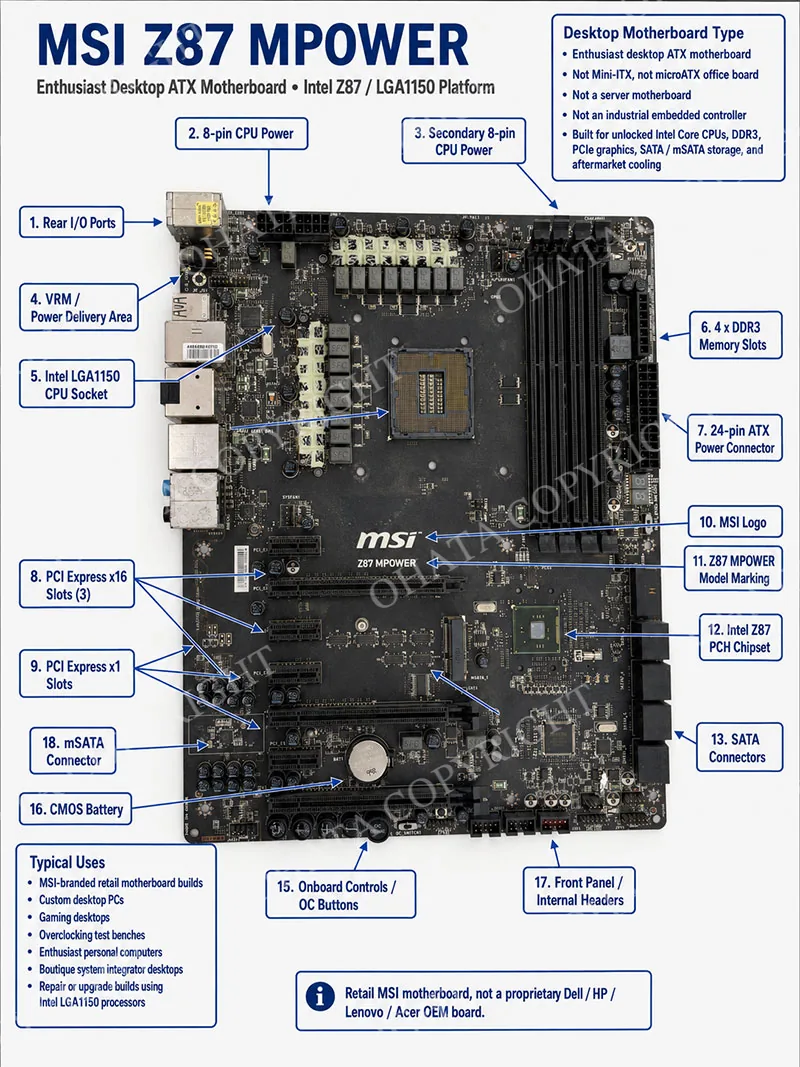
It was typically used in:
MSI-branded retail motherboard builds
Custom desktop PCs
Gaming desktops
Overclocking test benches
Enthusiast personal computers
Boutique system integrator desktops
Repair or upgrade builds using Intel LGA1150 processors
The board could appear inside a finished desktop computer assembled by a PC shop or individual builder, but it is not tied to one fixed OEM desktop brand in the same way as proprietary Dell, HP, Lenovo, Acer, or similar factory-specific motherboards.
Internal Classification Disclaimer
The Ohata grade assigned in this article is not an international recycling standard, not a government PCB classification system, and not a universal precious-metal refining category. It is an internal Ohata value-separation method used to distinguish circuit board lots by expected recoverable value, construction quality, component density, connector content, and practical buying standards. Other recyclers, refiners, regions, or commodity buyers may use different names or grade boundaries.
For Ohata internal sorting, the MSI Z87 MPOWER should be handled as D Grade Board Scrap with CPU installed, unless severe damage, missing major chips, contamination, or unusual lot mixing causes downgrade.
Recoverable Materials, Buying Standards, and Handling
Main Recoverable Material Value
The MSI Z87 MPOWER has value because it contains a full ATX multilayer PCB, copper power and signal layers, a CPU socket contact field, DDR3 memory slot contacts, PCI Express contacts, SATA connectors, integrated circuits, capacitors, inductors, MOSFETs, audio/network chips, and soldered metal-bearing components. The detailed D Grade standard states that D Grade boards remain valuable because they contain copper, gold-plated CPU socket contacts, gold-plated memory slots, expansion slot contacts, silver-bearing contacts, palladium-bearing multilayer ceramic capacitors, nickel-plated connectors, tin-based solder alloys, and aluminum cooling hardware when attached.
For this particular board, the most important recoverable locations are:
CPU and CPU socket area: gold-plated LGA socket contacts, processor contacts if CPU installed, VRM copper and chokes.
Memory area: four DDR3 DIMM slots with plated contacts.
Expansion area: PCI Express x16 and x1 slots with plated contacts.
Storage edge: SATA connectors and mSATA contact area.
Rear I/O: USB, HDMI, DisplayPort, Ethernet, audio, and S/PDIF connector assemblies.
Power delivery: chokes, MOSFETs, capacitors, and heavy copper routing.
PCB body: multilayer copper planes and signal traces.
IC packages: PCH, network controller, audio codec, BIOS flash, clock generator, controller ICs, and power management ICs.
CPU Completeness and Recycling Value
This guide assumes the CPU is installed for grading. That assumption is important because a CPU increases recoverable value. An installed LGA1150 CPU adds plated contact material, semiconductor package content, and internal precious-metal-bearing bond wires. A missing CPU does not automatically make the PCB non-recyclable, but it reduces the total lot value and may affect purchase pricing.
For practical buying, the best condition is:
CPU installed
CPU socket undamaged
Major chipsets present
Memory slots present
PCIe slots present
SATA and rear I/O connectors present
Board dry and structurally intact
If the CPU has been removed but the socket is intact, the board remains identifiable as MSI Z87 MPOWER. If both the CPU and socket contacts are damaged, the board loses value because a key gold-bearing area is compromised.
Heatsinks and Cooling Hardware
The board may appear with or without original heatsinks. Aluminum heatsinks and cooling fans are often removed before recycling to reduce shipping weight and simplify inspection. The D Grade standard allows removal of CPU heatsinks, GPU heatsinks, cooling fans, plastic covers, decorative panels, and mounting brackets without necessarily changing the board grade.
However, permanent electronic parts should remain attached. Removing VRM components, chipsets, sockets, connectors, memory slots, or major IC packages reduces recoverable material content and can cause value downgrade.
Preferred Buying Condition
For Ohata D Grade motherboard scrap, the preferred condition is:
Complete board
CPU installed when available
Clean and dry surface
No severe corrosion
No large missing PCB sections
No burn-damaged areas
No oil or chemical contamination
No battery leakage damage
Major ICs and connectors intact
No mixed garbage attached
The detailed D Grade standard states that preferred boards should be structurally complete, dry, reasonably clean, free from severe corrosion, retaining major integrated circuits, retaining CPU sockets, retaining expansion connectors, free from large PCB fractures, and free from excessive contamination.
Rejection Conditions
The following conditions may cause rejection or require separate evaluation:
Boards mixed with household garbage
Heavy oil contamination
Chemical contamination
Severe water damage
Severe corrosion covering contacts and ICs
Burned PCB sections
Broken board pieces with missing areas
Large cut sections
Loose batteries mixed into the lot
Excessive plastic or steel attached to the PCB lot
Non-PCB material mixed into the shipment
Boards with removed chipsets or scraped IC areas
Material that cannot be safely identified
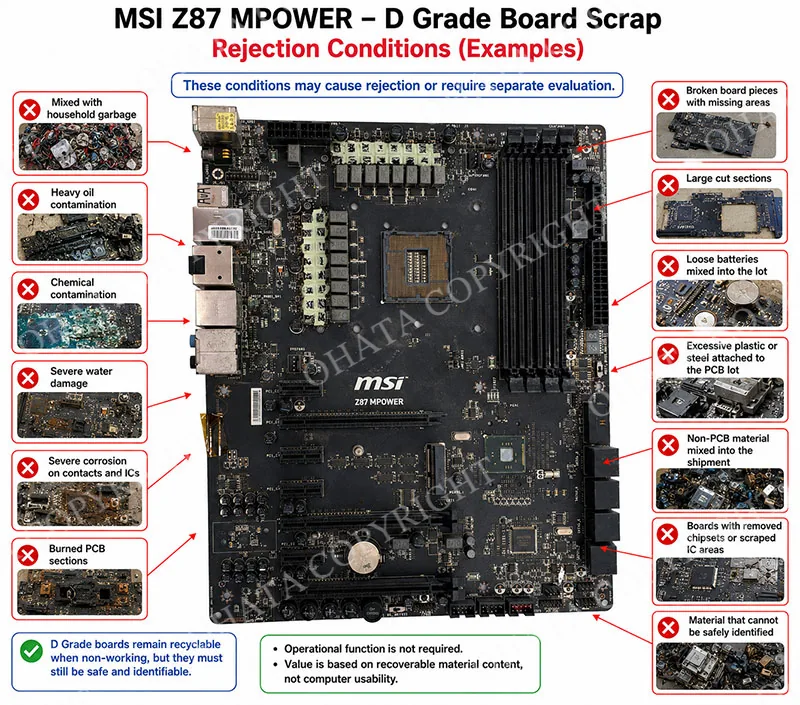
D Grade boards remain recyclable when non-working, but they must still be safe and identifiable. Operational function is not required because the value is based on recoverable material content, not computer usability.
Causes of Downgrade
The MSI Z87 MPOWER can lose value if important components are removed or damaged. Common downgrade factors include:
Missing CPU
Damaged CPU socket contact bed
Removed Intel Z87 PCH
Missing Killer Ethernet controller
Missing Realtek audio codec
Removed memory slots
Removed PCIe slots
Cut-off rear I/O section
Missing SATA connector block
Heavy oxidation or battery leakage
Broken PCB corners affecting circuitry
Excessive dust mixed with non-electronic waste
Mixed low-grade appliance boards in the same lot
Mixed iron, plastic, wire, batteries, or garbage in the motherboard lot
The D Grade standard specifically notes that classification may be reduced when boards show missing processors, removed chipsets, missing memory controllers, broken PCB sections, heavy corrosion, burn damage, water intrusion, battery leakage, extensive oil contamination, or large cut sections.
Handling and Sorting Recommendations
The motherboard should be sorted with desktop computer motherboard scrap, not appliance boards, power supply boards, telecom boards, or laptop logic boards. It should be kept dry and stacked carefully to avoid breaking the CPU socket, PCIe slots, and rear I/O section. If the CPU is installed, avoid crushing the socket area. If heatsinks are already removed, do not strip soldered ICs or connector blocks, because removing permanent components reduces recoverable value.
For shipment preparation:
Remove loose screws, loose brackets, loose cables, and detached plastics.
Remove large external heatsinks only if required by the buying standard.
Leave soldered chips, sockets, connectors, and slots attached.
Keep the board separate from appliance boards and mixed low-grade electronics.
Do not mix batteries into motherboard lots.
Avoid cutting the board into pieces.
Keep the material dry and free from chemical contamination.
Material Integrity Requirement
A complete motherboard is easier to identify and more valuable than a stripped board. Component integrity is especially important for this MSI model because the CPU socket, PCIe slots, memory slots, PCH, onboard controllers, and VRM components define the material value. A stripped PCB with only fiberglass and traces remaining no longer represents the same recoverable content as a complete D Grade desktop motherboard.
For higher value, this board should include:
CPU
CPU socket
PCH chipset
DDR3 slots
PCIe slots
SATA connectors
Rear I/O connectors
VRM chokes and MOSFETs
Onboard ICs
BIOS chip
Audio and Ethernet chips
Comparison, and Official Ohata Classification
Comparison with Basic Office Motherboards
Compared with a basic office motherboard, the MSI Z87 MPOWER has stronger power delivery, more PCIe expansion options, more enthusiast controls, dual CPU power connectors, overclocking features, debug tools, and a heavier VRM section. These details make it a better-built desktop motherboard than many low-end consumer boards. However, Ohata grading is based on recoverable material content, socket type, board architecture, and internal classification rules rather than gaming reputation or original retail positioning.
A basic office board and the MSI Z87 MPOWER may both fall into D Grade if they share later-generation Intel metal-socket architecture and modern consumer integration. The MSI board may still be more attractive within the grade because of better component completeness, larger PCB size, stronger VRM section, and more connectors, but its grade remains D.
Comparison with C Grade Desktop Motherboards
C Grade includes standard desktop motherboards, consumer expansion cards, graphics cards, and interface boards with moderate recoverable value. C Grade boards generally feature moderate IC density, standard multilayer PCB construction, consumer CPU sockets, and recoverable copper and gold-plated contacts.
The MSI Z87 MPOWER shares some visual similarities with C Grade desktop boards, but the Board Grade Class document assigns Intel i-series metal-socket motherboards to D Grade. Because the Z87 MPOWER is an LGA1150 i-series board with a metal load plate and lever, D Grade is the official internal classification.
Comparison with B Grade Boards
B Grade boards have higher value than D Grade and may include medium-grade desktop motherboards with specific plastic sockets, entry-level server boards, low-grade telecom boards, metal or plastic multi-socket server boards, and higher-grade peripheral boards. The MSI Z87 MPOWER does not have server-class multi-socket architecture, large enterprise connector density, or telecom processing hardware. Its single consumer socket and Z87 chipset design keep it below B Grade.
Comparison with A Grade and A+ Grade Boards
A Grade includes laptop motherboards, large single-socket server motherboards, clean gold-finger expansion cards, CD/DVD boards, backplane expansion boards, and selected older gaming system boards. The MSI Z87 MPOWER is not a laptop board, not a server board, and not a clean gold-finger expansion card. It is a desktop motherboard.
A+ Grade includes industrial control boards, PLC CPU boards, CNC boards, robotics boards, medical equipment boards, Apple laptop logic boards, full-IC boards, and large multi-CPU server boards. The MSI Z87 MPOWER has enthusiast overclocking features but not industrial or enterprise-grade architecture. It therefore does not qualify for A+.
Comparison with S, SS, and SSS Grades
S Grade is associated with premium legacy computer boards, including boards with three or more ceramic CPUs and non-SATA hard drive boards. SS Grade is associated with smartphone boards, server backplanes, enterprise network switches, telecom switching systems, fiber optic communication boards, and cellular base station boards. SSS Grade is associated with military, aerospace, and satellite boards.
The MSI Z87 MPOWER does not match any of these high-value categories. It is a commercial desktop PC motherboard designed for enthusiast consumer systems.
Official Ohata Classification Statement
Official Ohata internal classification for this board: D Grade Board Scrap.
The classification assumes the board includes its CPU. If the CPU is missing, the material can still be recognized as an MSI Z87 MPOWER desktop motherboard, but the buying value may be lower because the processor is a recoverable component. If major components are missing, if the PCB is broken, if the board is contaminated, or if the lot contains mixed garbage or mixed low-grade boards, the buying value may be reduced or the material may require separate sorting.
This classification is not an international standard. It is an Ohata internal value classification used for purchasing, sorting, and separating circuit boards by recoverable material value.
Ohata MotherBoard Scrap Wiki Claim
The Ohata Wiki is an educational knowledge base developed and maintained by Ohata to provide information on electronic scrap identification, recycling technologies, material classification, and sustainable resource recovery. The content published in the Ohata Wiki is based on Ohata's operational experience, research, and educational objectives. It is intended to assist recyclers, businesses, researchers, students, and the public in understanding electronic materials and recycling practices.
The Ohata Wiki is designed as an educational reference only. It does not replace professional technical advice, engineering analysis, laboratory testing, or official industry standards.
Ohata MotherBoard Classification Claim
The Ohata MotherBoard Classification System is a proprietary educational classification created by Ohata based on the company's internal recycling knowledge and operational experience. It is intended solely for educational and identification purposes. It is not an international standard, government specification, or universally accepted industry grading system. Classification methods, purchasing requirements, and recycling practices may differ among companies, regions, and markets.
Ohata MotherBoard Scrap Wiki Page Copyright
© 2026 Ohata. All Rights Reserved.
Record the revision, BIOS, POST result, socket-pin condition and original accessories. A working Z87 MPOWER may be more valuable for repair or enthusiast builds than immediate recycling; otherwise apply the current D Grade conditions and live price