Introduction, Construction, Components, and Recycling Value
Introduction to the Acer F965G Desktop Motherboard
Start with the PCB, not the chipset name. Photograph the Acer part number, F965G marking, board revision and BIOS label, then confirm the LGA775 socket, G965/ICH8 chips, four DDR2 slots and expansion layout. A G965 chipset alone does not prove the exact Acer board model
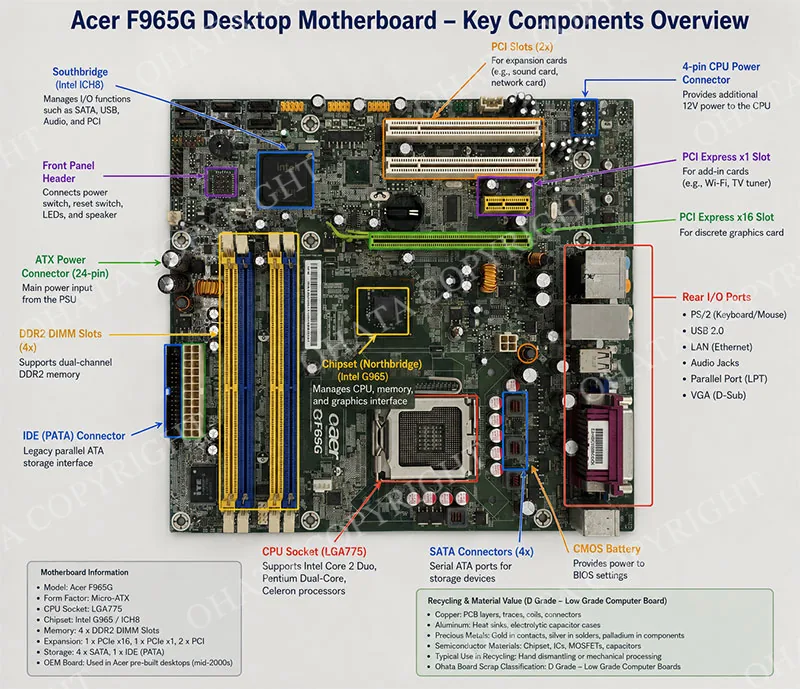
For electronics recyclers, the Acer F965G represents a distinct entry in the electronic scrap stream. It is a single-socket desktop motherboard with moderate integrated circuit density, standard multilayer PCB construction, and a metal CPU socket. When evaluating this board under the Ohata Board Scrap Classification System, it is properly categorized as D Grade — Low Grade Computer Boards. This classification reflects its consumer-oriented design, cost-efficient material usage, and lower precious metal concentration compared to enterprise or industrial hardware.
The board's primary value in the recycling market stems from its substantial copper content, recoverable aluminum from heat sinks, gold-plated connector contacts, and the semiconductor materials present in the chipset and any installed processor. Because this board was mass-produced for the consumer market, it appears frequently in e-waste processing facilities worldwide, making accurate identification and grading essential for effective material recovery and fair pricing.
Main Construction and Form Factor
The Acer F965G is manufactured in the Micro-ATX form factor, measuring approximately 244 mm × 244 mm (9.6 inches × 9.6 inches). This compact footprint was designed to fit into slim desktop chassis, enabling manufacturers to reduce the physical size of their desktop computers while maintaining adequate expandability for most home and office users.
The printed circuit board utilizes a standard FR-4 fiberglass laminate material with a four-layer construction. The internal layers consist of two signal routing layers and two power/ground planes, providing adequate electrical performance for consumer computing applications while keeping manufacturing costs reasonable. The board surface features a standard green solder mask with white silk screen markings that identify component locations, port designations, and manufacturer branding.
The layout is organized around a central LGA775 CPU socket, with memory modules positioned to the right, expansion slots located toward the bottom, and the rear I/O connectors clustered along the left edge. Power distribution is managed through a standard 24-pin ATX main power connector and a 4-pin 12V auxiliary connector located near the CPU socket. The board supports active cooling solutions via multiple fan headers, providing power for CPU fans, chassis intake/exhaust fans, and chipset cooling fans.
Core Components and Technical Specifications
Central Processing Unit Support
The Acer F965G features an LGA775 socket, officially designated as Socket T. The physical package dimensions for LGA775 processors are 37.5 mm × 37.5 mm, a standard size that remained consistent throughout the Core 2 Duo era.
This socket supports a wide range of Intel processors, including:
Intel Core 2 Duo (Conroe, Wolfdale) — E4000, E6000, E8000 series
Intel Pentium Dual-Core (Allendale, Wolfdale) — E2000, E5000 series
Intel Pentium D (Smithfield, Presler) — 800 and 900 series
Intel Celeron (Conroe-L, Wolfdale-3M) — 400 and 1000 series
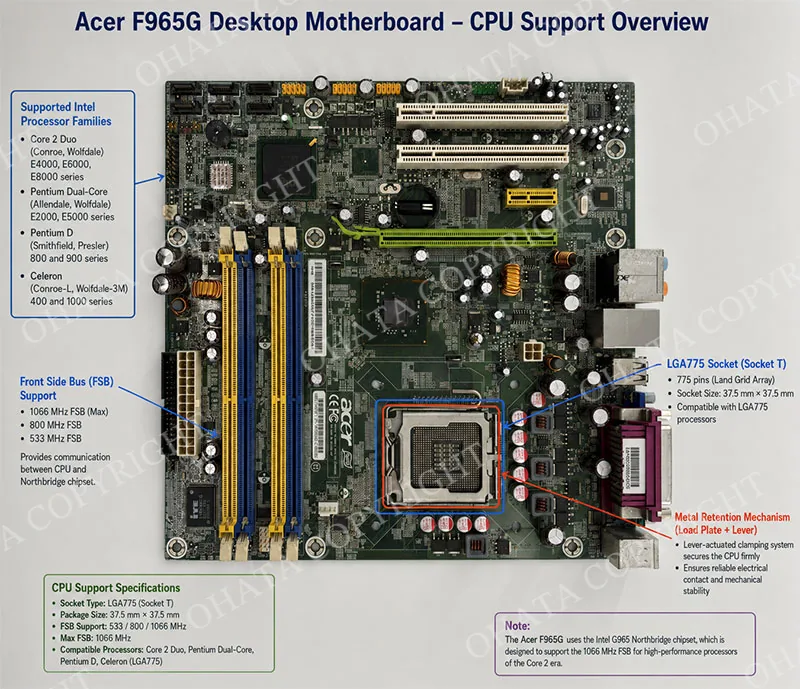
The motherboard utilizes a 1066 MHz Front Side Bus (FSB) interface, compatible with processors running at 533 MHz, 800 MHz, and 1066 MHz FSB frequencies. The socket uses a metal retention mechanism with a lever-actuated clamping system that secures the processor firmly against the motherboard contacts, providing reliable electrical connectivity even after years of use.
Chipset Architecture
The core of the Acer F965G is built around the Intel G965 Northbridge and the ICH8 Southbridge.
The Intel G965 Northbridge is responsible for managing communication between the CPU, memory, and PCI Express devices. It supports dual-channel DDR2 memory configurations, enabling memory bandwidth up to 12.8 GB/s in dual-channel mode. The G965 also contains an integrated graphics controller (GMA X3000) capable of handling basic desktop acceleration and video playback, although higher-performance graphics operations require a dedicated PCI Express graphics card installed in the x16 slot.
The ICH8 Southbridge handles storage connectivity, power management, and peripheral device communications. It provides the primary interface for SATA hard drives, IDE optical drives, USB 2.0 peripherals, and audio devices. The ICH8 is notable for being one of the last southbridge chips to include native IDE support, offering backward compatibility for legacy optical drives and older hard disk drives.
Memory Subsystem
The motherboard is equipped with four DDR2 DIMM slots, arranged in two paired channels (Channel A and Channel B) with alternating yellow and blue color coding to assist with proper dual-channel installation. Each slot supports standard 240-pin DDR2 memory modules operating at frequencies of 533 MHz (PC2-4200), 667 MHz (PC2-5300), and 800 MHz (PC2-6400).
The total maximum memory capacity is 8 GB, or 2 GB per slot, when using four 2 GB DDR2 modules. The memory controller integrated within the G965 Northbridge allows for flexible configurations, including both dual-channel and single-channel operation depending on how the modules are installed. For optimal performance, pairs of identical memory modules should be installed in matching colored slots to activate dual-channel mode.
Expansion Slots
The Acer F965G provides a balanced selection of expansion slots to accommodate various add-in cards:
One PCI Express x16 Slot (Green) — Located near the center of the board, this physical x16 slot provides the primary interface for dedicated graphics cards. The lane assignment operates at PCIe 1.1 speeds (2.5 GT/s per lane), providing 4 GB/s of total bandwidth in each direction for an x16 configuration. This slot is suitable for most consumer graphics cards produced during the mid-2000s.
One PCI Express x1 Slot (Yellow) — Designed for peripheral expansion cards such as sound cards, network adapters, and USB controllers, this slot operates at PCIe 1.1 x1 speeds, delivering 250 MB/s of bandwidth in each direction.
Two PCI 2.3 Slots (White) — The presence of two standard 32-bit PCI slots ensures backward compatibility with legacy expansion cards, including older sound cards, network interface cards, and proprietary industrial adapters. These slots operate at 33 MHz, providing 133 MB/s of total bandwidth.
Storage Interfaces
Storage connectivity on the Acer F965G is handled entirely through the ICH8 Southbridge:
Four SATA 3.0 Gbps Ports — Located near the left edge of the board, these four horizontal SATA ports provide compatibility with SATA 1.5 Gbps and SATA 3.0 Gbps hard drives and solid-state drives. While not supporting the later 6.0 Gbps standard, these ports offer adequate performance for mechanical hard drives and early SSDs used in retro computing applications.
One IDE PATA Port — A single 40-pin parallel ATA connector is positioned along the left edge, providing support for two independent IDE channels through a ribbon cable. This port supports ATA-100 and ATA-133 standards, enabling compatibility with older optical drives, ZIP drives, and legacy hard disks.
Onboard I/O Ports and Connectivity
The rear I/O panel features a compact layout designed for typical office environments:
VGA Port (15-pin D-Sub) — Provides analog video output from the integrated G965 graphics controller, supporting resolutions up to 2048 × 1536 at 60 Hz. This connection is suitable for standard office monitors and legacy display equipment.
Parallel Port (DB-25) — A full-size parallel port is included to support legacy printers, scanners, and industrial equipment. This port is especially valuable in commercial environments where older printing equipment remains in service.
Ethernet (RJ-45) — A 10/100/1000 Mbps Gigabit Ethernet port is provided through an integrated PHY controller, enabling full-speed network connectivity for office networking and broadband internet access.
USB 2.0 Ports — Multiple USB 2.0 Type-A ports are arranged in pairs on the rear panel, providing 480 Mbps data transfer speeds for keyboards, mice, external storage, and printers.
Audio Jacks — Three standard 3.5 mm audio jacks support stereo output, stereo input, and microphone input through a high-definition audio codec.
Power Delivery and Voltage Regulation
The motherboard uses a multi-phase voltage regulator module (VRM) design to deliver stable power to the CPU and chipset. The VRM is constructed from MOSFET transistors, inductors, and solid-state capacitors arranged around the CPU socket to minimize voltage ripple and improve stability under load. The 24-pin ATX main power connector supplies 12V, 5V, and 3.3V rails to the board, while the 4-pin auxiliary connector provides dedicated 12V power directly to the CPU VRM.
Recycling Value and Scrap Significance
The Acer F965G retains significant recycling value despite being an older, consumer-grade platform. When evaluating this board for material recovery, several factors contribute to its attractiveness in the electronic scrap market:
Copper Content: The multilayer PCB contains substantial copper within the internal power planes, signal traces, and ground layers. The four-layer construction provides a reliable copper recovery yield during downstream refining. Additional copper is present in the inductors, chokes, and transformer components associated with the VRM and power management circuits.
Gold-Plated Contacts: Gold plating is applied to several critical connection points, including the LGA775 processor socket pins, the four DDR2 memory slot contacts, and the PCI Express x16 expansion slot contacts. While the gold layers are thin due to cost-efficient manufacturing, the sheer number of contacts provides meaningful accumulation when boards are processed in bulk.
Integrated Circuits and Processors: The G965 Northbridge and ICH8 Southbridge contain silicon, ceramic substrates, and gold bond wires inside their BGA packages. Any compatible CPU installed in the socket adds additional semiconductor material, gold plating, and copper pins to the recoverable value.
Aluminum: The CPU heat sink, chipset heat sinks, and metal retention brackets attached to the board contribute additional aluminum for recovery, although these components should be separated before processing to avoid affecting the PCB classification.
Ohata D Grade Classification, Identification Guide, and Desktop Motherboard Types
Ohata D Grade Classification Criteria
Under the Ohata Board Scrap Classification System, the Acer F965G is classified as D Grade — Low Grade Computer Boards. This classification accurately reflects the board's engineering characteristics, material composition, and recoverable value potential.
The decision to categorize this motherboard as D Grade is based on the following measurable engineering characteristics:
Metal CPU Socket — The LGA775 socket features a metal CPU retention bracket with a lever-actuated mounting mechanism. This is a defining characteristic of D Grade boards under the Ohata classification, which explicitly identifies "Desktop motherboards with metal socket" as a primary category within D Grade.
I-Series Platform Architecture — The motherboard's Intel G965/ICH8 chipset configuration corresponds to the "I-Series" era of consumer computing, which is specifically referenced in the D Grade definition as "I-Series motherboards, where the CPU socket has a metal cover and lever, and the center base usually has a specific double-L or rectangular slot."
Low Precious Metal Concentration — Compared to higher-grade enterprise, industrial, or telecommunications boards, the Acer F965G utilizes thinner gold plating on contacts, fewer precious metal compounds in the semiconductor packaging, and cost-effective PCB materials that reduce recoverable precious metal yields.
Consumer-Oriented Design — This board was engineered for cost-sensitive consumer applications rather than 24/7 enterprise operation or industrial automation. The component selection emphasizes affordability over premium materials, placing it below A+ Grade, A Grade, and B Grade in the classification hierarchy.
Integrated Functional Density — The G965 chipset integrates graphics processing, memory control, and expansion management into a compact device layout. This integration reduces the total number of discrete integrated circuits, resulting in lower semiconductor density than multi-chip enterprise platforms.
It is important to note that the Ohata Board Scrap Classification System is an internal grading framework developed specifically for Ohata's purchasing and recycling operations. It is not an ISO standard, nor is it recognized as an international electronic scrap classification system. This classification is used solely to ensure consistent grading across Ohata facilities, enabling accurate pricing, efficient sorting, and predictable refining outcomes for all materials handled by the company.
Detailed Identification Guide
Identifying the Acer F965G motherboard correctly is essential for proper grading and accurate valuation. The following identification marks and characteristics should be used to confirm the board's identity:
Printed Circuit Board Markings
The most reliable identification marker is the PCB silkscreen printing. The designation F965G is prominently printed on the board surface, typically located between the memory slots and the LGA775 socket. This model number uniquely identifies the Acer F965G and distinguishes it from other Intel G965-based motherboards that may utilize different layouts or component configurations.
Additional markings include:
acer brand logo printed directly onto the PCB surface, confirming the OEM source.
DIMM1, DIMM2, DIMM3, DIMM4 labels indicating memory slot positions and correct dual-channel pairing.
SATA1-4 indicators near the SATA ports for easy identification during installation.
ATX_POWER markings on the 24-pin power connector.
Layout Identification
The board layout is distinctive and can be recognized even by experienced recyclers without reading small text markings:
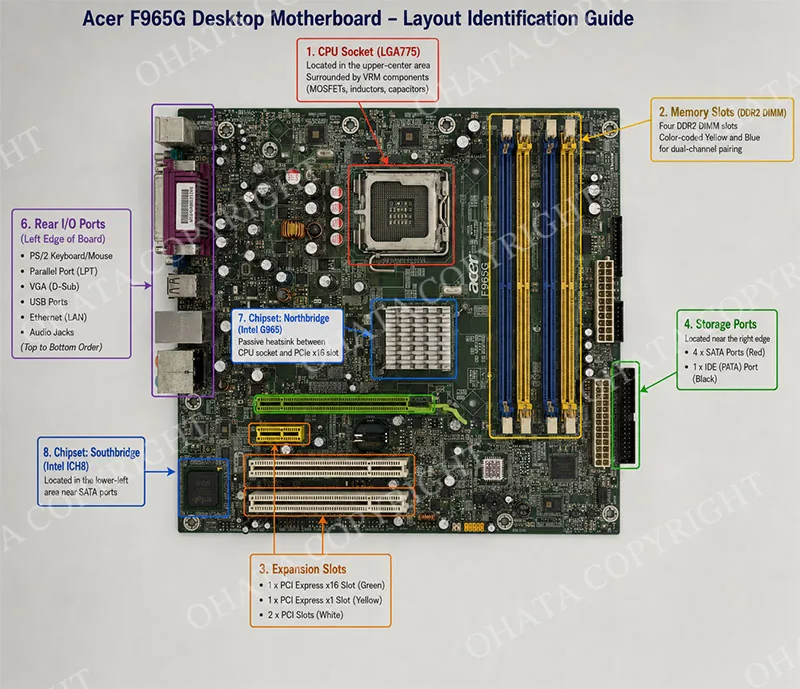
CPU Socket Location: LGA775 socket positioned in the upper-center area of the board, surrounded by MOSFETs, inductors, and solid capacitors comprising the VRM.
Memory Slots: Four DDR2 DIMM slots arranged in two parallel rows, color-coded yellow and blue for channel pairing.
Expansion Slots: Single green PCIe x16 slot, single yellow PCIe x1 slot, and two white PCI slots arranged along the bottom edge.
Storage Ports: Four SATA ports located near the left edge, with a single IDE PATA port positioned adjacent to them.
Rear I/O: VGA port, parallel port, Ethernet port, USB ports, and audio jacks arranged in a specific order along the left edge of the board.
Chipset Locations: G965 Northbridge with passive heat sink positioned between the CPU socket and PCIe x16 slot; ICH8 Southbridge located near the SATA ports on the lower-left side.
Typical Usage and Installation Platforms
The Acer F965G motherboard was primarily installed in Acer Veriton and Acer Aspire commercial desktop computer systems during the 2006-2008 period. These pre-built desktop systems were distributed to businesses, schools, government agencies, and home users worldwide, making the F965G one of the most frequently encountered LGA775 OEM motherboards in electronic recycling streams.
Commercial applications included office workstations, educational computer labs, retail point-of-sale terminals, and basic multimedia production systems. The motherboard's built-in VGA graphics, parallel port support, and legacy IDE compatibility made it particularly suitable for environments requiring connections to older peripheral equipment.
Computer enthusiasts and custom system builders also utilize the Acer F965G for retro computer projects and vintage gaming systems. The board's support for Core 2 Duo processors makes it capable of running Windows XP, Windows Vista, Windows 7, and various Linux distributions with excellent compatibility. The presence of PCIe x16 slot allows custom builders to install period-correct graphics cards such as the NVIDIA GeForce 7 series or ATI Radeon X1000 series for retro gaming. Some enthusiasts use these boards to build file servers, home media centers, or dedicated firewall appliances due to their low power consumption and reliable construction.
Board Condition and Its Impact on Classification
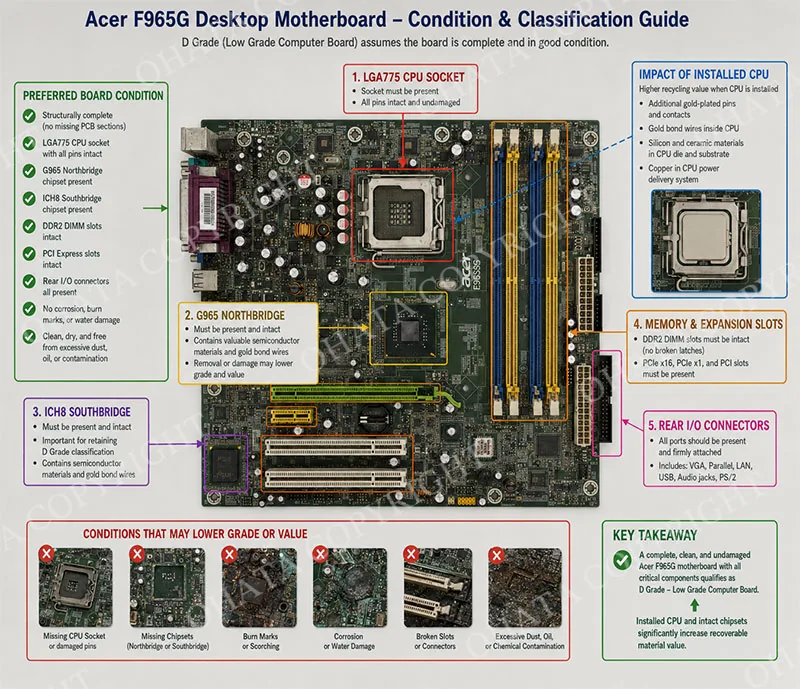
The classification of the Acer F965G as D Grade assumes that the board is reasonably complete and structurally intact. The presence or absence of specific components directly influences the final value and grading determination.
Preferred Board Condition
For optimal grading, the motherboard should be:
Structurally complete with no missing PCB sections
Retaining the LGA775 CPU socket and all socket pins in good condition
Retaining the G965 Northbridge and ICH8 Southbridge chipsets
Retaining the DDR2 DIMM slots and PCI Express slots
Retaining the rear I/O connectors (VGA, parallel, Ethernet, USB, audio)
Free from significant corrosion, burn marks, or water damage
Free from excessive dust, oil, or chemical contamination
Dry and reasonably clean for accurate inspection
Impact of Installed Components
Critical Importance of CPU Installation:
The presence of a compatible processor significantly enhances the board's recycling value. A complete board with an installed CPU contains:
Additional gold-plated pins and contacts within the processor package
Gold bond wires located within the CPU's internal structure
Silicon and ceramic materials contained in the processor die and substrate
Copper connecting the CPU's power delivery system
When a CPU is installed, the board's recoverable material value increases substantially compared to a bare motherboard. Conversely, a board with a missing processor socket or a physically damaged socket may be downgraded to a lower classification or experience reduced pricing because the lost processor contacts reduce the total gold recovery potential.
Chipset and Component Completeness:
The G965 Northbridge and ICH8 Southbridge are critical components for retaining full D Grade classification. These BGA packages contain valuable semiconductor materials, gold bond wires, and ceramic substrates that contribute to the board's recycling value. If the chipset chips are removed, scorched, or severely damaged, the board's classification may be reduced because of diminished recoverable semiconductor content.
Conditions That Reduce Value
Several conditions lead to value reductions or downgrades during scrap evaluation:
Missing CPU Socket: A board with a removed CPU socket loses substantial gold plating and pin contacts, resulting in a significant drop in recoverable precious metal value.
Removed Chipsets: Boards with removed G965 or ICH8 chipsets have lower integrated circuit density and reduced precious metal content, potentially moving the board into Appliance Board A or Appliance Board B categories.
Severe PCB Damage: Broken boards, cut sections, shattered FR-4 material, or large fractures may be downgraded because the broken sections reduce the surface area for copper recovery and complicate mechanical processing.
Heavy Corrosion: Water damage, battery acid leakage, or exposure to corrosive chemicals can destroy solder joints, dissolve copper traces, and oxidize gold-plated contacts. Heavily corroded boards may be rejected or heavily discounted.
Burn Damage: Electrical shorts, lightning strikes, or overvoltage conditions can cause burn marks and melted PCB sections. Burned boards are less valuable because the high temperatures degrade precious metal surfaces and contaminate the PCB material.
Missing Connectors: The removal of memory slots, PCIe slots, SATA ports, or rear I/O connectors reduces recoverable gold content and should be avoided when possible.
Extensive Missing Components: Boards missing numerous capacitors, MOSFETs, resistors, or inductors may be downgraded due to the reduced weight and lower component value.
Rejection Criteria
Certain board conditions lead to outright rejection at most recycling facilities:
Fire-Damaged Boards: Boards with extensive fire damage, melted laminates, and heavy charring are typically rejected because of the contamination risk and the degraded material quality.
Biohazard or Chemical Contamination: Boards heavily contaminated with sewage, industrial chemicals, or biohazardous materials are rejected for safety reasons.
Severe Physical Destruction: Boards that have been crushed, shattered into multiple pieces, or ground into fragments are generally rejected because they are no longer identifiable and cannot be properly graded.
Mercury Switches: Some older motherboard accessories contain mercury tilt switches. These must be removed or rejected due to hazardous material regulations.
Swollen or Leaking Batteries: Lithium coin cells that have leaked, swollen, or exploded present safety hazards and should be removed or rejected if the contamination has damaged the board.
Recoverable Materials, Buying Standards, and Handling
Recoverable Materials from the Acer F965G
The Acer F965G motherboard contains several economically recoverable materials that make it attractive to electronic recyclers:
Copper Recovery
Copper represents the largest recoverable metal by weight and is distributed throughout the motherboard in multiple forms:
PCB Power Planes: The four-layer board construction includes internal power and ground planes that typically contain 10% to 15% copper by total board weight.
Signal Traces: Fine copper traces connect all electronic components, carrying data and control signals between the CPU, chipset, memory, and expansion slots.
Voltage Regulation Components: Inductors, chokes, and transformer windings in the VRM provide significant copper content.
Connector Contacts: The SATA ports, IDE connector, and power connectors contain copper-based contacts that contribute to recoverable yields.
Gold Recovery
Gold is present in several locations, although in relatively thin layers compared to enterprise-grade hardware:
LGA775 Socket Pins: The CPU socket contains hundreds of gold-plated spring contacts that provide reliable electrical connectivity.
DDR2 DIMM Slots: Each memory slot features gold-plated contact fingers that increase precious metal recovery.
PCIe x16 Slot: The primary expansion slot includes gold-plated edge contacts that are amenable to recovery.
CPU Internal Bond Wires: Any installed processor contains microscopic gold bond wires that connect the silicon die to the package contacts.
Silver Recovery
Silver is commonly found in:
Solder Alloys: Lead-free solder joints used throughout the PCB may contain silver along with tin and copper.
Electrical Contacts: Some connector terminals and relay contacts in the power management section utilize silver-bearing alloys.
Palladium Recovery
Multilayer ceramic capacitors (MLCCs) containing palladium electrodes are distributed throughout the motherboard, particularly near the CPU socket and memory slots. These capacitors provide an additional precious metal contribution when large quantities of boards are refined.
Aluminum Recovery
The aluminum content of the motherboard comes from:
CPU Heat Sink: A standard aluminum heat sink is normally mounted over the processor to dissipate thermal energy.
Chipset Coolers: The G965 Northbridge often features a passive aluminum heat sink.
Mounting Brackets: Metal brackets used to secure the motherboard and heat sinks contain recyclable aluminum.
Buying Standards and Grading Considerations
When purchasing Acer F965G motherboards as scrap, Ohata buyers evaluate each lot based on the following factors:
Board Completeness: Complete boards with CPU installed and all major components intact receive the highest D Grade pricing. Boards with missing components are evaluated on a case-by-case basis.
Condition Assessment: The physical condition of the PCB, connectors, and solder joints is inspected for corrosion, damage, burn marks, and contamination.
CPU Presence: Boards with installed CPUs, especially Core 2 Duo or Pentium Dual-Core processors, are valued higher because of the additional gold, copper, and semiconductor material.
Component Integrity: The presence of the G965 Northbridge and ICH8 Southbridge chipsets is confirmed during visual inspection. Missing chipsets reduce value.
Contamination: Boards contaminated with oil, grease, chemical residues, or excessive dirt may require special handling and will be evaluated accordingly.
Mixed Materials: Boards mixed with plastic housings, steel brackets, external cables, batteries, or other non-PCB materials will be graded down due to contamination.
Physical Damage: Broken PCB sections, cracks, missing connectors, and severe wear are identified during inspection and reduce the final grade.
Preparation and Handling Guidelines
To maximize the scrap value and maintain D Grade classification, suppliers should follow these preparation guidelines before shipping:
Removing Non-Electronic Accessories:
The following items should be removed from the board before shipment:
Aluminum heat sinks (CPU and chipset)
Cooling fans
Plastic shrouds and air guides
Metal mounting brackets
External cables and wire harnesses
CMOS batteries
Protective covers or blanking plates
Removing these items reduces shipping weight, simplifies visual inspection, and prevents downgrading due to mixed materials. The PCB itself should remain intact with all attached electronic components.
Separation from Other Materials:
The Acer F965G motherboard should be stored and shipped separately from:
Lower-grade appliance control boards
Power supply units
Metal chassis or computer cases
Plastic housings
Other types of computer hardware
Contamination with these materials may reduce the board's classification to Appliance Board A or Appliance Board B, resulting in lower pricing and less efficient refining.
Preservation of Components:
When possible, leave the CPU installed in the socket because it substantially increases the board's recoverable material value. If the CPU must be removed, store it separately and include it with the motherboard shipment for proper handling and recovery.
Packaging:
Ship boards in sturdy corrugated cardboard boxes designed for heavy electronic components. Use protective packing materials to prevent damage during transportation. Keep boards dry and free from moisture exposure to prevent corrosion and oxidation.
Disclaimers and Compliance
The classification of the Acer F965G as D Grade under the Ohata Board Scrap Classification System is based on the board's physical engineering characteristics as defined by Ohata's internal grading standards. It is essential to emphasize that this classification is not an international standard. It is a proprietary grading system developed by Ohata for internal use within its electronic scrap purchasing and recycling operations.
While the Ohata system shares some characteristics with other industry grading frameworks, it remains distinct and should not be used as a substitute for ISO standards, WEEE directives, or other regulated electronic waste classifications. Recyclers, buyers, and suppliers are advised to confirm classification interpretations with Ohata representatives before finalizing purchase agreements.
Comparison, and Official Ohata Classification
Comparison with Related Ohata Grades
To understand why the Acer F965G motherboard is classified as D Grade, it is helpful to compare it with the adjacent grades in the Ohata classification hierarchy:
D Grade vs C Grade
C Grade boards typically include standard desktop motherboards with plastic CPU sockets rather than metal retention mechanisms. Boards in the C Grade category may also have longer gold fingers, higher integrated circuit density, or more substantial PCB construction. The Acer F965G's LGA775 metal CPU socket firmly places it in D Grade rather than C Grade, as C Grade specifically describes "Desktop Motherboards with CPU Plactic Socket No. 2,4,6,7,9."
Key differences:
Socket Type: D Grade (metal socket) vs C Grade (plastic socket)
Gold Plating: D Grade (thinner, lower coverage) vs C Grade (moderate coverage)
Integrated Circuit Density: D Grade (lower, integrated chipset) vs C Grade (moderate, more discrete controllers)
Recoverable Value: D Grade (lower precious metal concentration) vs C Grade (higher precious metal concentration)
D Grade vs Appliance Board A
Appliance Board A consists of household appliance control boards, such as washing machine controllers, refrigerator electronics, and HVAC control modules. While these boards may contain substantial copper and power-handling components, they differ from the Acer F965G in their primary function.
Key differences:
Primary Function: D Grade (digital computing, graphics processing, expansion) vs Appliance Board A (motor control, power switching, automation)
Connector Types: D Grade (expansion slots, memory slots, CPU socket) vs Appliance Board A (wire harness connectors, relay terminals)
Chipset Architecture: D Grade (large chipset, PCIe interface) vs Appliance Board A (microcontroller, analog circuits)
Recoverable Materials: D Grade (CPU gold, gold fingers) vs Appliance Board A (heavier copper, transformers)
D Grade vs B Grade
B Grade boards include entry-level server motherboards, medium-grade telecommunications equipment, and commercial interface cards. These boards generally exhibit higher semiconductor density and better construction quality than the Acer F965G.
Key differences:
Application: D Grade (consumer desktop) vs B Grade (entry-level server, commercial networking)
Component Density: D Grade (lower density, integrated chipset) vs B Grade (higher density, more discrete ICs)
Socket Design: D Grade (single metal socket) vs B Grade (multiple plastic/metal sockets)
PCB Construction: D Grade (standard 4-layer) vs B Grade (premium multilayer, heavier copper)
Official Ohata Classification Confirmation
Based on the detailed physical inspection and engineering evaluation of this motherboard, the official classification under the Ohata Board Scrap Classification System is D Grade — Low Grade Computer Boards.
The classification is confirmed by the following physical characteristics:
Metal CPU Socket — The LGA775 socket features a metal CPU retention bracket and lever-actuated clamping system, aligning exactly with the D Grade specification.
I-Series Platform — The Intel G965/ICH8 chipset configuration corresponds to the described "I-Series motherboards" characteristic.
Consumer-Oriented Construction — The board utilizes cost-efficient materials, thinner gold plating, and standard four-layer PCB construction typical of D Grade consumer hardware.
Low Precious Metal Concentration — The design prioritizes affordability over premium materials, resulting in lower recoverable precious metal yields than enterprise-grade electronics.
Single Processor Architecture — The board supports a single LGA775 processor with integrated graphics and peripheral management, reflecting the "low-grade computer boards" profile.
Standard Expansion Configuration — The layout includes PCIe x16, PCIe x1, and PCI slots, typical of D Grade desktop motherboards rather than specialized server or industrial platforms.
This classification ensures consistent grading, fair pricing, and efficient downstream processing for this high-volume consumer motherboard. The Acer F965G remains a valuable source of copper, aluminum, and semiconductor materials, and when properly handled with installed CPUs and complete components, provides meaningful recycling returns within the D Grade material stream.
Ohata MotherBoard Scrap Wiki Claim
The Ohata Wiki is an educational knowledge base developed and maintained by Ohata to provide information on electronic scrap identification, recycling technologies, material classification, and sustainable resource recovery. The content published in the Ohata Wiki is based on Ohata's operational experience, research, and educational objectives. It is intended to assist recyclers, businesses, researchers, students, and the public in understanding electronic materials and recycling practices.
The Ohata Wiki is designed as an educational reference only. It does not replace professional technical advice, engineering analysis, laboratory testing, or official industry standards.
Ohata MotherBoard Classification Claim
The Ohata MotherBoard Classification System is a proprietary educational classification created by Ohata based on the company's internal recycling knowledge and operational experience. It is intended solely for educational and identification purposes. It is not an international standard, government specification, or universally accepted industry grading system. Classification methods, purchasing requirements, and recycling practices may differ among companies, regions, and markets.
Ohata MotherBoard Scrap Wiki Page Copyright
© 2026 Ohata. All Rights Reserved.
Record the part number, revision, installed CPU and POST result before grading. Confirm whether the PATA connector uses a separate controller, then apply the current Ohata metal-socket desktop-board rule and compare reuse value with the live scrap price.