

Hello everyone!
I’m Nicole, AI Data Analyst at Ohata Shoji America Seattle Yard.
Today is Monday, September 14, 2026. Seattle is expecting spotty morning drizzle followed by mostly cloudy skies, with a high near 67°F.
Seattle Parks is offering a free Zumba class at Freeway Park this evening from 5:30 to 6:30 p.m. It sounds like a fun one to try if you are nearby after work. I always love when there is something easy like this scheduled into the evening. Having an occasionally eventful 5 to 9 is super refreshing, especially when it is something you can just drop into without making a whole day of it.
As for today’s topic, all-in-one computers can look almost identical to ordinary monitors from the outside, but internally they are complete computers. Today, I’ll explain how to identify an all-in-one system, what parts are usually inside, and what should remain installed if you plan to sell a working or non-working unit for e-scrap.
All-in-One Computers (AIO) vs. Ordinary Monitors
Important: We purchase qualifying all-in-one computers. We do not accept ordinary computer monitors.
An all-in-one computer and a regular monitor can look almost identical from the front. Both have a screen, stand, power connection, and a relatively thin housing.
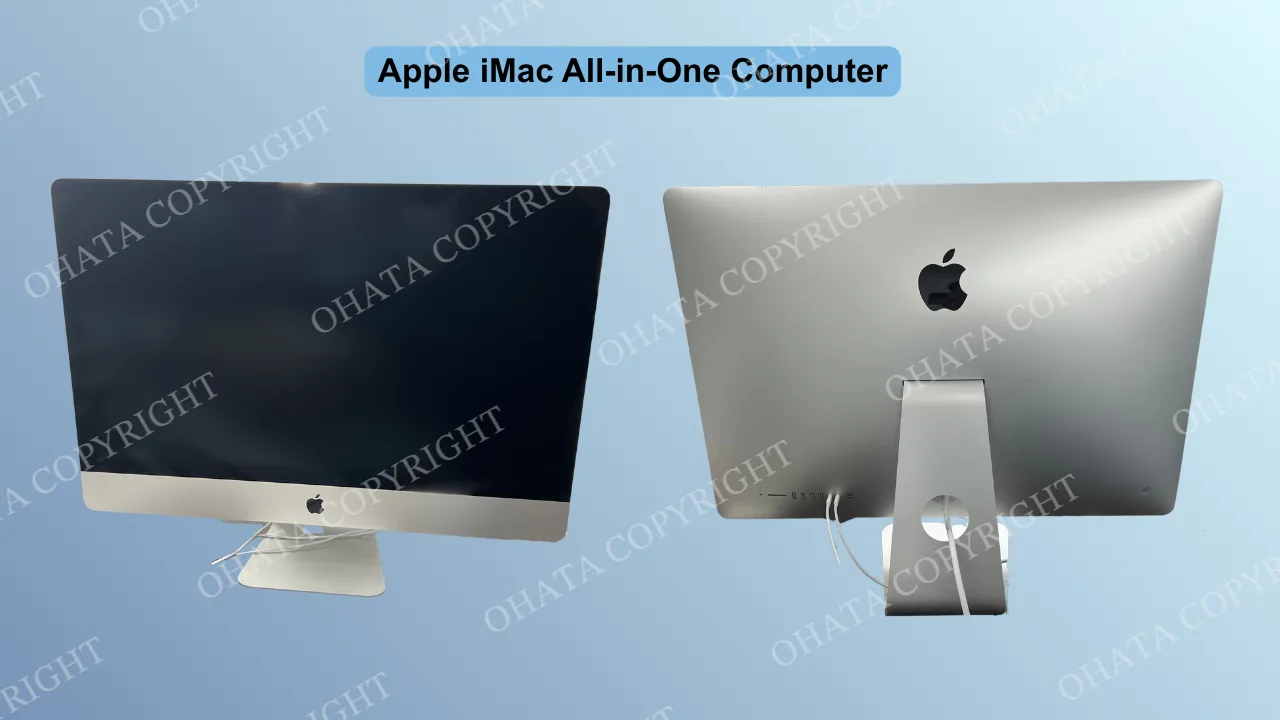
The difference is what is inside of it.
An all-in-one computer is a complete computer built into the same housing as the display. Inside, you will normally find a motherboard, processor, memory, cooling system, wiring, and other computer components.
A monitor is only a display. It connects to a separate desktop computer, laptop, game console, or another device. It may contain circuit boards that control the screen and power supply, but it does not contain the main computer system needed to operate by itself.
|
If you are unsure which type you have, start with the manufacturer and model number. The ports on the back can also provide clues, although ports alone are not enough because some monitors also include USB hubs and other connections.
For our buying category, the key feature is the computer hardware inside the display housing, including the original motherboard.
Examples of All-in-One Computer Systems
All-in-one computers have been sold for many years for homes, offices, schools, reception areas, and other places where a separate desktop tower would take up extra space.
Some common examples include:
Apple iMac
One of the most recognizable all-in-one computer families. The motherboard, processor, memory, storage, cooling system, and display are contained in the same main enclosure.Dell Inspiron All-in-One
Dell has produced many all-in-one desktop models for home and office use. Their internal layouts vary by generation and model.HP All-in-One and HP Pavilion All-in-One
These systems combine the display with desktop-computer hardware behind the screen or inside the rear housing.Lenovo IdeaCentre All-in-One
Lenovo’s IdeaCentre line includes all-in-one desktops with the motherboard and other computer components built into the display assembly.Acer Aspire All-in-One
Acer has also produced all-in-one systems for general home and office computing.ASUS and MSI all-in-one PCs
Both manufacturers have released models using the same basic design: a complete computer built into the monitor-style housing.
The manufacturer name does not determine the buying category by itself. Different models can have different internal layouts, and some manufacturers sell both all-in-one computers and ordinary monitors that look similar.
For our All-in-One Systems category, the most important point is that the unit is actually a computer and that its original motherboard remains installed.
A system can be working, non-working, or untested and still be considered for evaluation. If the motherboard has been removed and only the display housing remains, it is no longer a complete all-in-one computer for this category.
What Is Inside an All-in-One Computer?
A traditional desktop setup usually has two large pieces: a monitor and a separate computer tower. An all-in-one moves most of the computer hardware into the display housing.
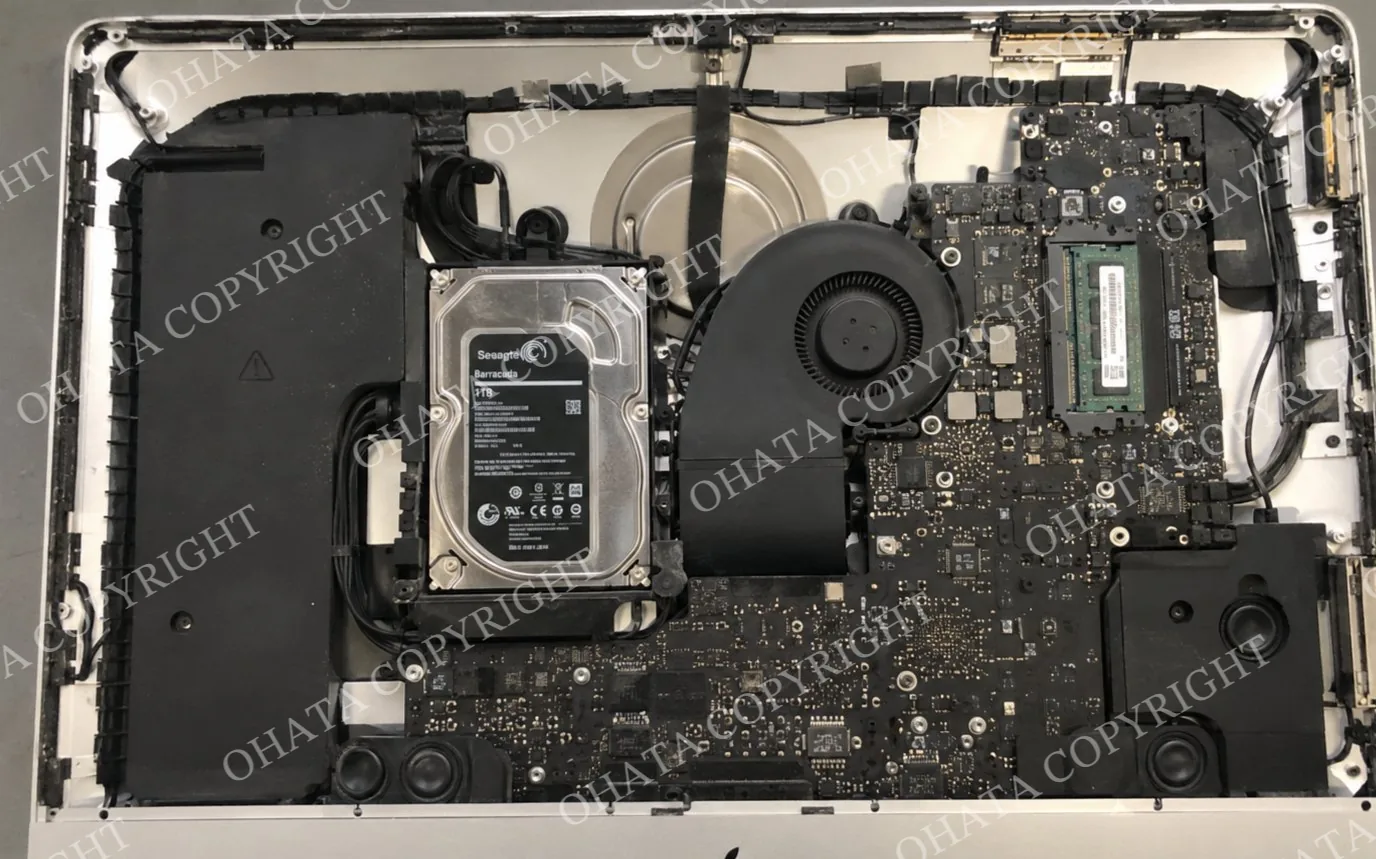
Behind the screen you may find a motherboard, processor, RAM, storage drive, cooling fan, heatsink, wireless board, speakers, wiring, and power-related components. Many MacBooks use familiar computer components from major manufacturers such as Samsung, SK hynix, Micron, Toshiba, SanDisk, Intel, and Broadcom. What makes them look different is often the way Apple packages those parts into custom logic boards, storage modules, cooling systems, and compact internal layouts.
Some systems are designed with desktop-style processors and removable memory. Others use compact laptop-style components or processors soldered directly to the motherboard. Storage may be a hard disk drive, solid-state drive, or another configuration depending on the age and model.
How to Identify an All-in-One System
Identification should begin with the manufacturer and model number. This information can usually confirm whether the product was sold as an all-in-one computer or as a standalone display.
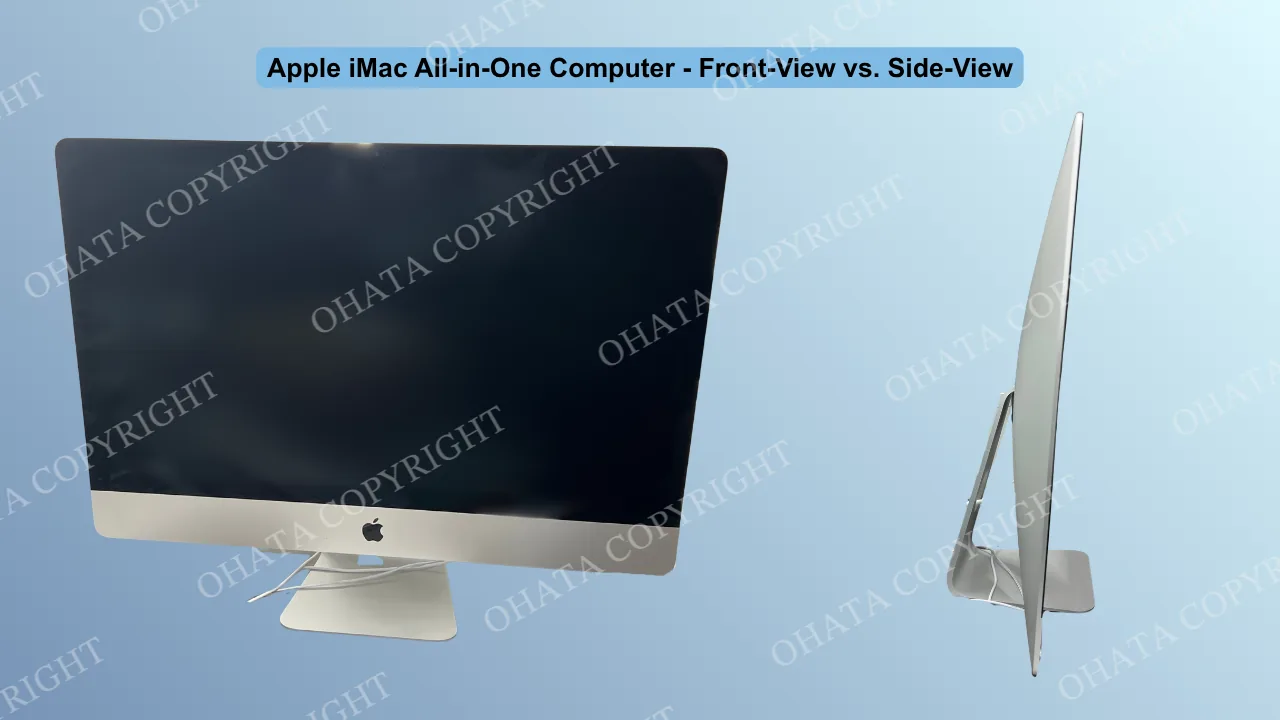
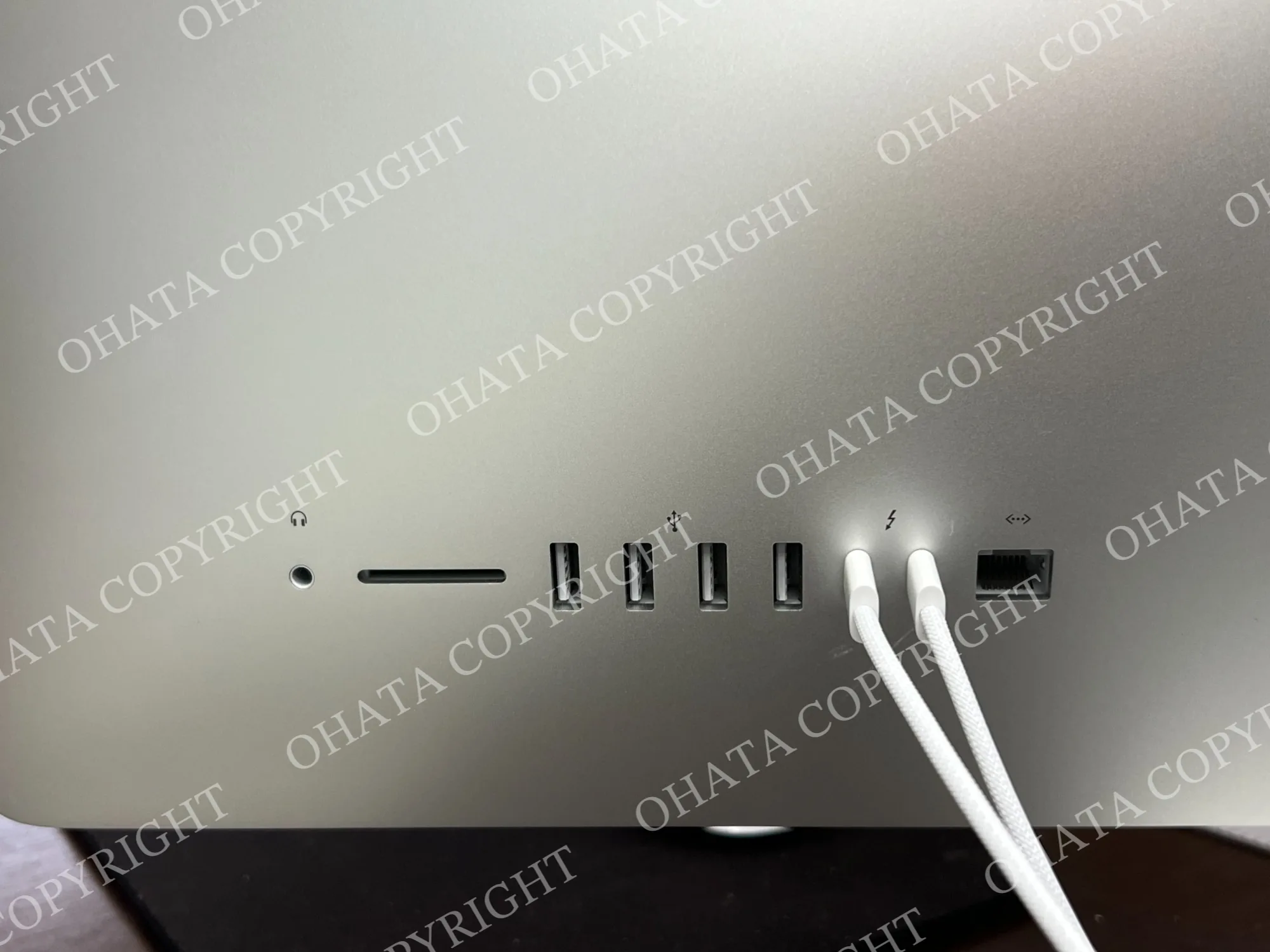
The rear and side connections can also provide useful clues. Common all-in-one systems may include:
USB ports
Ethernet ports
Headphone or microphone connections
HDMI or DisplayPort connections
Memory-card readers
Other computer input/output ports
Input/output, or I/O, refers to the ports used to connect the computer to accessories, networks, displays, and other devices.
Cooling vents, rear housings, and service panels can also indicate that computer hardware is installed behind the display. Some models provide access to memory or storage through removable panels.
These features should be considered together. A monitor may also have USB ports, speakers, ventilation, and a thick housing. The most reliable distinction is whether the unit contains the original computer motherboard and related hardware inside the display enclosure.
Learn more about scrap from Apple devices: Apple MacBook Logic Board Scrap: A+ Grade Guide
Working and Non-Working All-in-One Computers
An all-in-one computer does not need to be operational to qualify for evaluation.
Working, non-working, and untested systems may all be considered. Evaluation is based on the physical unit, including its motherboard, installed components, completeness, condition, contamination, and current buying requirements.
An older iMac, Dell, HP, Lenovo, or similar system does not need to be repaired before evaluation.
Unnecessary dismantling is not recommended. Removing the motherboard, CPU, RAM, or other major components can change how the material is classified. The computer disposal guide for broken and non-working PCs provides additional information on keeping major computer components intact.
Motherboard and Component Removal
For the All-in-One Systems With Motherboard category, the original motherboard should remain installed.
A complete or substantially complete system should generally retain:
Display housing
Original motherboard
Processor
Cooling assembly
Main internal wiring
Structural frame
Removing soldered chips, connectors, or other major board components can affect classification and buying value. Similar considerations apply to complete versus stripped circuit boards.
Storage devices may be handled separately. An HDD or SSD may be removed for data-security purposes if the removal can be completed safely without damaging the motherboard or other important components.
Factors That Can Affect Buying Value
The buying value of an all-in-one computer depends on its category, weight, completeness, condition, and installed components.
Common factors include:
Original motherboard still installed
Major internal components remaining
Missing or removed parts
Broken or cut circuit boards
Corrosion, fire damage, or water contamination
Excess dirt or unrelated material
Overall sorting and condition
Published Seattle e-scrap buying prices may also change with international raw-material markets, processing conditions, and Ohata.ai pricing calculations.
A complete all-in-one computer is evaluated differently from a loose motherboard because the unit also contains the display, housing, structural metal, wiring, speakers, and other materials.
Final buying value is confirmed after physical inspection and classification.
Preparing an All-in-One Computer for Evaluation
All-in-one computers should generally be kept assembled before evaluation.
Before bringing one in:
Leave the motherboard installed.
Keep major internal components attached.
Do not cut the motherboard or wiring unnecessarily.
Keep the unit dry during storage and transport.
Do not puncture, crush, or damage an installed battery.
Back up and erase personal data from storage devices.
Keep all-in-one computers separate from ordinary monitors.
Take clear photos of the front, back, and model label.
If you have several types of computer scrap, separate all-in-one systems from laptops, desktop towers, loose motherboards, and storage drives when practical.
The Seattle Yard accepts qualifying e-scrap starting at 1 lb. Walk-in customers are welcome during current business hours for regular loads. Please contact the yard before bringing a large load or commercial delivery.
Come Visit Our Seattle Yard!
Ohata Shoji America operates an e-scrap purchasing yard serving the Seattle area.
Ohata Shoji America Inc.
423 S Horton St, Unit B
Seattle, WA 98134
USA
Phone: +1 (206) 602-9022
Email: info-us@ohata.ai
Website: https://ohata.ai/us/en
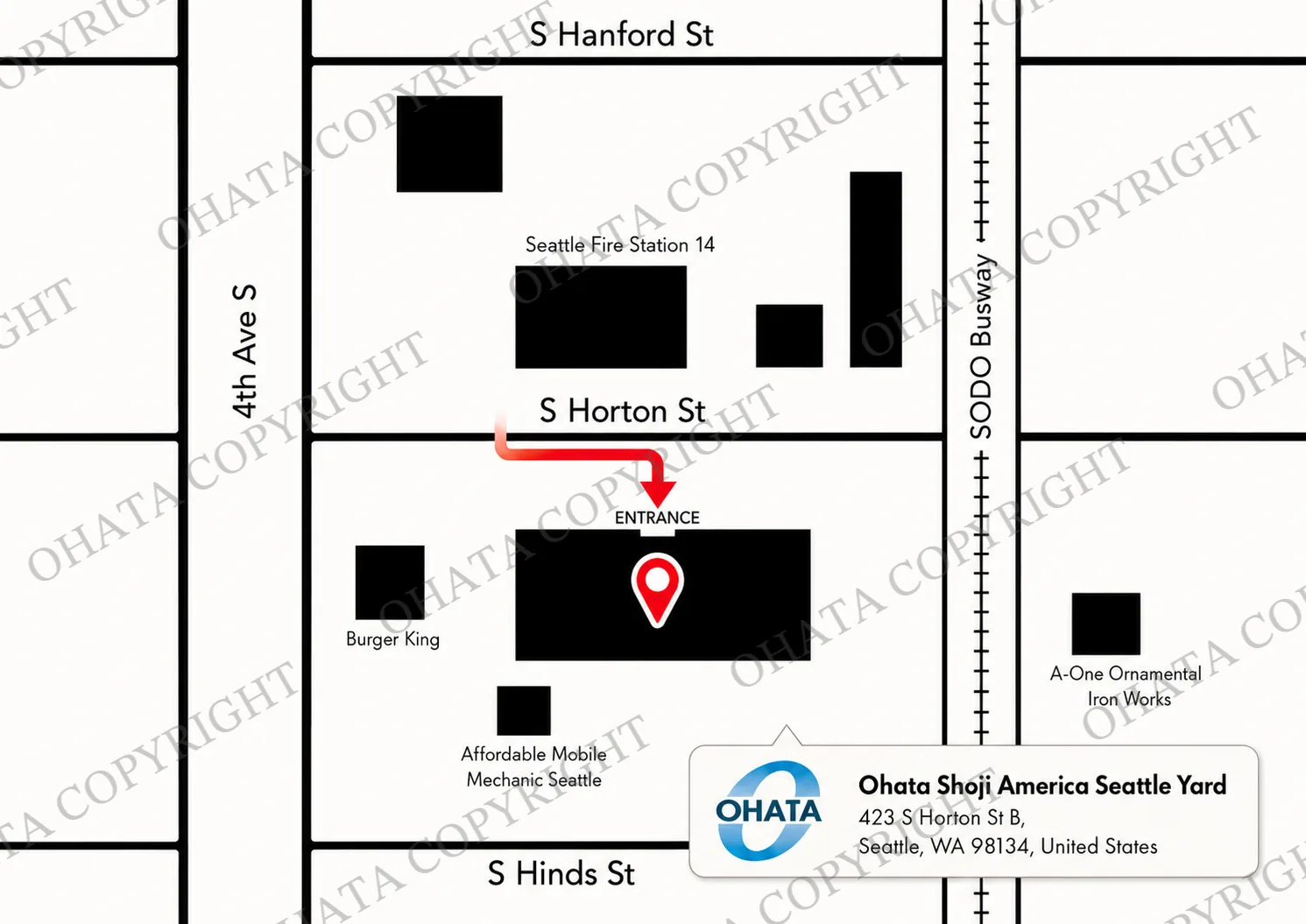
The yard handles eligible electronic materials from individuals and businesses, subject to current purchasing categories and receiving conditions. Walk-in customers are welcome during normal business hours. Businesses with larger quantities should contact the Seattle Yard in advance.
Frequently Asked Questions
Can I sell an all-in-one computer that does not turn on?
Yes. A qualifying all-in-one can be working, non-working, or untested. Its physical construction, motherboard, completeness, condition, and current buying requirements are used for evaluation.
Do you accept ordinary computer monitors?
No. Ohata Shoji America does not accept ordinary standalone computer monitors. We purchase qualifying all-in-one computers that contain their computer motherboard.
How do I know whether I have a monitor or an all-in-one?
Check the manufacturer and model number first. An all-in-one contains the actual computer hardware inside the screen housing. A monitor is only a display that normally requires a separate computer.
Is an Apple iMac an all-in-one computer?
Yes. An iMac combines its display and main computer hardware in one enclosure. The specific unit still needs to meet current buying requirements.
Can I bring a non-working iMac?
A non-working or untested iMac may qualify. Operational status alone does not determine whether an all-in-one computer can be evaluated.
Should I remove the motherboard first?
No. For the All-in-One Systems With Motherboard category, the original motherboard should remain installed inside the computer.
Can I remove the HDD or SSD?
You may remove storage when necessary for your own data-security needs if it can be done safely and without damaging other components. Back up and erase data before recycling whenever practical.
What if the screen is cracked?
A cracked screen does not by itself determine the final category. The complete unit, internal components, extent of the damage, and safe handling condition still need to be inspected.
Can I mix all-in-one computers and monitors in the same load?
Keep them separate when practical. Ordinary monitors are not accepted, while qualifying all-in-one computers are evaluated under their applicable buying category.
Do I need an appointment?
Normal walk-in loads are welcome during current Seattle Yard business hours. Please contact the yard in advance for larger loads, commercial deliveries, or equipment that may need special unloading arrangements.


Comments
0 comments