Punched or Bent Hard Drives: With Board vs. Without Board
A punched or bent hard drive may look like a simple piece of damaged metal, but one detail can change its buying category: is the controller board still attached?
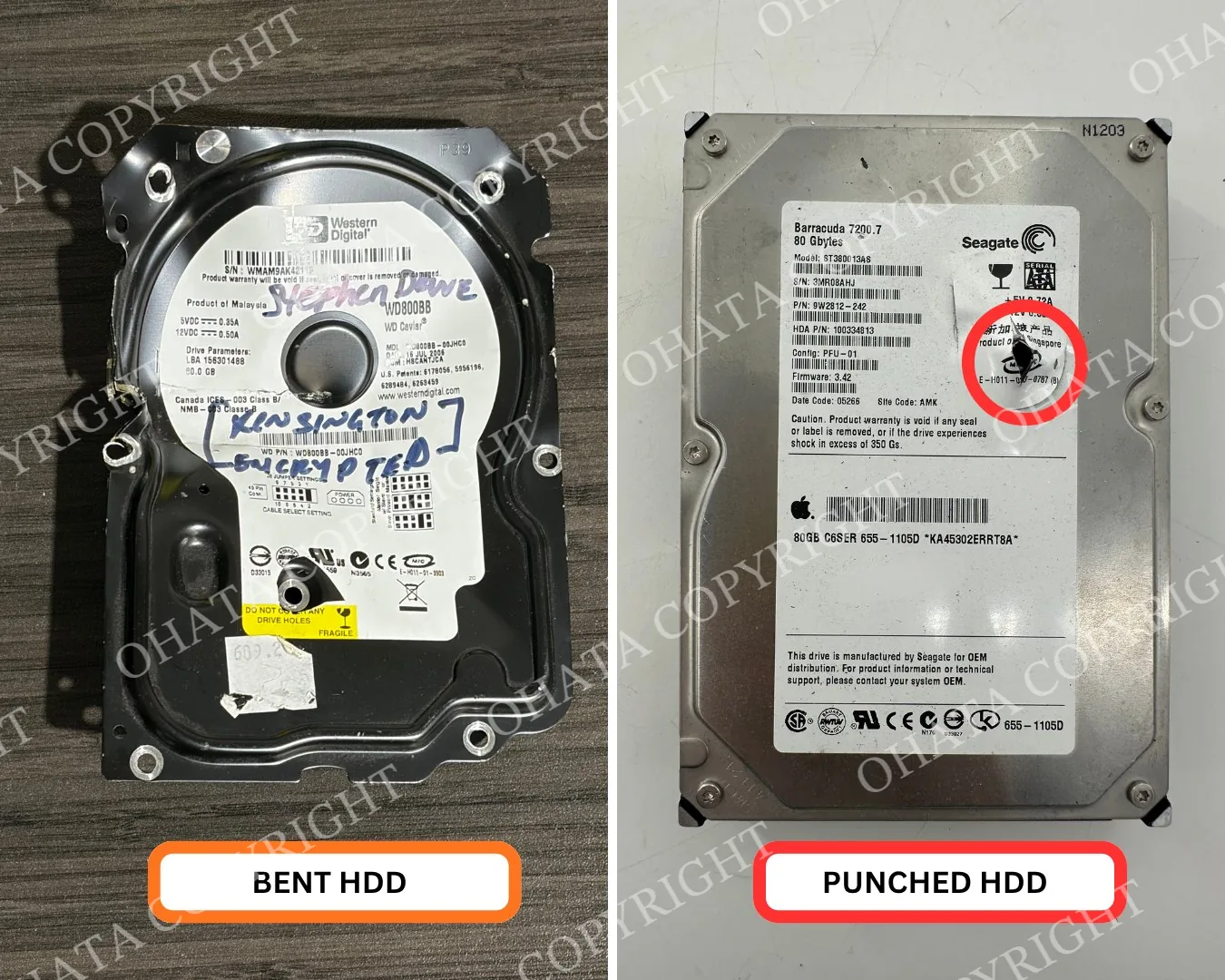
Before comparing the with-board category and the without-board category, you may have a more basic question: why are hard drives punched or bent in the first place?
Learn more on YouTube: How to Identify SATA and Non SATA HDD Boards
Why Are Some Hard Drives Punched or Bent?
Hard drives can contain personal, business or organizational data. When computers and servers are retired, some equipment owners physically damage their drives as one part of their data-security or asset-disposal process.
Punching creates a hole through the housing, while bending changes the shape of the drive and may make it difficult to reinstall or operate. You may therefore receive drives that were already damaged before they entered the e-scrap stream.
However, you don’t need to punch or bend a hard drive simply to sell it to Ohata Resource Canada. Physical damage can create sharp edges, scatter small parts and change the applicable buying category.
A visible hole or bend also shouldn’t be treated as proof that all data has been securely destroyed. Before a drive leaves your control, back up anything you need and follow your own data-security requirements. Businesses should use their approved internal procedures or qualified data-destruction services when required.
If your hard drive is still complete, leave it intact unless you already have a documented reason to alter it. If it has already been punched or bent, the next step is to check whether the external controller board remains attached.
The Difference at a Glance
Turn the hard drive over and look at its underside. If you see a small printed circuit board attached to the metal housing, you likely have a punched or bent hard drive with board. If that board has been removed, it may belong in the without-board category.
What to check
With Board
Without Board
Metal hard-drive housing
Present
Present
External controller board
Still attached
Removed
Physical condition
Punched or bent
Punched or bent
Sorting group
With-board material
Without-board material
Final evaluation
Physical inspection required
Physical inspection required
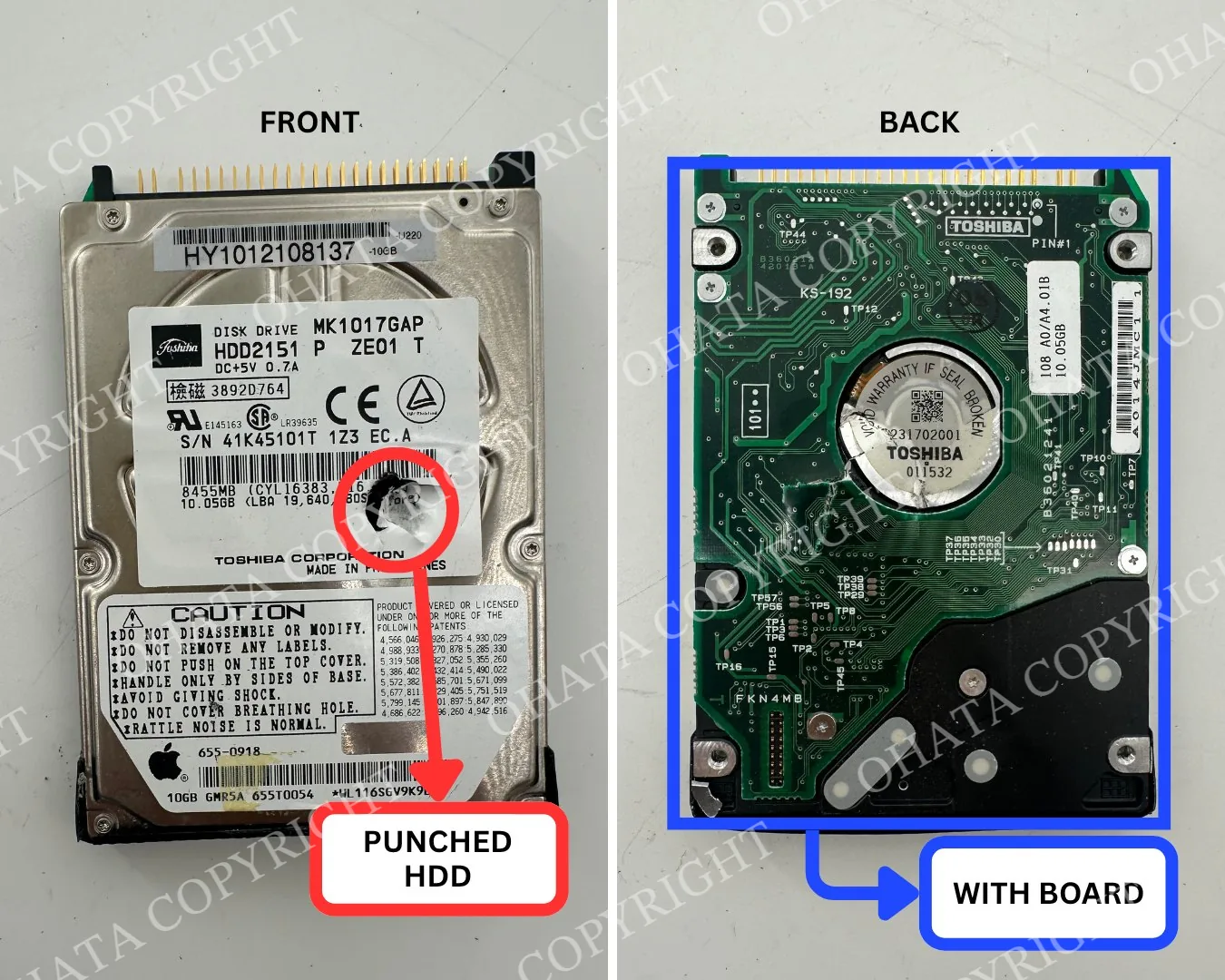
The easiest place to begin is the underside of the drive. You don’t need to identify every chip or connector—just confirm whether the board remains physically attached.
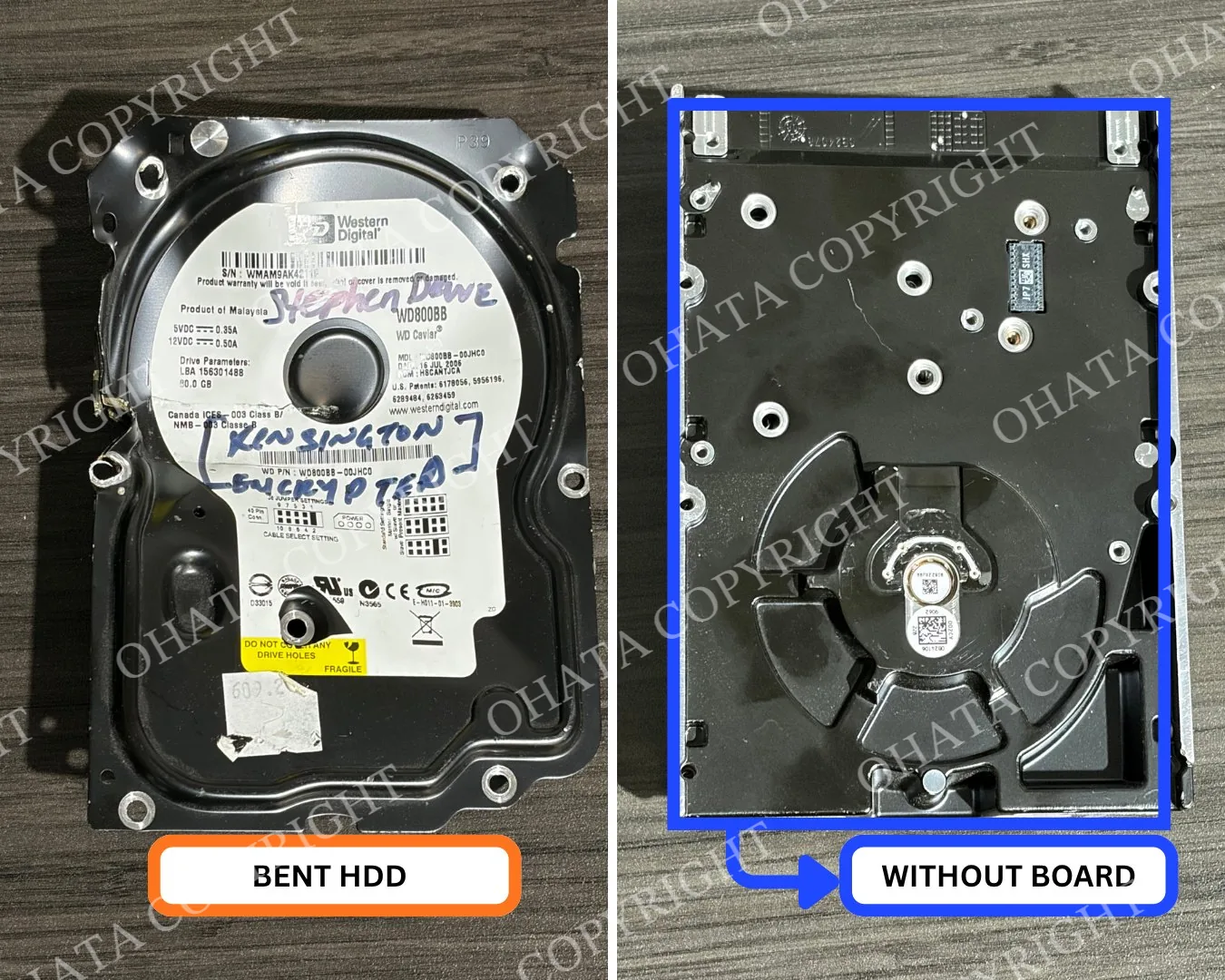
What Does “With Board” Mean?
The board attached to the underside of a hard drive is commonly called the controller board or HDD PCB. PCB means printed circuit board.
This board carries the drive’s power and data connectors, along with integrated circuits and electrical contacts used by the drive. If it remains attached to the punched or bent housing, the item can be considered for the with-board buying category.
The board must actually be attached. Placing a loose controller board beside the drive doesn’t turn it into a with-board item.
If you’d like to understand what these small PCBs contain, the HDD SATA Board Identification Guide explains the common connectors, controller ICs and physical features.
What Does “Without Board” Mean?
A punched or bent hard drive is considered without board when its external controller PCB has been removed.
You may see empty screw holes, exposed contact points or a recessed area where the board used to sit. The remaining item still contains the metal housing and internal drive assembly, but the external PCB is no longer part of it.
If you also have the removed PCB, keep it separate. Loose SATA and older non-SATA controller boards may require different identification. You can compare them using the HDD SATA Board Guide and HDD Non-SATA Board Guide.
Ohata.AI Can Help You Identify the Starting Category
Still unsure which side is the controller-board side? Ohata.AI can analyze clear photographs and suggest a possible item type or buying category by comparing visible features with reference information.
For the best starting result, prepare:
One photograph of the top
One photograph of the complete underside
One close-up of the controller-board area
One photograph showing the punch, bend or other damage
An approximate quantity and total weight
Place one drive on a plain surface and photograph it directly from above. Keep the full outline visible, use even lighting and avoid overlapping drives.
Ohata.AI may help distinguish a damaged drive with its controller board attached from one where the PCB has been removed. It may also help identify a loose board as a possible SATA or non-SATA HDD controller board.
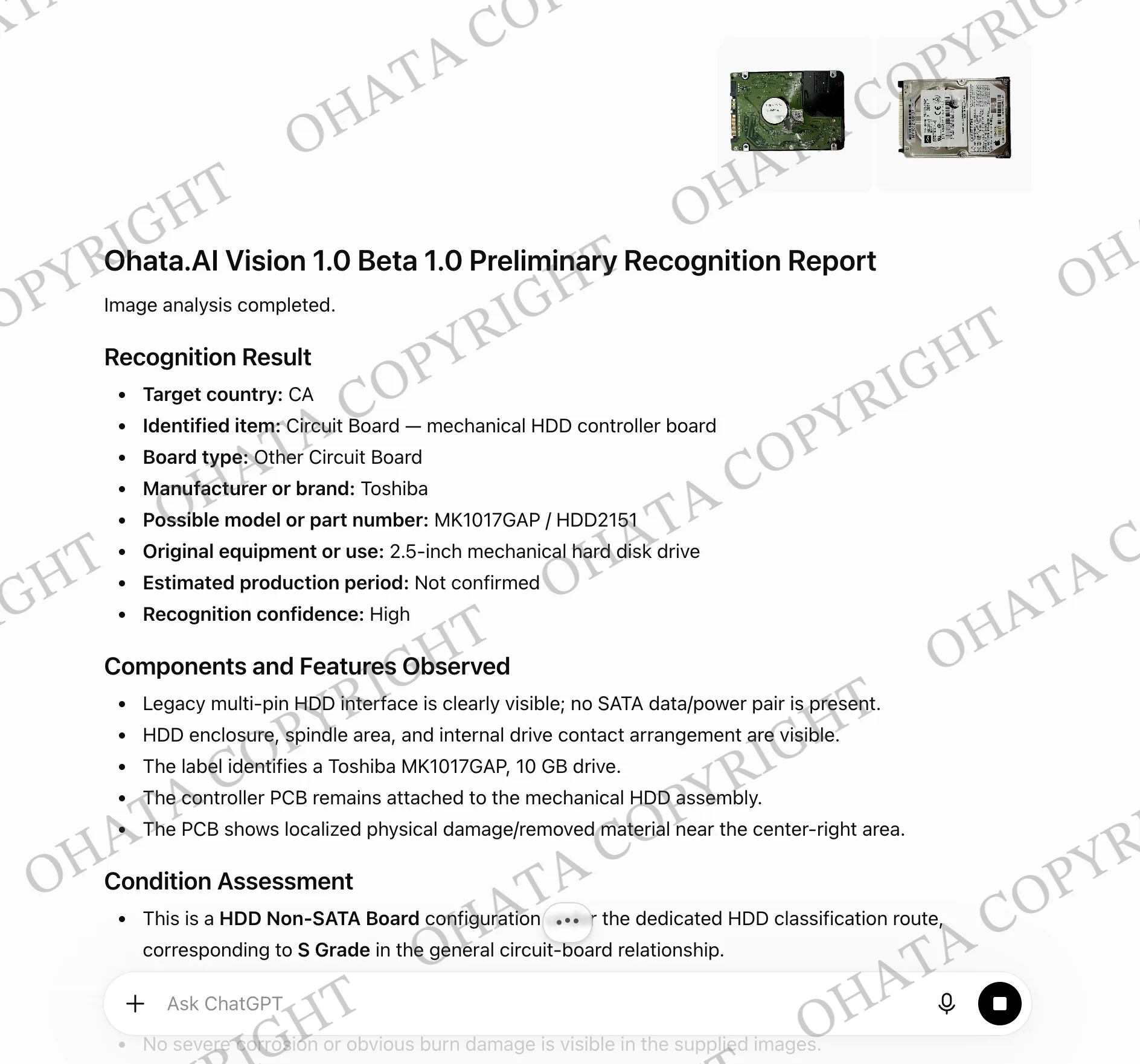
However, it cannot confirm hidden damage, measured weight or every purchasing condition from a photograph.
Ohata.AI is an identification aid. Final acceptance, classification and buying price depend on physical inspection, weight, completeness, condition and current buying requirements.
Please Don’t Remove the Board Just for Selling
Should you remove the controller board before bringing in the hard drive? Usually, there’s no need to do that unless you already understand how the materials should be separated.
Removing the board changes the item from a with-board drive into two separate pieces that may require different identification. It can also leave you with small screws and loose components that are easy to misplace.
If you aren’t sure, leave the drive in its current condition. Take photographs of both sides and contact the Richmond team before dismantling anything further.
What Can Affect the Buying Price?
Whether the controller board is attached is important, but it isn’t the only detail considered during a buying evaluation.
We may also need to check:
Whether the board is attached or removed
The drive’s physical weight
Missing housing sections
Corrosion, fire damage or contamination
Excess brackets, plastic or foreign material
Whether different drive types have been sorted
Current buying requirements
As of the August 7, 2026 updates, the published Richmond reference prices were CAD 0.45 per lb for punched or bent drives with board and CAD 0.26 per lb for punched or bent drives without board. These prices may change, so please open the individual item pages or check the current Canadian e-scrap buying prices before visiting.
Published prices are references. Final acceptance, category, weight and buying price are confirmed after physical inspection.
How Should You Sort Several Drives?
If you have more than one hard drive, begin with a few simple groups:
Complete hard drives
Punched or bent hard drives with board
Punched or bent hard drives without board
Loose HDD SATA controller boards
Loose HDD non-SATA controller boards
Burned, corroded or heavily contaminated drives
Uncertain items
There’s no need to identify every model before contacting us. Clear groups are more useful than an unconfirmed grade.
Keep the material dry, and place drives with sharp edges in a sturdy container. Don’t leave loose boards or screws where they can be lost during transportation.
A Few Photos Can Make Identification Easier
You don’t need professional camera equipment. Place one drive on a plain surface and take:
One photograph of the top
One photograph of the underside
One close-up showing whether the PCB is attached
One photograph of the punched or bent area
Keep the complete outline visible and avoid glare, blur, cropping and overlapping items.
If you have several matching drives, add one group photograph to show the quantity. Then prepare an approximate total weight.
Photograph unusual, heavily damaged or board-free examples separately so their condition isn’t mistaken for the condition of the whole group.
Common Identification and Sorting Mistakes
A few simple mistakes can make the material harder to evaluate:
Mixing with-board and without-board drives
Calling a loose PCB a with-board drive
Mixing complete HDDs with punched or bent HDDs
Combining loose SATA and non-SATA controller boards
Removing boards before confirming the correct preparation
Treating physical damage as guaranteed data destruction
If an item doesn’t clearly fit one group, place it in an “uncertain” container and photograph both sides. You can also browse the Hard Drive Scrap Wiki pages for additional examples.
Still Unsure Which Group You Have?
Turn the hard drive over and ask one simple question: is the external controller PCB still attached?
If yes, begin with the with-board category. If no, compare it with the without-board category and keep any removed PCB separate.
You can use Ohata.AI for a preliminary photo-based suggestion or send the Richmond team clear photographs, the approximate quantity and weight. Please leave the material intact until the preparation has been confirmed.
For directions and current visitor information, review the Richmond yard access page.
Final acceptance, classification and buying price are determined after physical inspection.