Good morning, I’m Yuan Jun. Today is August 4, 2026, and this CPU scrap classification guide for Seattle recyclers will help you recognize different processor packages, separate valuable CPUs, and avoid common mistakes that can reduce the value of a load.
Seattle should have a pleasant summer morning, with temperatures near 60°F early in the day and rising into the low 70s by late morning. Skies are expected to remain mostly clear, although local air quality may be less comfortable than usual, so it is worth checking conditions before spending a long time working outdoors.
Seattle also has plenty happening today. The Seattle Mariners are scheduled to play the Detroit Tigers at T-Mobile Park at 5:40 p.m., giving local baseball fans an easy option for an evening downtown. The Seattle Seahawks are also receiving national attention as the new season of Hard Knocks, featuring the team’s training camp in Renton, premieres tonight.
CPU scrap may look like a small and simple recycling category, but processors can vary greatly in construction, age, contact style, precious-metal content, condition, and expected recycling value. Two CPUs of similar size may belong to completely different grades.
The Ohata CPU classification system ranges from CPU-SSS, the highest grade, through CPU-F, which covers damaged, contaminated, mixed, or unidentified processor scrap. Classification should be performed carefully from the highest possible grade downward and then checked again from the lowest grade upward. An electronic component that is not actually a CPU should be classified as NONE, rather than being forced into a CPU category.
Why CPU Scrap Should Be Sorted Before Selling
A mixed container of processors can include vintage ceramic CPUs, modern Intel LGA processors, AMD pin-based processors, laptop BGA chips, slot-style processor modules, and low-grade plastic ICs. When all of these materials are combined, the buyer must spend additional time identifying and sorting every item.
That extra work may affect how the shipment is evaluated. A carefully separated load makes inspection easier and allows the valuable processors to be recognized instead of being hidden among lower-grade material.
Sorting is especially important when a collection includes vintage ceramic CPUs. Older gold-cap or ceramic processors should not be mixed with modern fiber CPUs, damaged chips, heat sinks, motherboard components, or unidentified plastic ICs.
A simple starting method is to organize CPUs into separate containers according to visible construction:
Gold-cap ceramic processors
Ceramic processors without gold caps
Processors with gold-plated pins
Modern processors with flat contact pads
Soldered BGA chips
Green or brown fiber processors
Cartridge-style processor modules
Small plastic ICs
Damaged, dirty, or mixed processors
You do not need to know every processor model before beginning. Package construction, contact style, and condition can already tell you a great deal.
CPU-SSS: Gold-Cap Ceramic CPUs
CPU-SSS is the highest classification in the Ohata system. These processors normally have a ceramic body, a visible gold-colored cap, and gold-plated pins.
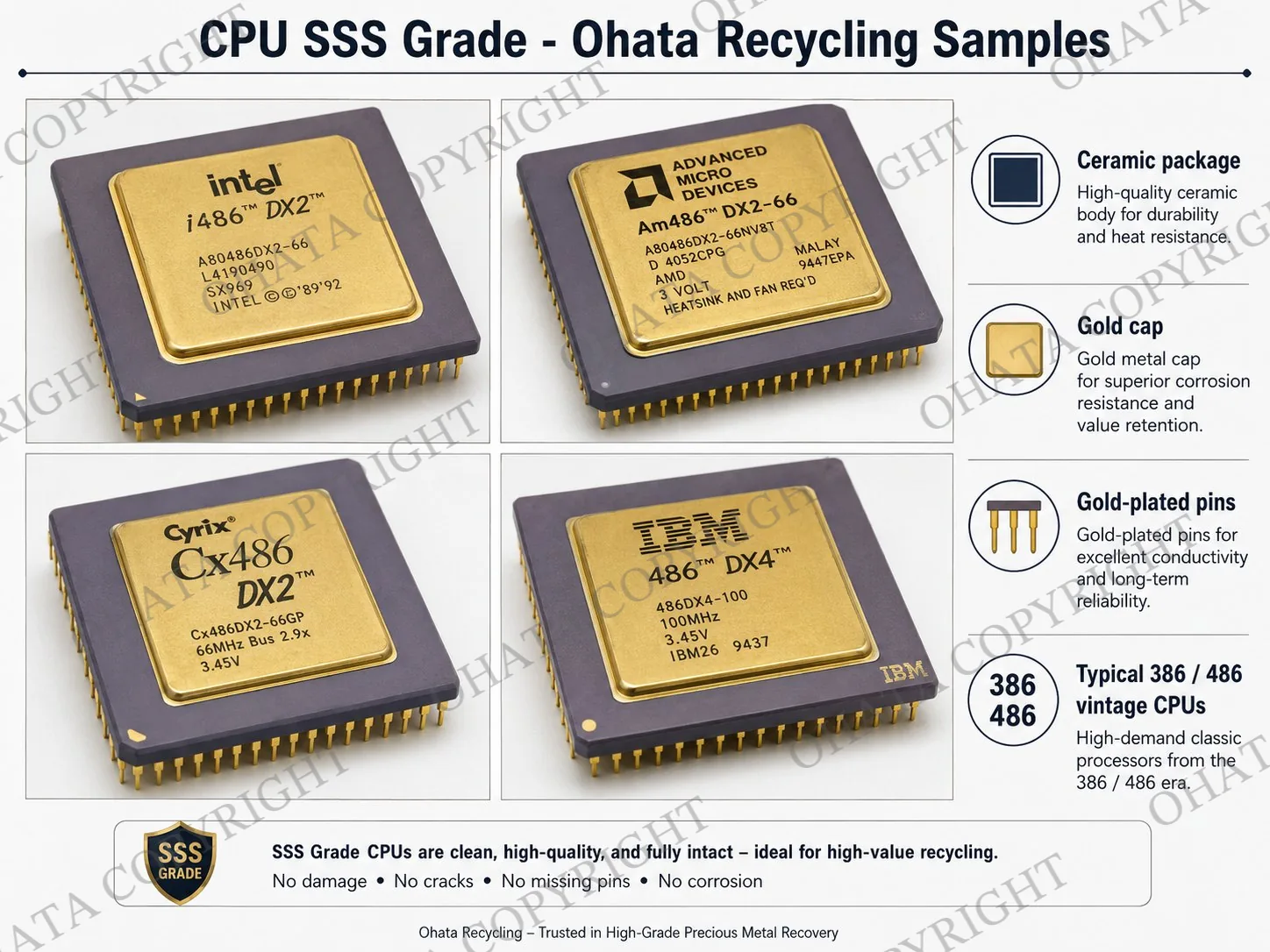
Typical examples include selected 386 and 486 processors, along with certain vintage military or aerospace processors. Their unusual package construction and precious-metal-bearing surfaces distinguish them from modern desktop CPUs.
Look for three main features:
A rigid ceramic package
A gold-colored metal cap
Gold-plated pins underneath
Do not confuse a gold-colored label or painted surface with a true gold-cap ceramic package. The cap should be part of the processor’s physical construction.
These processors should be stored separately and handled gently. Broken ceramic bodies, missing caps, severely bent pins, or attached contamination may affect classification and purchase value.
CPU-SS: High-Grade Ceramic CPUs
CPU-SS processors also use ceramic packages and commonly have gold-plated pins, but they do not have the gold cap required for CPU-SSS.
Examples may include ceramic versions of Intel Pentium processors and older AMD or Cyrix processors. The exact appearance varies, so it is important to examine both the package material and the underside.
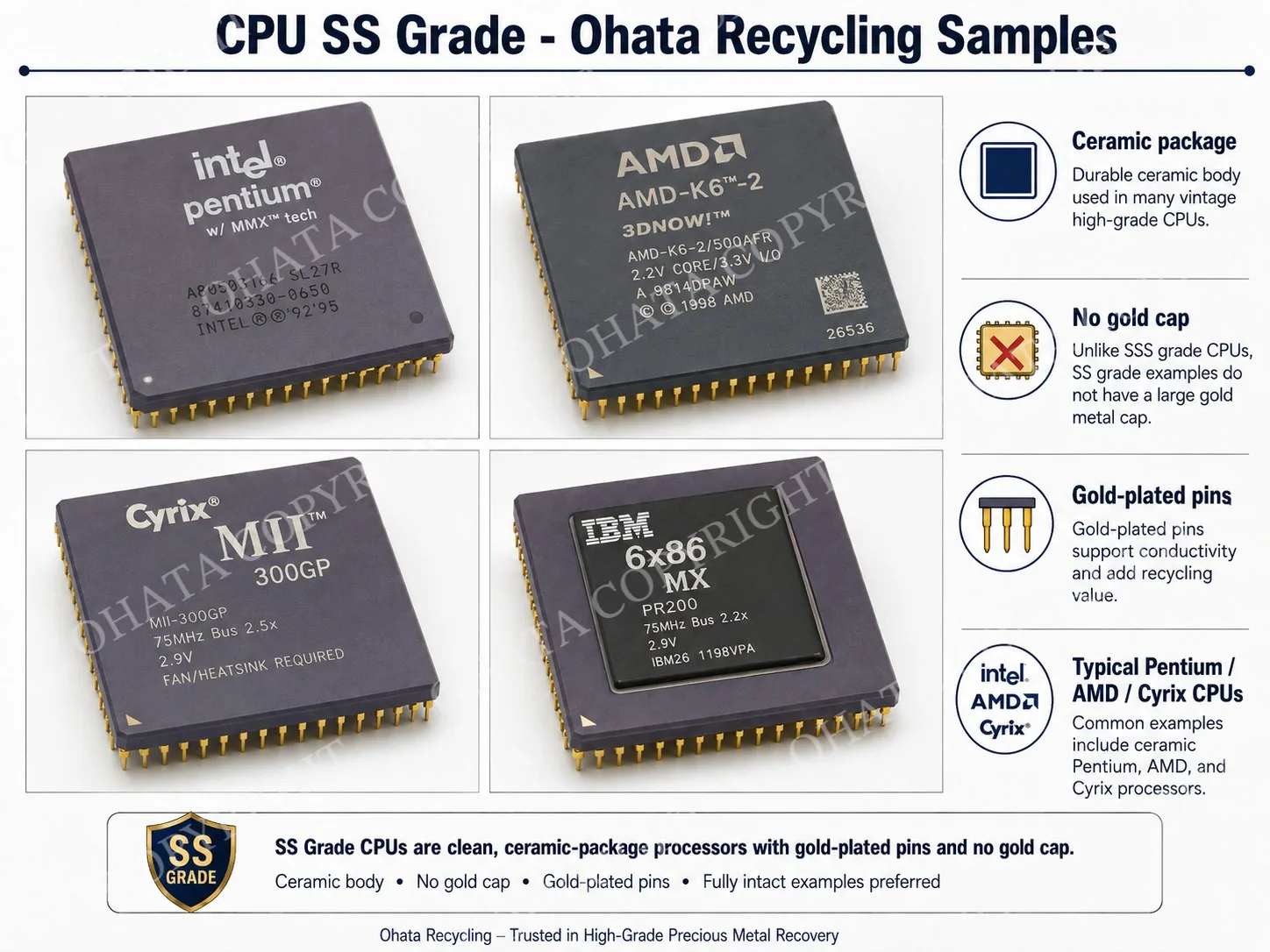
Ceramic packages usually feel harder and heavier than modern organic fiber substrates. Their surfaces may be white, gray, purple, brown, or another ceramic color.
Do not place every old pin-style processor in this grade. If the package is made from green or brown fiber material rather than ceramic, it may belong to a different category.
CPU-S: Gold-Pin PGA CPUs
CPU-S covers gold-pin Pin Grid Array, or PGA, processors. PGA means that the processor has a grid of projecting pins on its underside.
Examples may include AMD Athlon processors, AMD Opteron processors, and processors designed for platforms such as Socket 370 or Socket 478. The most useful identification feature is the organized field of gold-plated pins.
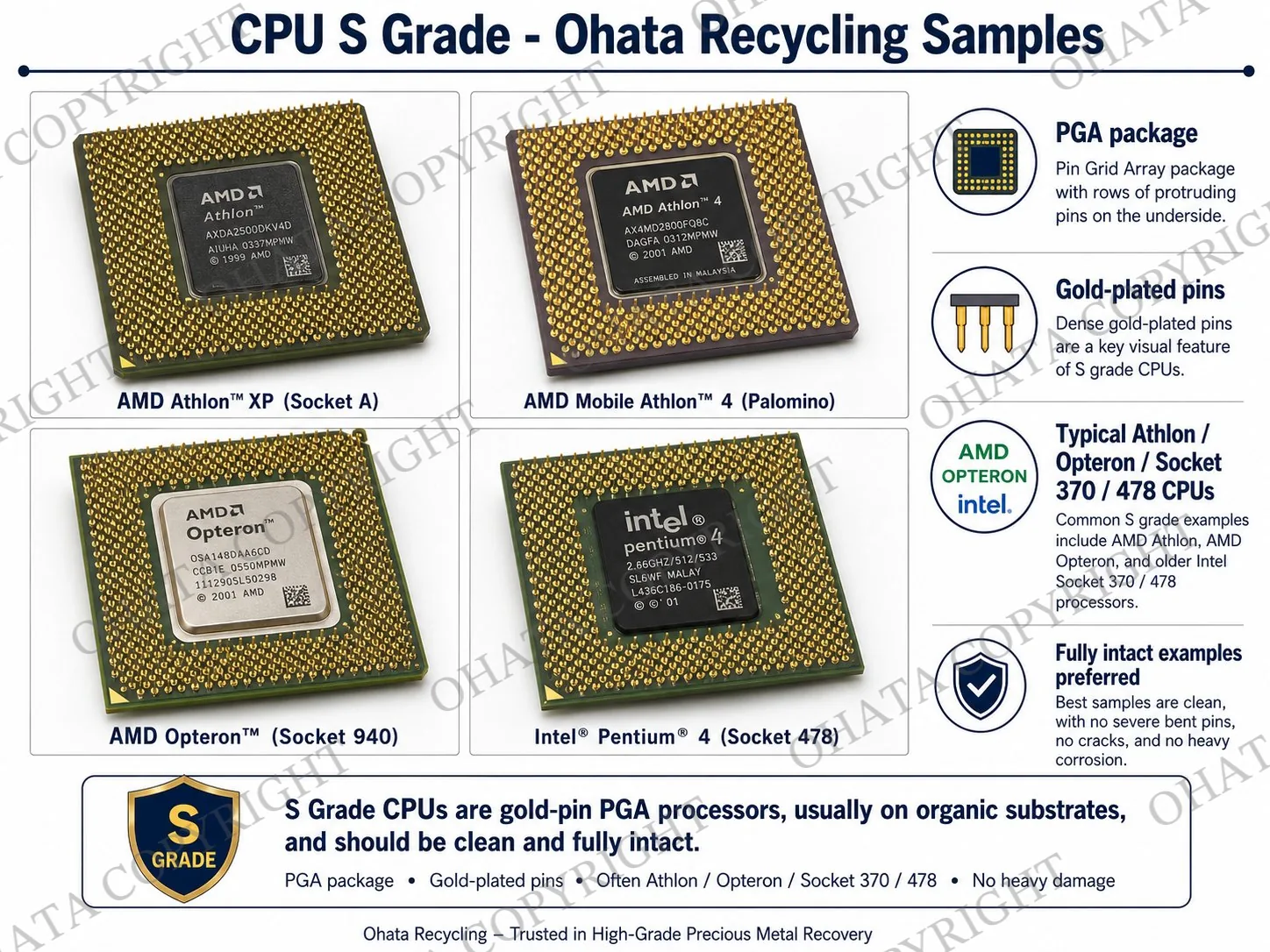
Inspect the underside carefully. Pins should still be present, and the processor should not be heavily corroded or covered with thermal paste, oil, or other contamination.
A few slightly bent pins may be handled differently from a processor with a crushed or largely missing pin field. Severe physical damage may cause the item to be downgraded.
CPU-A: Modern LGA CPUs
CPU-A includes modern Land Grid Array, or LGA, processors. Instead of projecting pins, an LGA CPU has flat contact pads on the underside.
Common examples include many Intel Core i3, Core i5, Core i7, Core i9, and Xeon processors. The pins are normally located inside the motherboard socket rather than on the CPU itself.
This makes an LGA processor easy to distinguish from a PGA processor. Turn the CPU over and check whether you see flat gold-colored contact lands or a field of projecting pins.
Avoid scratching the contact surface or placing adhesive labels directly over it. Scratches, oxidation, and residue can make inspection more difficult even when the processor remains recognizable.
CPU-B: BGA CPUs and Processor-Type IC Chips
CPU-B covers Ball Grid Array, or BGA, components. BGA packages use small solder balls underneath the chip instead of removable pins or flat socket contacts.
Laptop CPUs, GPUs, chipsets, and similar soldered processor chips may use BGA construction. These components are normally mounted directly to a circuit board during manufacturing.
Loose BGA chips should be kept separate from ordinary plastic ICs and complete CPUs. Because several types of chips can share a similar square package, identification may require visible part numbers, package markings, or AI-assisted image analysis.
A chip removed by uncontrolled heating may have burned edges, missing corners, excess solder, or board material attached. That damage can affect how the item is handled.
CPU-C: Fiber CPUs
CPU-C includes processors built on green or brown organic fiber substrates. These packages are usually lighter than ceramic CPUs and are common among modern Intel and AMD desktop processors.
Some fiber processors may have pins, while others may have different contact designs. The fiber substrate itself is an important part of the classification.
Do not classify a processor as ceramic simply because it is old or has gold-colored contacts. Compare the body material carefully. Ceramic is rigid and mineral-like, while an organic processor substrate resembles a dense electronic circuit-board material.
CPU-D: Slot CPUs and Processor Modules
CPU-D includes cartridge-style processors and CPU modules such as Slot 1 and Slot A designs. Pentium II and some Pentium III processors are familiar examples.
Unlike a small square CPU, a slot processor may look like a long cartridge or narrow circuit-board assembly. It can contain a processor core, cache chips, a connector edge, and protective housing.
Do not remove the circuit board or cache chips simply to reduce weight. A complete and identifiable module is usually easier to evaluate than a stripped or broken assembly.
CPU-E and CPU-F: Lower-Grade and Problem Material
CPU-E includes small plastic processor chips, microcontrollers, logic ICs, and similar components with relatively low precious-metal content. These parts may still be recyclable, but they should not be mixed with high-grade ceramic or gold-pin CPUs.
CPU-F includes broken, bent, corroded, contaminated, mixed, or unknown processors. CPUs with heat sinks still attached may also be placed in this problem-material category until they are properly prepared and identified.
Examples of conditions that may lead to CPU-F classification include:
Broken processor bodies
Severely bent or missing pins
Heavy corrosion
Burn damage
Oil or chemical contamination
Attached heat sinks
Mixed processor grades
Unreadable or unknown components
If an item is not actually a CPU, classify it as NONE. Motherboard chipsets, memory chips, power transistors, and other electronic components should not automatically be described as loose CPUs merely because they have black rectangular packages.
Final CPU Sorting Advice
CPU classification becomes much easier when you focus on four questions: Is the package ceramic, fiber, plastic, or cartridge-style? Does it have a gold cap? Does the underside have pins, flat pads, or solder balls? Is it complete and clean?
Take a few minutes to separate your processors before bringing them to a recycling buyer. Careful sorting protects high-grade material, reduces inspection time, and gives you a clearer understanding of what is actually in your CPU scrap collection.
Bring your sorted CPUs to the Seattle Yard for inspection, or use Ohata.ai to learn more about processor and electronic-scrap classification. The goal is not simply to dispose of old chips—it is to identify them responsibly and preserve the recycling value that remains inside each category.
Seattle CPU Scrap Purchasing Information
Ohata Shoji America Inc.’s Seattle Yard is listed at 423 S Horton St, Unit B, Seattle, WA 98134. The facility serves individuals, repair businesses, IT service providers, recyclers, and commercial suppliers in Seattle and the greater Puget Sound region.
The listed contact details are:
Phone: +1-206-602-9022
Email: info-us@ohata.ai
Website: Ohata.ai USA
Walk-in customers are generally welcome during regular business hours, although businesses with large or recurring quantities should contact the yard before delivery. Advance notice can help with unloading, inspection, grade separation, and weighing.
Frequently Asked Questions
1. What is the highest CPU scrap grade?
CPU-SSS is the highest grade in the Ohata system. It includes qualifying ceramic processors with gold caps and gold-plated pins.
2. Are all ceramic CPUs CPU-SSS?
No. A ceramic processor without a gold cap may be CPU-SS rather than CPU-SSS. The cap, package material, pins, and overall construction must all be checked.
3. How can I tell PGA and LGA processors apart?
A PGA processor has projecting pins underneath. An LGA processor has flat contact pads, while the matching motherboard socket normally contains the pins.
4. Should I mix modern CPUs with vintage ceramic CPUs?
No. Keep vintage ceramic, gold-pin, LGA, fiber, BGA, and damaged processors in separate containers whenever possible.
5. Do attached heat sinks affect classification?
They can. Heat sinks add non-CPU material and may prevent full inspection. Processors with attached heat sinks may be treated as lower-grade or unprepared material until separated.
6. Are laptop BGA chips classified the same as removable desktop CPUs?
No. Soldered BGA CPUs, GPUs, and chipsets belong to the CPU-B category in this classification system.
7. What happens to broken or corroded CPUs?
Broken, heavily bent, corroded, dirty, contaminated, mixed, or unknown processors may be classified as CPU-F.
8. Can Ohata AI identify a CPU from one photo?
A clear photo can provide useful identification assistance, but both sides are better. Physical inspection may still be necessary when markings are unclear or several packages look similar.