What Is S Grade Circuit Board Scrap?
S Grade is an internal Ohata classification for qualifying premium legacy computer and storage circuit boards. It is positioned between SS Grade and A+ Grade within the Ohata Board Scrap Classification.
The category is not based on computer performance, collectability, manufacturer reputation, or original equipment price. A board may be old, large, or covered with gold-colored contacts without meeting the S Grade requirements.
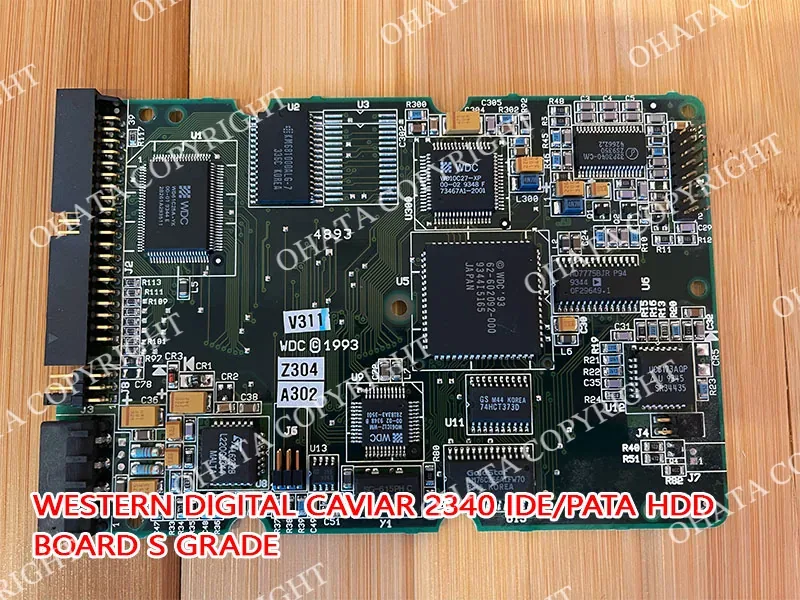
S Grade is determined by the complete physical board received, including its processor configuration, integrated circuits, connectors, construction, completeness, condition, and expected recoverable-material profile.
The Ohata classification is a recycling and purchasing system, not an electronics-industry performance grade or precious-metal assay. Other recyclers may use different grade names and category boundaries.
Which Boards May Qualify as S Grade?
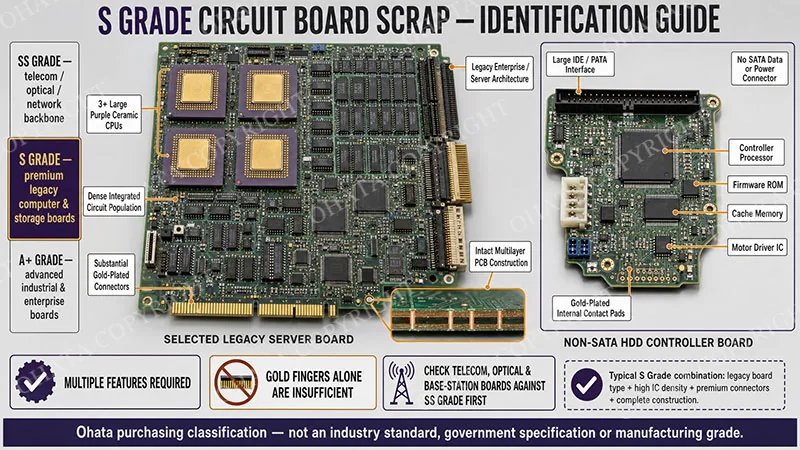
The principal S Grade routes include:
Boards with three or more qualifying ceramic CPUs: The processors must be physically installed and the board must retain its other major components. Empty sockets do not count as ceramic CPUs.
Qualifying non-SATA HDD controller boards: These may include certain IDE, PATA, EIDE, SCSI, and other legacy hard-drive boards that retain their original controller components and connectors.
Other premium legacy computer boards: Selected enterprise, workstation, processor, or storage boards may qualify when their complete construction and recoverable-material profile are consistent with S Grade.
Ceramic CPUs may have purple, brown, white, gray, or other package colors. Package color alone does not determine whether the processor or board qualifies.
A non-SATA connection is also not enough by itself. The HDD board’s interface, controller ICs, supporting components, completeness, and condition must be checked together.
Other legacy boards may display numerous integrated circuits, ceramic processors, socketed components, substantial gold-plated contacts, quality connectors, and a dense overall layout. These characteristics support identification but do not independently establish the grade.
A board’s origin provides context, but an enterprise, workstation, scientific, industrial, or storage-system label does not automatically make it S Grade.
Learn more: S Grade vs A+ Grade Circuit Boards Ohata
How to Identify a Possible S Grade Board
Begin by identifying what the board came from and then inspect the complete assembly.
Inspection point
What to examine
Board type
Legacy computer, processor, workstation, storage, or HDD controller board
Processor configuration
Number, package type, and condition of installed CPUs
Integrated circuits
Quantity, size, distribution, and evidence of removed chips
Contacts
Gold fingers, plated connector pins, socket contacts, and processor contacts
Connectors
Original storage, memory, expansion, and system connectors
HDD interface
SATA or qualifying non-SATA connection
Completeness
Installed CPUs, controllers, memory devices, firmware chips, and PCB sections
Condition
Cracking, burning, corrosion, contamination, cutting, or missing components
For boards evaluated under the ceramic-CPU rule, confirm that three or more qualifying ceramic processors are installed. Do not count empty sockets, plastic IC packages, heatsinks, or ordinary chipsets as ceramic CPUs.
Next, examine the integrated-circuit population. S Grade boards may contain numerous processing, memory, firmware, control, and interface ICs distributed across the PCB. Empty sockets, disturbed solder areas, scraped packages, or missing chipsets may indicate that valuable components were removed.
Gold fingers and plated contacts are useful clues, but they are not proof of S Grade. Many expansion cards and lower-grade computer boards also have gold-plated edge contacts.
Manufacturer names, board numbers, processor markings, and interface labels can help identify the original application. However, different revisions of the same product may use different components and may not receive the same classification.
Ohata reference photographs illustrate qualifying examples; they are not an exclusive list of accepted manufacturers or model numbers.
SATA and Non-SATA HDD Boards
The distinction between SATA and non-SATA hard-drive controller boards is especially important within the Ohata classification.
A SATA HDD board normally has separate L-shaped SATA data and power connections.
Older non-SATA boards may instead use a wider multi-pin IDE or PATA connector, a SCSI interface, or another legacy connection.
Qualifying non-SATA HDD boards may be evaluated under S Grade. SATA HDD controller boards are classified separately and should not be mixed into the S Grade non-SATA category.
The interface is the starting point, not the complete classification. A qualifying controller board should retain its original PCB structure, main controller IC, motor driver, firmware components, memory where originally installed, and relevant connectors.
“Old HDD board” and “non-SATA HDD board” are not interchangeable descriptions. Confirm the actual interface rather than estimating from the drive’s age, color, brand, or physical size.
Why S Grade Boards Have Higher Recycling Value
S Grade boards combine several material-bearing features within one complete assembly. Depending on the board, these may include ceramic processors, numerous integrated circuits, plated contacts, connector systems, soldered components, and copper within the PCB.
Many older computer systems used several separate processors, memory devices, controllers, firmware chips, and interface ICs to perform functions that later electronics combined into fewer packages. This distributed architecture can produce the dense, component-rich layouts associated with qualifying legacy S Grade boards.
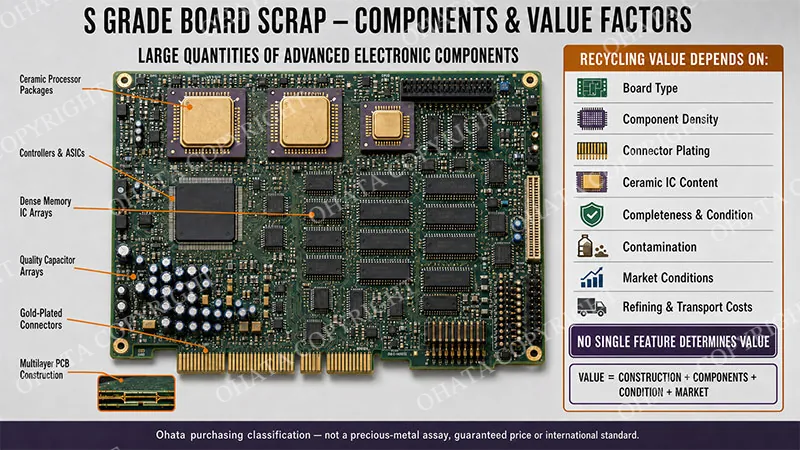
Copper commonly represents a large portion of the recoverable metal by weight. Gold may be present on plated contacts, processor pins, connector surfaces, and certain internal component structures. Tin, nickel, silver, and other metals may also be present, depending on the board’s design.
The exact recoverable composition varies substantially. A photograph cannot confirm plating thickness, internal PCB layers, bonding-wire material, or the quantity of any particular metal.
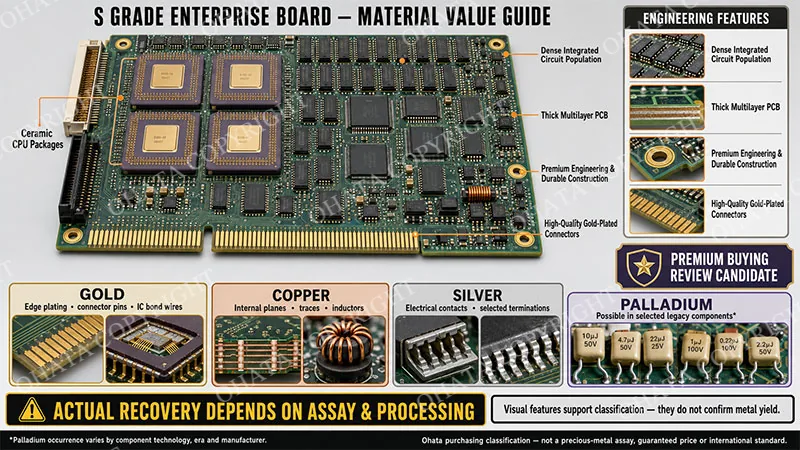
S Grade value comes from the combined recoverable-material profile of the complete board, not from one ceramic processor or visible gold-colored connector.
Age alone does not determine value. Many old appliance, consumer, and computer boards have sparse layouts or simple construction and belong to lower Ohata categories.
S Grade Boundaries and Common Mistakes
SS Grade primarily covers qualifying high-value telecommunications, enterprise networking, optical communication, and other advanced communication boards. S Grade focuses more strongly on qualifying legacy computer and storage boards, particularly boards with three or more ceramic CPUs and qualifying non-SATA HDD controller boards.
A+ Grade covers separate qualifying categories, including certain industrial and enterprise boards and SATA HDD controller boards. A dense industrial controller does not become S Grade merely because it appears complex or valuable.
Common classification mistakes include:
counting empty processor sockets as ceramic CPUs
treating every old motherboard as S Grade
confusing SATA and non-SATA HDD controller boards
assigning S Grade because a board has gold fingers
relying on one large chip while ignoring the rest of the board
classifying by manufacturer, model, original cost, or equipment reputation
overlooking removed processors, controllers, or PCB sections
A board should not be moved into S Grade simply because it is older, larger, cleaner, heavier, or more visually impressive than another board. It must satisfy the applicable S Grade construction and product requirements.
When boards from different manufacturers meet the same S Grade requirements and arrive in comparable condition, differences in brand, model, processor speed, or original retail price do not normally create separate scrap grades.
Buying, Downgrade, and Rejection Guidance
S Grade boards should be delivered complete, clean, dry, and identifiable. Qualifying ceramic CPUs, controller ICs, firmware chips, permanently installed memory, gold fingers, connectors, and original PCB sections should remain attached.
External cables, loose covers, cooling fans, large steel brackets, and unrelated hardware may be separated when doing so will not damage the board or remove original electronic components. If removal is difficult or could crack the PCB, leave the assembly intact for inspection.
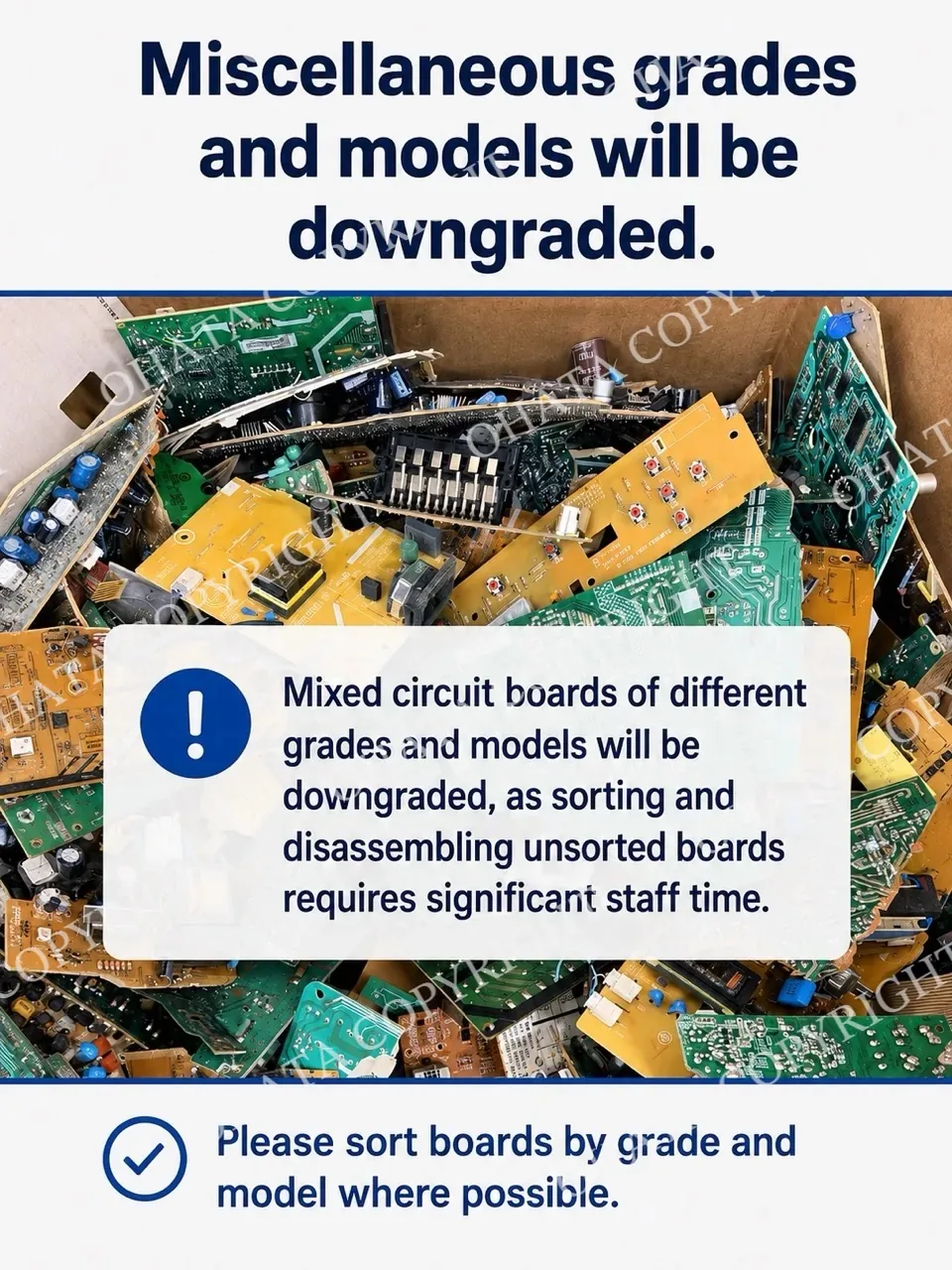
Boards may be downgraded when ceramic CPUs or major controller chips have been removed, gold fingers have been cut off, PCB sections are missing, or the remaining material no longer meets its original S Grade route. Extensive cracking, severe corrosion, water damage, burning, carbonization, or heavy dirt, oil, mud, adhesive, and chemical contamination may also affect classification.
Minor surface wear, ordinary dust, light scratches, or limited physical damage do not automatically prevent S Grade classification when the board remains identifiable and its qualifying components are present.
Severely burned, chemically treated, hazardous, deliberately misrepresented, heavily contaminated, or extensively fragmented boards may be rejected. Different board grades should be sorted separately whenever practical.
Do not burn boards, scrape plated contacts, cut off gold fingers, remove ceramic CPUs, or use chemicals to test for precious metals. These actions can reduce recoverable value and create health, fire, and environmental hazards.
Final classification is determined by the board’s processor configuration, construction, component density, completeness, condition, recoverable-material profile, and current buying requirements.
Related References Resources
Use these guides to compare S Grade with adjacent categories: